PlayStation 2 Setup
Set up your PlayStation®2 computer entertainment system according to its Instruction Manual. Ensure the MAIN POWER switch (on the back of the console) is ON.
•
When the power indicator lights up, press the OPEN button to open the disc tray.
•
Place the Fisherman's Challenge™ disc on the disc tray with the label side facing up.
•
Press the OPEN button again to close the disc tray.
•
Attach game controllers and other peripherals as appropriate.
•
Follow on-screen instructions and refer to this manual for software information.
Memory Cards
A memory card (8MB) (for PlayStation®2) is required to save game settings and progress. Insert the memory card into MEMORY CARD slot 1 before starting play (MEMORY CARD slot 2 is not used).
You can load saved games from the same memory card, or from any memory card (8MB) (for PlayStation®2) containing previously saved Fisherman's Challenge™ games.
Memory Card Notes
Fisherman's Challenge™ uses at least 210KB of memory card data to save each game. Make sure there is enough free space on your memory card.
Do not insert or remove a memory card while saving/loading games or after the power has been turned ON.
Main Menu
Tournament
Become a bass angler and compete for the championship over several years as you work to become the top professional bass angler.
Variety
Enjoy fishing under diverse fishing conditions and rules. You can also compete against other players.
Free Fishing
In this mode you can select the stage, time, and weather and enjoy bass fishing as you like it.
Tackle Box
View a list of tackle that can be used in the Tournament Mode and the Free Fishing Mode.
Aquarium
Take a look at the fish caught in the Tournament Mode and the Free Fishing Mode.
Records
View trophies earned in the Tournament Mode and confirm your rankings in the Variety Mode.
Options
Change various game settings.
Game Controls: Fighting and Landing
If you successfully hook a fish while retrieving, reel in the line to bring in the fish. The controls are the same as during retrieving, except that the line will pull differently depending on the fish.
When trying to land a fish, don't just reel in the line but also make sure to work the rod and adjust the drag.
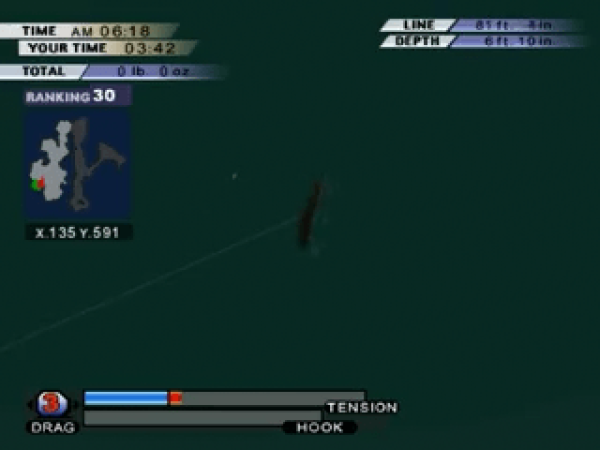
Fighting Screen
Tension Meter
This indicates how tight the line is. When the line becomes loose, the Tension Meter becomes shorter, and when the line becomes tight the Tension Meter becomes longer.
If the line stays loose, the Hook Meter is narrowed. Conversely, if the line stays tight, the Tension Meter becomes short vertically, and the fishing line is more likely to break.
Hook Meter
This indicates how securely the hook has been sunk. The Hook Meter decreases unless you do a good job in matching the rod with the movement of the fish.
If the meter disappears, the words "Hook Off" are displayed on the screen and the hook is lost.
Drag
The tightness of the drag can be adjusted to three separate levels, 1 (light) to 3 (heavy).
Arrow
You can keep the Hooking Meter from dropping by moving the rod in the direction of the arrow.
Tournament Home Screen
This is the basic screen of the Tournament Mode.
•
Fishing Experience of Player
•
Name of Tournament held in the current month
•
Participate in Tournament
•
A cup is displayed next to tournaments that have been won previously.
Participate in Tournament
Participate in a tournament being held in the current month.
Next Tournament
Sit out the tournament held in the current month and advance time to the next month that a tournament is held. Tournaments for which you do not meet the participation criteria are skipped.
Calendar
Confirm the schedule of tournaments being held throughout the year. Move the cursor over the calendar to switch the tournament that is displayed.
If that tournament is available to you, press confirm to proceed.
•
SemiPro Phoenix Tournament
Fishing Shop
Use your funds (BAG) to purchase tackle. Lures that you have lost during tournament play can be purchased here.
•
You can only have one type of rod and reel.
•
You can have up to nine (9) of the same lure.
Tackle Box
Confirm your current tackle.
Save & Quit
Save the current game conditions or quit the game and return to the Main Menu.
Saving the Game
Game data can be saved on