Gettin' Started
MEMORY CARD slot 2
MEMORY CARD slot 1
disc tray
RESET button
OPEN button
USB connector
controller port 1
controller port 2
Note: illustration may not match all PlayStation 2 console types. For owners of SCPH-70000 series PlayStation 2 systems, refer to the setup instructions supplied with your system. Set up your PlayStation®2 computer entertainment system according to the instructions in its Instruction Manual. Make sure the MAIN POWER switch (located on the back of the console) is turned ON.
Press the RESET button. When the power indicator lights up, press the OPEN button and the disc tray will open. Place the GET ON DA MIC disc on the disc tray with the label side facing up. Press the OPEN button again and the disc tray will close.
Attach game controllers and other peripherals, as appropriate. Follow on-screen instructions and refer to this manual for information on using the software.
Memory Card (8MB)(for PlayStation®2)
To save game settings and progress, insert a memory card (8MB) (for PlayStation®2) into MEMORY CARD slot 1 of your console.
•
At least 299KB of free space on the memory card is required to save game data.
•
This game supports saving and loading of game data in MEMORY CARD slot 1 only.
•
You can load saved game data from the same memory card or any memory card containing previously saved GET ON DA MIC games.
Gettin' in the Game
Title Screen
•
Appears shortly after you start up the game.
Main Menu
•
Press the button on the title screen to display the main menu.
•
Use the menu navigation controls to select a game mode:
•
SINGLE PLAYER access all single player modes (more: pg. 5)
•
MULTIPLAYER access all multiplayer modes (more: pg. 5)
•
TUTORIAL architect your hip-hop style with no pressure
•
EYETOY start here when playing with the EyeToy® USB Camera to access both single player and multiplayer EyeToy modes
•
EXTRAS view game credits and high scores for different songs, including character name, song, level, difficulty and $$
•
OPTIONS Configure various game settings (more: pg. 5)
•
SAVE/LOAD you gotta save to keep moving forward (eight save slots per memory card are available; after than you overwrite saved games) and you gotta load to continue saved games
Modes
Single Player
•
CAREER build your path from rags to royalty
•
EXHIBITION train your abilities in one venue for the highest scores
•
PRACTICE original karaoke mode where you be the pro
•
FREESTYLE make your own sound on beat tracks or songs
Multiplayer
•
COMPETITION you're judged and rewarded for your "pro-formance"; tangle with friends for the highest score as you "pass the mic" in turn
•
CO-OP mingle with a friend and combine your talents for the highest score
•
PARTY everyone takes a shot "rapaoke"-style
•
FREESTYLE back-to-back battle; be the hottie with the hottest rhymes; press the controller buttons any time for money and comments from Sway; press/ buttons any time to "thumb" your opinion of the performer
Options
•
MUSIC tend to the volume of the background music track •
MIC adjust the volume of the mic playback through the speakers
•
SOUND FX set the sound effects volume
•
ARTIST VOICE adjust the volume of original lead vocals
•
LYRICS display the song lyrics, or don't
•
SETTINGS restore the original default settings or retain your custom settings
Play It
As in any decent hip hop event, in GET ON DA MIC you are judged by the way you sing. So the more you train, the better you become!
To begin, select a:
•
CONFIGURATION single player: difficulty; multiplayer: number of players, difficulty, match duration in minutes, number of match rounds; freestyle: duration
Cash You Earned
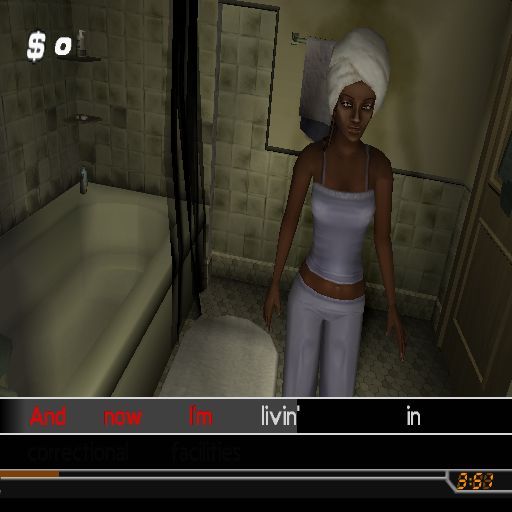
Your wealth is earned by performing. It increases when you sing and decreases when you spend.
Lyrics
While you are singing, lyrics scroll across the bottom of the screen (if LYRICS is ON in options mode). You have to sing them by imitating the artist who made them famous. Respecting the beat is high priority. The color of the words evolves with your performance:
Lyrical Flow
Every few lyrics, Sway tells you how you're doing, ranging through bad - nice - good - perfect. This directly affects the cash you get. Cash is also linked to your level and accuracy.
Rock Da Mic Meter
The ROCK DA MIC meter fills up (or down) according to your lyrical performance. It awards you with special bonuses for power performances and initiating on-stage ROCK DA MIC moves.
Clock
The clock counts down the song duration in minutes/seconds.
Chosen One
At the end of the song, your success or failure is revealed and you can save your game.
Status
The status screen summarizes your performance, showing how much cash you earned and the max number of ROCK DA MIC moves you made.
Move On
Finishing a level means you can move up to the next one.
Spend
Get cash and
.png)

.png)

.png)

.png)

_1.png)
.png)
.png)