Options Menu
The Options Menu can be accessed from the Pause Menu or the Mission Selection Menu. You can adjust the following settings:
•
Vibration - Turn on/off your DUALSHOCK®2 analog controller's vibration feature.
•
Auto-Save - Choose whether or not the game will automatically save your progress.
•
Safari Guide Helper - Turn on/off this assistance feature.
•
Sound Options - Adjust the volume levels for the Voice, Effects and Music.
•
Delete Save Slot (only available from Mission Selection Options Menu) - Allows you to erase the current saved game, so you can begin a new one. Once the data is erased, it cannot be retrieved.
Safari Guide Helper Option
This option allows a grown-up or older sibling to use a second DUALSHOCK 2 analog controller to assist the player. At any time during a Completion Game, a second player can help out by performing the same action on their controller, increasing the speed at which the Completion Meter fills.
Whenever you see the icon appear in the lower right-hand corner of the screen, a second player can help out. When the second player moves their DUALSHOCK 2 analog controller, this icon will begin to glow.
The Safari Guide Helper Option can be turned on and off in the Options menu. You will also be given the option to turn this feature on or off when you start your Safari Rescue mission.
Safari Rescue Mode
The Safari Rescue mission is the main mode of the game. You'll help all kinds of animals on six rescue adventures as you travel through Africa to save the elephants from a mean Magician's spell!
As you move along the Safari Trails, you will encounter many African animals that need your help in mini-mission challenges, including Spotting Scope Games, Completion Games, Rescue Pack Games, Click the Camera Games, and Travel Games.
Your Wild Journey Through Africa
•
Tallest Mountain Mission - Help Diego and Baby Jaguar find the Magic Drum that will free the elephants from the mean Magician's spell.
•
Savannah Saves - Help Diego, Baby Jaguar, Juma, and Erin the Elephant rescue animals in this grassy part of Africa.
•
Riverbank Rescues - Rescue more mixed-up animals in and around the river where dense green vegetation grows.
Mission Selection Menu
The game will always display your most recently saved mission when you enter this screen. Press the X button to load the latest game and return to the last checkpoint.
Once a mission has been completed, it will unlock so that you can go back and play it again if you wish. You can scroll through the available missions by moving the left analog stick to the left or right.
You can return to any mission you have already completed. Just move the left analog stick to the left or right to find and select the mission. Then choose one of the patches shown underneath it to pick the section of that mission you want to replay.
Patches
The patches each represent a section of that mission. After selecting the mission by pressing the button, you'll be able to move the left analog stick left or right to scroll through the patches. Select the patch for the section you wish to replay and press the X button to start.
If you didn't earn the patch for that section, it will have a dark tint. You can replay the sections for another chance to earn the patch.
African Safari Book
Once a full mission has been completed, you can view that section of the African Safari Book from this screen. Pressing the button will open the African Safari Book for the mission you've selected. Press the A button to access the African Safari Book section from that mission.
The African Safari Book will appear at the end of each mission to show you photos and facts, as well as the Safari Rescue Patches or Action Patches you earned during the rescue.
You can also access the African Safari Book from the Mission Selection Menu once the mission is unlocked. Press the A button to access the African Safari Book's photos and facts for the African animals you've helped during that mission.
Options
Pressing the SELECT button will access the Options Menu. Any changes made to the Options Menu will be saved in this profile only and will not affect the other saved game profiles.
Safari Stuff and Searchables
Diego will need to interact with many things in the environment. Diego can simply jump or drop onto some, while others require the player to press a button, or perform a simple action to make them work.
Basic Objects
Diego can interact with these things by jumping onto them, or dropping onto them.
Action Objects
Diego can perform special actions by interacting with these objects.
Searchable Objects
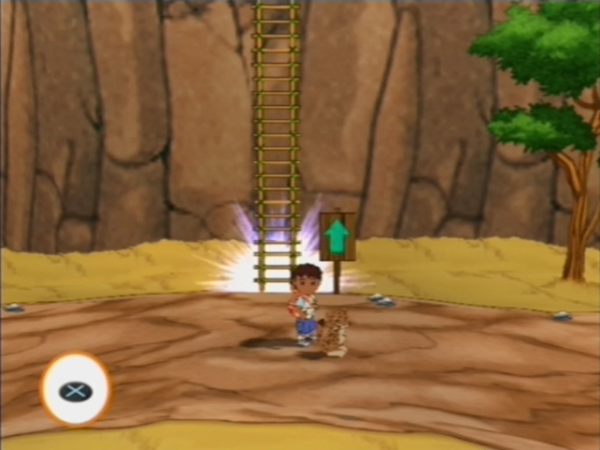
These objects glow to let you know that you can search them. By pressing the X button while the object is glowing, Diego or Baby Jaguar will use their special skills to find what might be hiding in there.
Safari Trail
Help Diego, Baby Jaguar, and the Rescue Team travel along the Safari Trail! As you move along the trail, you'll be able to explore things in the environment as well as reach the Completion, Selection, and Travel Games. You'll also need to help Diego collect objects and find animals along the Safari Trail.
On-Screen Meters and Icons
At times, as you play, special meters and icons will appear on the screen.
•
Safari Stamp Meter: This is a vertical meter on the