Profile Setup
The first screen you see in Motocross Mania 3 is the Profile Page. •
Choose Create New Profile if you are starting for the first time.
•
Choose Profile List to load and continue a current profile.
Press the directional buttons ↑ or ↓ to cycle between options. Press the ✕ button to confirm your selection. If no profiles exist, you cannot choose Profile List.
Create New Profile
To enter a new profile name, press the directional buttons ← or → to change the character. Then press the directional buttons ↑ or ↓ to change the current selection.
Once you are happy with your profile name, press the ✕ button to advance to the Main Menu.
Profile List
To load a previously saved profile, press the directional buttons ↑ or ↓ to cycle the current saved profiles. Press the ✕ button to confirm your selection.
Main Menu
Championship
Championship races are not conventional 3-lap races. It's about surviving the length of the race. Races have a set number of laps and a required finishing position.
Riders can dispose of opponents using the game's combat system. Races become a last man standing event where you either knock other riders out or avoid combat to reach the finish line.
Single Race
Single Race allows you to choose a race mode and compete in a single event on any available circuits with any characters and bikes.
Normal Race
Compete in a race where an opponent cannot knock you out. It is a simple race where the first one over the line wins. If a rider is knocked from their bike, they will be remounted and allowed to continue.
Last Man Standing
Last Man Standing races are the same format as championship events. Players must avoid being knocked from their bike and either destroy opponents or safely cross the line.
Time Trial
Your aim is to set a new fastest time on any unlocked circuits. If you beat any of the top ten times, a new time appears on the board.
Freestyle
The freestyle event is a special stadium-based event where riders compete over obstacles to score points by performing tricks.
Multiplayer
Choose from a number of different multiplayer game modes.
Mini Games
Choose from a number of different mini games, including Battle Royal and Bomb Tag.
Options
Setup numerous gameplay options, as well as sound and video settings.
Combat
Basic Combat Moves
Ground Attacks
Cool ground combat moves that do more damage than standard attacks but will give a disadvantage while being performed. There is no steering during these attacks.
There are 4 ground attacks you can perform:
Staying Alive & Bringing The Pain
The objective of Championship is to survive and outlast your competition. Knowing how to survive and take out the opposition plays a big part.
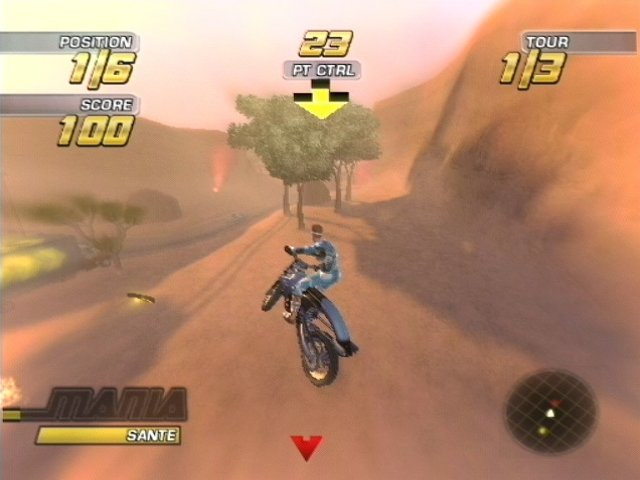
MANIA Meter
Positioned on the bottom left of the screen is the MANIA meter. This meter gives you a number of advantages in combat. While it is filling, you can use its juice for quick boosts of speed, though this will empty the meter. Once the meter is full, your advantages quickly increase.
When the meter is full, press the ✕ button to initiate MANIA mode. This will slow down the world around you and give you twice as much time to dish out punishment. To exit MANIA mode before the meter is emptied, press the ✕ button once more.
Watch Your Health
Below the Mania meter is the HEALTH meter. Keep a close eye on this, as once it's empty, you're out in a Last Man Standing event. There are two stages to your health: overall health and stamina.
Stamina will empty faster than health. When it hits zero, you will be knocked off. Stamina will refill, and you can only be knocked out of the race when your health hits zero.
Options
Make adjustments to the game's available options. Press the directional buttons ↑ or ↓ to highlight an option, and then press the ✕ button to confirm your selection.
High Scores
Here you can view all your best scores and compare them to your friends. Once you have chosen High Scores, you will be asked to choose the game mode you want to view. Once you have chosen your desired table, press the directional buttons ← or → to scroll the tables for the different tracks.
Player Locker
View your current game progress and total time played. In the player locker, you can also view individual characters' garages and see which rider has the best rides available. To change the garage for each rider, press the directional buttons ← or → and then press the ✕ button to view the garage.
Audio Options
Adjust the game's sound and music volume, as well as making specific changes to the music played in-game.
Sound & Music
To change the sound and music volumes, highlight the option, then press the directional buttons ← or → to raise or lower the volume setting.
Jukebox
Highlight Jukebox, then press the ✕ button to view the game's song list. Press the directional buttons ↑ or ↓ to scroll through the songs, then ← or → to toggle individual songs ON or OFF.
Song Order
The song order option allows you to choose whether you want the game's songs to be played randomly or in the order shown in the jukebox. Press the directional buttons ← or → to toggle NORMAL or RANDOM play.
Video Options
.png)

.png)

.png)


_1.png)
.png)