Getting Started
PlayStation®2 Setup
Set up your PlayStation®2 computer entertainment system according to its Instruction Manual. Ensure the MAIN POWER switch (on the back of the console) is turned on.
Press the RESET button. When the power indicator lights up, press the OPEN button to open the disc tray. Place the X-Men™ Legends disc on the disc tray with the label side facing up. Press the OPEN button again to close the disc tray.
Attach game controllers and other peripherals as appropriate. Follow on-screen instructions and refer to this manual for software usage.
Memory Card
To save game settings and progress, insert a memory card (8MB) (for PlayStation®2) into MEMORY CARD slot 1. You can load saved game data from the same memory card or any memory card (3MB) (for PlayStation®2) containing previously saved games.
Starting Up
DUALSHOCK®2 Analog Controller Configurations
•
left analog stick (L3 button when pushed down)
•
right analog stick (R3 button when pushed down)
To select menu options, use the ↑ and directional buttons to navigate. Highlight the desired option and press the button to accept. Follow on-screen button prompts to accept with and go back with .
X-Men™ Legends supports the DUALSHOCK®2 analog controller. When the mode indicator is on, the left analog stick functions the same as the directional buttons.
Main Menu
Welcome to the Xavier Institute™. From the Cerebro™ Room, you can access the Danger Room™, modify options, view unlocked cinematics, or begin a fresh game.
•
Begin Story—Start a new game.
•
Load Game—Continue an existing saved game from your last save point.
•
Danger Room—Access a variety of multiplayer modes and training missions.
•
Options—Set sound, camera, and controller vibration options. You can also view the controller layout.
•
Review—View unlocked cinematics, comics, and artwork.
•
Credits—View the game credits.
X-Men™ Legends
X-Men™ Legends is a high-action role-playing game where you and your favorite heroes embark on their most dangerous adventure yet. Take control of a team of X-Men, travel to exotic locations, and complete daring missions to save the world.
The game allows you to live the adventure as an entire team of heroes. Choose the most suitable heroes for each mission, customize them, and launch them into an epic story.
Teaming Up
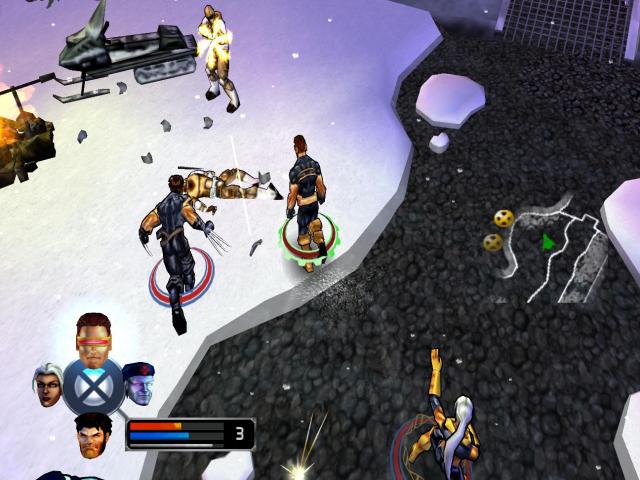
X-Men Legends focuses on building your own team of Super Heroes™. The first mission puts you in control of Wolverine™. As you unlock more heroes, you can choose a team for each mission.
You can change your team composition at Xtraction Points, but these blue X icons are not everywhere, so choose your team wisely. Once in the game, your allies will follow you; use their powers and pick targets to attack.
To bring allies to your side, press the Call Allies button. During combat, press the Call Allies button to command allies to attack your targeted enemy with their selected power.
Xtraction Points
Xtraction points are save points found throughout the game. Activate an Xtraction point by pressing the button to change your team, save a game, load a game, or visit the Danger Room.
Besides changing your team, you can also revive fallen team members using tech bits and purchase items from Forge and Healer.
Attributes & Skills
Leveling up is a core RPG experience. When you accrue enough experience, your character gains a new level. A double-helix pattern around the selection icon at the character's feet indicates a level-up.
Enter the menu to level up and add points to your character's attributes and skills. If you're unsure where to place points, Cerebro™ can auto-upgrade them for you when you press the button.
Attributes
Attributes are basic traits shared by all mutants: Strike, Agility, Body, and Focus.
•
Strike—Increase your attack level.
•
Agility—Increase your defense level.
•
Body—Increase your maximum health.
•
Focus—Increase your maximum energy and energy regeneration rate.
AI Level (3 types)
Determines actions of teammates not controlled by a human player.
•
Aggressive—Always attacks your target immediately.
•
Normal—Attacks when the opportunity arises.
•
Defensive—Stays away from enemies, attacking only when attacked.
AI Heal (4 types)
Allows AI to automatically heal teammates using remaining health packs when health is below a certain level (if more than 2 health packs remain). This setting affects all AI controlled X-Men.
•
Never—AI will not use any health packs.
•
Less Than 20%—AI will use a health pack when a teammate is below 20% of maximum health.
•
Less Than 40%—AI will use a health pack when a teammate is below 40% of maximum health.
.png)

.png)
.png)

.png)
_1.png)


.png)

_1.png)
_1.png)


.png)
.png)


