Getting Started
1. Turn OFF the power switch on your Game Boy® Advance. Never insert or remove a Game Pak when the power is on.
2. Insert the Game Pak of American Idol into the slot on the Game Boy Advance. To lock the Game Pak in place, press firmly.
3. Turn ON the power switch. The game will load (if it doesn't, begin again at step 1).
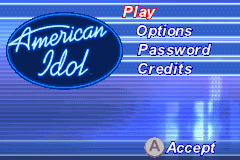
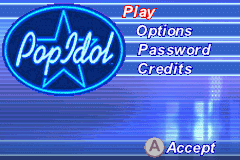
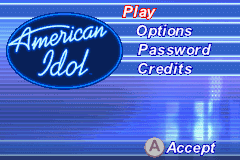
4. When the Main Menu appears, begin your game.
How to Play
Your American Idol is in the spotlight and it's up to you to make them sing! It's easy. On screen you'll see the song circle. Around this are icons representing the A and B Buttons, and a cursor which sweeps around the circle clockwise.
Simply press the button shown on the circle when the cursor is over it to make your American Idol sing. Time your presses well (see Smileys) and your American Idol will sing in tune. Miss too often and your singer will show you (and the judges) just how bad, "bad" can be!
Long notes are represented by two button icons on the song circle connected by a band. Press the button shown at the beginning of the note when the cursor reaches it and hold it down until the end of the note, then release.
Combo presses are represented by two button icons on the song circle together. When the cursor is over a combo icon, press both buttons together.
Creating Your American Idol
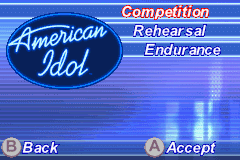
This is it! Your chance to become the latest, greatest, most famous singing phenomenon in the world-renowned American Idol competition. From the Main Menu, select “Play” to get into one of American Idol's three game modes (see Game Modes), then create your character…
Highlight each option in turn by pressing the Control Pad Up and Down. While an option is highlighted, press the Control Pad Left or Right to change the option's setting. Each change you make is shown on the character on the right of the screen. Keep going until you're happy with your American Idol's look, then press the A Button.
Between rounds in Competition Mode, go back to the wardrobe for a costume change. Look cool and funky to get the best reception from the judges (shown bottom-left of the performance feedback screen).
Game Modes
Competition Mode is the real deal-the American Idol Competition itself! Audition for your place in the contest, then sing your way through the competition all the way to the TV Final.
Between rounds in the studio competitions you'll get to check out the leaderboard of contestants. Highlight the face of one of your rivals and press the A Button to watch their performance. To go onto the next round, select your own face - the one with the red box round it.
Rehearsal mode helps you practice until perfection. Use Rehearsal Mode to improve your singing technique on any of the unlocked songs, until even the most hard-hearted judge is moved to tears by your performance.
Endurance Mode tests how long you can stay at the top. In this mode, you sing each song back-to-back. Each song gets harder and swaying the judges opinion (shown by the star bar on the left) gets tougher. Keep singing to the best of your ability to get the highest score you can.
Unlocking Stuff
Great performances in Competition and Endurance Modes will unlock extra outfits for your American Idol that you can put on next time you visit the wardrobe. Check out your new gear in the Options Menu.
Select "Unlocked," then highlight "Next" or "Last" and press the A Button to switch through the various new clothing.
Passwords
If your performance is so bad that you get tossed from the contest or when you perform extra well, you'll be given a password. Make a note of any passwords you're given so that the next time you play, you can enter it under "Password" in the Main Menu to restore all of your unlocks.
Options
Select "Options" from the Main Menu to open the Options Menu. The following settings are available:
•
Unlocked: Shows all the new gear you've unlocked - see "Unlocking Stuff."
•
SFX: Highlight SFX and press the Control Pad Left or Right to set the volume of the sound effects in the game.
•
Music: Highlight "Music" and press the Control Pad Left or Right to change the volume of the music in the game. •
Screen: Highlight "Screen" and press the Control Pad Left or Right to change the brightness of the screen.