Starting a Game
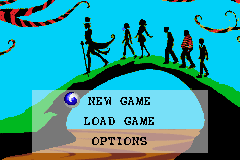
From the Title Screen, press START to access the Main Menu. Use the Control Pad to move the cursor up and down to highlight NEW GAME, LOAD GAME, or OPTIONS, then press the A Button to select.
•
NEW GAME: Starts a new game.
•
LOAD GAME: Loads a previously saved game.
•
OPTIONS: Allows the player to adjust Difficulty, Sound, and Music, as well as view Credits.
Game Types
Select one of the following modes from the menu:
•
ADVENTURE: Play as Charlie and join him on his adventures in the chocolate factory.
•
MINI-GAMES: Play mini-games during the Adventure mode.
•
OOMPA-LOOMPA ALBUM: View bonus images unlocked during the Adventure mode.
Pause Menu
Press START during gameplay to access the Pause Menu. From here, you can select CONTINUE to return to the game or EXIT GAME to return to the Main Menu. You can also view your remaining number of tries, as well as the number of Square Candies That Look Round and W-O-N-K-A Letters collected. Pressing the B Button will also exit you back to the game.
Collectables, Candy Powers, and Oompa-Loompa Tools
Charlie must pick up specific items to solve puzzles, with some unlocking bonus content.
•
Square Candies That Look Round: Collect 25 to unlock an item in your Oompa-Loompa Album. Find the entire collection to complete the album.
•
W-O-N-K-A Letters: Spell out WONKA by finding all the letters to unlock mini-games.
Mini-Games and Levels
•
To the Juicing Room: Overcome obstacles and roll Violet toward the Juicing Room.
•
The Juicing Room: Activate the Juicing Machine to juice Violet so she can return to normal size.
•
Lift-A-Loompa: Use the fudge dipper to fish Oompa-Loompas out of a vat of fudge. •
Blueberry Jam: Use the trampoline to bounce the Oompa-Loompas to the Juicing Room. •
Nut Room Chaos: Toss the nuts to squirrels and avoid the Scrubberbots.
•
Chocolate Broadcast: Transmit chocolate treats via Television Chocolate by aiming your chocolate to land next to two others of the same kind.
•
Shipping and Receiving: Help Oompa-Loompas send out candy boxes in the Shipping and Receiving department. 

 (En,Fr,Es,Nl).png)

 (En,Fr,Es,Nl).png)
 (En,Fr,Es,Nl).png)
.png)
