Getting Started
This CD-ROM is exclusively for use with the Sega Saturn system. Do not attempt to read it in other CD players, as this may damage headphones and speakers. Installation and Booting
1. Install your Sega Saturn system following the instruction manual. Plug in Control Pad 1. 2. Place the Sega Saturn CD-ROM label-side up in the CD tray and close the lid. 3. Press the power button to load the game. The game starts after the Sega Saturn logo screen appears. If nothing appears, turn off the system and verify the installation. To stop a game or return to the title screen, press the Reset button on the console.
Control Panel and Navigation
To return to the control panel at any time, simultaneously press the A, B, C, and Start buttons. If you turn on the power without a CD, the CD audio control panel will appear.
To play a game from this panel:
•
Press the D button to move the cursor to the upper-left button.
•
Press Start to display the initial game screens.
Disc Care
Your disc contains a security code. Keep it clean and handle it carefully. If the system has difficulty reading the disc:
•
Clean it starting from the center and wiping in a straight line toward the edge.
Control Screen Layout
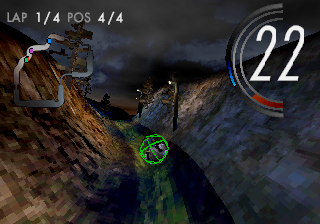
Key display elements include:
Radar
Check your position at all times with the radar. You are represented by a blue dot. Other racers are represented by dots corresponding to their specific colors.
Rechargers
Jump
The bike can lift off the ground for a short period. A blue bottom meter on the screen shows remaining jump energy. Hit blue energy pyramids on the track to increase this energy.
Turbo
Pressing the turbo button provides a speed boost. A green top meter shows remaining turbo energy. Collect green rotating objects on the tracks to increase this energy.
Selection Menus
Maneuver Menus
Use the D button UP/DOWN to view menu options. Use the A button to view sub-menus. Press B to return to the previous menu after making a sub-menu selection.
In menus with many choices, the last option is denoted by ":" (two dots). For example, difficulty levels are listed as Normal/Hard.
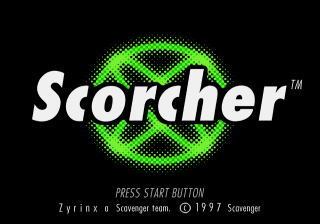
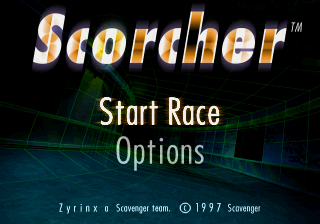
Start Screen
The Start Screen offers the following options:
•
Start Race: Go to the Start Race menu to compete in Scorcher.
•
Options: Go to the Options menu.
Start Race Menu
Select your game mode from the following:
•
Championship: Starts the race in championship mode.
•
Attack Lap: Start on a track of your choice, provided you are qualified.
•
Training: Like Attack Lap, but with no other bikes on the track.
Options Menu
Navigate to different settings:
•
Difficulty level selection: Choose Easy, Normal, or Hard using the left and right arrows.
•
Configuration: Go to the configuration menu.
•
High scores screen: Go to the high scores menu.
•
Music: Go to the music menu.
Configuration Menu
Access further settings:
•
Controls: Go to the controls menu.
•
Graphics Mode: Go to the graphics mode menu.
•
Sound: Go to the sound menu.
View High Scores Menu
This menu allows you to choose which high scores you wish to view.
Music Menu
Listen to the different melodies that play during the game. Use the up and down arrows to choose one, then press the A button to confirm the selection.
Sound Menu
Customize audio settings:
•
Music: Choose to play with or without music.
•
Sound Effects: Choose to play with or without sound effects.
Ingame Menu
Press the START button during gameplay to access the menu screen. Select "Return to Race" when you want to continue playing.
Rules of the Scorcher Race
Races start at high speed with bikes coming out one by one. There is a time limit for each lap, shown by a countdown in the top-right corner.
If you fall off the bike, you revert slightly on the track but lose valuable seconds. Remember, time is gold!
You can choose between three game modes:
Championship Mode
There are six levels in this mode. You must finish the race in the top three positions in each level to advance to the next one.
Attack Lap Mode
This mode is for setting records. You can race on tracks you have successfully finished.
Training Mode
This mode is for practicing on new tracks. There are no other bikes on the track.
Qualifications for Racing Tracks
Championship
You start on track number 1. You must finish in the top three positions to compete in the next track.
Attack Lap
You can start on any of the first three tracks. To access the last three tracks, you must have completed them successfully in Championship mode.
Training
You can practice in any level where this game mode is offered.
Times That Condition Highest Scores
Highest scores show competitors who achieved the best time for:
•
A championship (all six tracks)
Lap Time
The time taken to complete a single lap
.png)

.png)

 (Rev A).png)