How to Start the Game
The number of Lemmings you must save to progress varies by level, with 100 being the maximum required. You must assign skills to Lemmings to guide them to safety within the time limit.
Lemmings march forward automatically upon falling from the trap door, turning around only when hitting obstacles. Use the provided skills to save as many as possible from their own forward march.
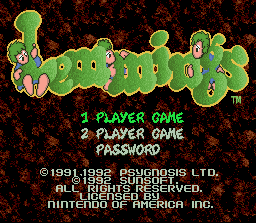
To begin, insert the cassette and turn on the system to view a short demo followed by the title screen.
Title Screen Options
Title Screen Controls
•
Press the D-Button up or down, or use the Select Button, to choose an option.
•
Press the Start Button to begin selecting your options.
One Player Game
Selecting the One Player Game displays a level preview screen showing the level name, number, and specific requirements. You can select from four difficulty levels by pressing the Select Button: FUN, TRICKY, TAXING, or MAYHEM.
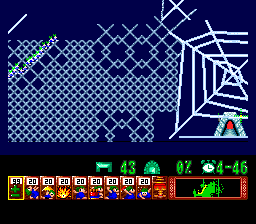
The level preview screen displays the following details:
•
1) Name and Number of the Level (which may hint at the required strategy).
•
2) Number of Lemmings that will drop from the trap door.
•
3) The percentage of Lemmings you must save to proceed.
•
4) The minimum release rate speed, which can be increased but not lowered below this starting number.
•
5) Time Limit to complete the level.
•
6) Selected difficulty rating.
Press the Select or Start Button to begin the level.
Clearing the Level
A results screen appears after gameplay ceases, showing the required rescue percentage, your actual rescue percentage, and your total score. If you fail, you can choose to retry the level. If you succeed, press the Start Button to proceed to the next level.
All Lemmings must be cleared from the screen before moving on. Any remaining Blockers or trapped Lemmings must be exterminated. There are 125 levels in the one-player option.
Two Player Game
The screen is split vertically so each player can view and control their Lemmings independently across the entire playing field. The left controller manages the blue-clothed Lemmings, while the right controller manages the green-clothed Lemmings.
Both players start with the same number of skilled Lemmings. In the first level, each player starts with 40 Lemmings, and any saved Lemmings are added to this total for the next level. The maximum number of Lemmings you can receive or save per level is 80.
Each level features a blue exit and a green exit. You must guide your Lemmings to your color-matched exit while blocking your opponent. You can win by guiding your opponent's Lemmings into your own exit, but you cannot control your opponent's screen or Lemmings.
A central bar indicates saved Lemmings with blue and green notches. There are 20 levels in the two-player option.
Password
Completing a level awards you a password, which is displayed on the scoring screen after pressing the Start Button. Write these down to resume your progress later.
To use a password, select "Password" on the title screen and use the following controls:
•
D-Button: Select letters.
•
A or B Button: Insert the selected letter.
•
X and Y Buttons: Move spaces left and right.
•
Start Button: Confirm the password and resume play.
Continue and Level Select
If you fail a level, you have 10 seconds to press the Start Button on the scoring screen to retry. If you do not press it, the game resets.
To replay previously completed levels, press left or right on the D-Button while on the Level Title Screen. You can only select levels you have already mastered.
Sound Test
To access the Sound Test, press Select and Start together when the title screen appears, then select "Sound Test." You can sample music from the levels but cannot assign music to specific levels. Press the Start Button to exit.
•
Select Button: Music select
•
A or B Button: Music start
Skills and Tasks
Skills and tasks may be limited depending on the level. You must conserve your available skills and use them wisely.
•
Climber: Scales vertical obstacles. Once assigned, the Lemming permanently retains this skill, even after performing other temporary tasks like digging.
•
Floater: Safely falls from extreme heights. Must be assigned while the Lemming is falling, and remains active for the duration of the level.
•
Bomber: Explodes after a five-second countdown, destroying nearby terrain without harming other Lemmings.
•
Blocker: Stands in place to prevent other Lemmings from walking past.
•
Builder: Builds a diagonal bridge upward in the direction they are facing, laying down a maximum of 12 steps.
•
Basher: Digs horizontally through obstacles, stopping once through or if assigned a new task. Some materials cannot be penetrated.
•
Miner: Mines a diagonal downward tunnel in the direction they are facing. Can be reassigned during the task.
•
Digger: Digs a vertical tunnel straight down. Can be reassigned during the task.
Other Actions
These automatic states cannot be selected from the menu but will display when hovering the cursor over active Lemmings:
•
WALKER: A Lemming walking normally.
 (Rev 1).png)


.png)