Setting Up
To play "Lemmings" and "OH NO! More Lemmings" on your PlayStation® game console: •
Set up your PlayStation game Console in accordance with the instruction manual supplied with the system. •
Follow your system directions to open the Disc cover and place the Disc onto the bed of the drive, ensuring the printed side faces upwards.
•
Close the Disc cover. If the unit is switched off, press the Power button to begin play. If the unit is already on, press the Reset button.
•
Now follow on-screen instructions to start the game.
Warning
It is advised that you do not insert or remove peripherals or Memory cards once the power has been turned on. Make sure you have enough free blocks on your Memory card before commencing play.
Console Top View
Console Front View
The Lemming Exodus
Lemmings are tiny, green-haired rodents of very little brain. Moreover, they're so simple, they rely on YOU to make all their decisions. Oblivious to their lethal surroundings, the Lemmings are migrating en masse and regularly meandering their way into danger.
Fortunately, you can safeguard their exodus. By assigning special skills to the lemmings, you can ensure they reach the level Exits intact. However, a forgotten Blocker or a misplaced bridge could spell disaster for every Lemming on the screen. Remember - the species won't survive without you!
Language Select Menu
Use the Left and Right Directional buttons to select your language. Press the button to confirm.
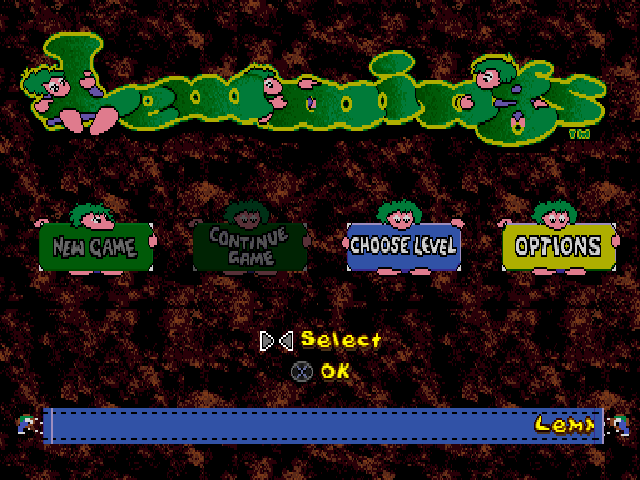
Main Menu
New Game Menu
You can play either of the two games featured on this disc – “Lemmings” or “OH NO! More Lemmings”. We advise beginners to start with “Lemmings”. Press the button to confirm which rodent riot you wish to choose.
Choose “Lemmings” and the Difficulty Menu will be displayed. Use the Left and Right Directional buttons to choose from Fun (Easy), Tricky (Medium), Taxing (Hard) and Mayhem (Extra Hard). Then press the ✖ button to continue. The Objective Screen will be displayed (see The Objective Screen).
Choose "OH NO! More Lemmings" and an advanced Difficulty Menu will be displayed. Use the Left and Right Directional buttons to choose from Tame (Easy), Crazy (Medium), Wild (Hard), Wicked (Extra Hard) and Havoc (For Pros Only!). The Objective Screen will then be displayed (see The Objective Screen).
Continue Game Menu
Start again at the beginning of the last level you reached.
Select Level Menu
Use the Up and Down Directional buttons to scroll through the list of level titles and press the ⊗ button to confirm the one you wish to play or re-play.
Note: You can only play the levels with the tooth icon placed next to the level's title.
Options Menu: Sound
Music
Use the Left and Right Directional buttons to decrease or increase the music volume.
FX
Use the Left and Right Directional buttons to decrease or increase the volume of the sound effects.
Mono/Stereo
Use the Left and Right Directional buttons to choose between Mono or Stereo sound.
Saving
Use the Directional buttons to select a Memory card block, and press the ✖ button to confirm. Select the SAVE option and press the ✖ button. The File Name Grid will be displayed.
Use the Directional buttons to enter your name and press the ✖ button. Highlight END to complete your File Name entry. Follow on-screen instructions to complete the save. Finally, press the ✖ button to return to the Main Menu.
Loading
Highlight a Memory card block containing a Lemming icon and press the ✖ button. Then highlight LOAD and press the ✖ button. Once loaded, you will be returned to the Main Menu.
Now highlight CONTINUE GAME and press the ✖ button. And, hey presto! – a bit of Lemming-Memory magic and you can pick up again where you last left off!
Deleting
Should you wish to delete a Lemmings saved game (shame on you!), then highlight DELETE and follow the on-screen instructions. Finally, press the ▲ button to return to the Memory card screen.
Release Rate
A release rate of 1 will have those green-haired chums falling through the Trap Door at a leisurely rate of one every few seconds, while a release rate of 99 ensures a veritable flood of Lemmings.
Rating
The difficulty category of the level. At this point there's nothing else to do but press the button to continue into the next level.
In-Game Pause
Press the START button to pause the action. Then press the SELECT button to display the following message:
Use the Up and Down Directional buttons to select, then press the ⊗ button to confirm. Choose CONTINUE to resume the game from the point at which it was paused. Choose RESTART LEVEL to begin the current level again. Choose QUIT to return to the Main Menu.
Level Completion Screen
At the end of every level, the game will tally up your performance, calculating all the Lemmings that


_1.jpg)
_2.jpg)
_3.jpg)