The Mission Ahead
Sooner or later B.O.B. is bound to find a car he can drive to pick up his date. In any case, be prepared to visit two other worlds, Anciena and Ultraworld. And be prepared to encounter some straaaaannnge creatures!
Scoring and Lives
B.O.B. scores big when he offs his enemies! When he nets 200,000 points he gets another life.
You begin the game with three lives. Whenever B.O.B.'s Power Bar disappears, he loses a life. The game is over when he loses all of his lives.
The Clock
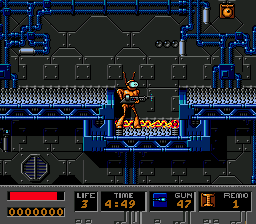
This tells you how much time you have to complete the level. It runs backwards. When your time is down to zero, your power bar quickly runs out, and that's all folks!
Power Bar
This is not candy! It shows how much energy B.O.B. has left.
•
When B.O.B.'s energy reaches 50% the Power Bar turns orange.
•
When his energy reaches 25% the Power Bar turns red.
•
When the Power Bar disappears B.O.B. disappears!
Wrenches, Energizers & 1-ups
Wrenches revitalize B.O.B.'s 'Power'. Look for these and be sure to grab them. A 1-up icon gives B.O.B. another life.
•
To pick up a wrench or a 1-up: Pass over them. If the items are out of reach, jump or use a remote.
Using Rechargers
B.O.B. can be revitalized by entering a recharger.
•
To enter a recharger: Position B.O.B. in front of it and press the Control Pad up.
•
To exit a recharger: Press the Control Pad down.
Collecting Items on the Run
B.O.B. can enhance his arsenal by picking up extra ammunition and remotes while on the run. As B.O.B. is running to get through the world, he sees icons representing guns and remotes.
•
To pick up guns and remotes while on the run: Pass over them. If the items or icons are out of reach, jump or use a remote.
Changing Guns & Remotes from the Play Screen
•
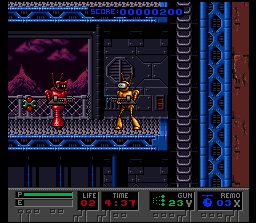
To select a gun: Press L to cycle through the available ammunition. The Gun Indicator Window shows the gun B.O.B. is ready to fire.
•
To select a remote: Press R to cycle through the available remotes. The Remote Indicator shows the remote B.O.B. is ready to use.
Game Elements
Changing Guns & Remotes from the Inventory Screen
•
To access the Inventory Screen: Press START. The game is paused, and B.O.B.'s circuit board appears. Available guns and remotes are brightly lit, while unavailable weapons are dimmed.
•
To select a gun: Press L or Y to move the white box over the gun you want to use.
•
To select a remote: Press R or X to move the white box over the remote you want to use.
•
To return to play: Press START.
Note: You cannot pause the game or access the inventory screen when you're fighting the last boss at its final phase.
.png)

.png)
.png)









.png)


 (En,Fr,De).png)


_1.png)
.png)
.png)


.png)
_1.png)
.png)