Starting the Game
•
Turn off your Super Nintendo Entertainment System by sliding the POWER bar away from the Game Pak slot. Plug a game controller into your system. •
Insert the Big Sky Trooper Game Pak, label facing front, in the system slot.
•
Turn on the system by sliding the POWER bar toward the system slot.
•
When the Title screen appears, press the START Button to begin play.
•
Choose your character (male or female) with the A or START button.
•
If you have previously saved a game, you may restore this game by choosing the BST Combat Suit icon in the middle, then selecting the saved game you wish to play.
Using the Viewscreen
Walk up to your ship's viewscreen and press the A button. FIDO will appear. Select the display mode you want with your control pad, then press A again.
Talk to FIDO
You can ask FIDO about items in your inventory. FIDO has lots of useful hints and information. It's IMPORTANT to ask him about any new item you collect.
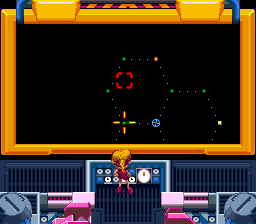
Go to Skyway Map
Use this map to travel around the Big Sky Galaxy. Move the cursor to a destination planet. If the cursor flashes GREEN, you can go there by pressing the A button. If the cursor flashes RED, the planet is out of range, and you need to install a Cosmic Transport Relay.
•
You can travel to ANY planet that already has a relay. Double green cursors reveal their presence on the map.
•
If the planet you're on has a Relay, you can travel to any ADJACENT planet, whether it has a Relay or not. But you can't reach distant planets that don't have them. The RED cursor shows which planets are off limits.
Go to Viewport
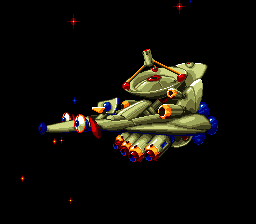
The Viewport shows the planet or space station that the Dire Wolf (your spaceship) is currently orbiting. You can deploy or retrieve Cosmic Transport Relays by pressing the A button. Mission Orders
FIDO hands out new mission orders (and a promotion!) every time you complete a mission. Keep focused on your next objective and you can't go wrong!
Beaming Down
During the game you will need to beam down to planets and space stations to pick up items or defeat occupying slugs. To do this, stand in the middle of the AIRLOCK and press the A button. Saving Games
To save your game, move your character to one of the four SLEEP CHAMBERS on your ship and press the A button. The numbers on the sleep chambers correspond to the save game numbers at the beginning of the game.
Battle Screen
When you arrive at a planet occupied by Slugs, you must defeat their space patrols, or be forced to retreat to your previous location. Use the A button to fire rocket thrusters and the B button to fire torpedoes. As you progress through the game you will receive spaceship powerups. Give them to FIDO to install. Two of the powerups are special weapons. Launch and explode SPACE MINES by pressing and releasing the Y button. Launch and explode QUARK TORPEDOES by pressing and releasing the X button. Suit Modules
The combat suit is a tricky piece of high-tech equipment that requires skill & ingenuity to configure.
•
spacer (position irrelevant)
•
blocker (position irrelevant)
•
Power Pack (can vary from positions shown--as long as the sockets connect)
Module Assembly Diagram
•
configuration at startup, and a good neutral position that eases transitions to most of the useful combinations
Suit Module Combos
•
MAGNET HANDS ENABLED (power + #2 + #3): push & pull objects
•
SNORKEL ENABLED (power + #1): swim underwater
•
POWER BALL ENABLED (power + #1 + #2 + #3): more powerful weapon
•
JET PACK ENABLED (power + #2): fly through space •
SELF REPAIR ENABLED (power + #1 + #4): convert battery power to health
•
CAMOUFLAGE ENABLED (power + #3): look like the enemy
•
SUPER SHIELD ENABLED (power + #3 + #4): deflect enemy blows
•
ICE RAY ENABLED (power + #4): freeze enemies & lava
•
SWEEP SHOT ENABLED (power + #2 + #3 + #4): more powerful weapon
•
BOUNCE SHOT ENABLED (power + #1 + #2): more powerful weapon
•
TACTICAL NUKE ENABLED (power + #1 + #2 + #3 + #4): ka-boom!
.png)

.png)

.png)
.png)



_1.png)


_1.png)


.png)
