Getting Started
Turn OFF the Power switch of your Nintendo® Game Boy® Advance. Never insert or remove a Game Pak when the power is on.
Insert the Garfield Game Pak into the Game Pak Slot of the Game Boy® Advance. Press firmly to lock the Game Pak in place.
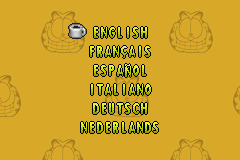
Turn the Power switch ON. The Game Boy® Advance Screen will appear followed by license screens and the Language Selection Screen (if you do not see them, start again from step 1).
Select your language and then press the A Button to go to the Main Title Screen.
Press the A Button or START to go to the Main Menu.
Main Menu
In the Main Menu, press the A Button to choose the highlighted option. Change the option by pressing +Control Pad Up or Down.
There are two options in the Main Menu:
Play Game
In this menu there are two Save Slots. If you have not played the game before, both Save Slots will indicate “NO DATA”.
Choose one of the Slots to begin a new game and select the difficulty. If you have played the game before, the name of the last level you have reached will appear in a Saved Slot. From a Saved Slot that has a level name, you can play that specific level or any previous levels.
You can change the selected Save Slot with +Control Pad Up or Down. Once you are on the selected Save Slot, you can change the selected level with +Control Pad Left or Right.
When you have selected the level you want to play, press the A Button to start playing it. Pressing the B Button will take you back to the Main Menu.
To delete a Save Slot, highlight “ERASE DATA”, press the A Button, and then use the +Control Pad to select the slot you wish to delete.
WARNING: once data has been deleted it cannot be recovered.
Options
The Options Menu allows you to adjust the audio settings in the game.
The “Credits” option shows you who produced the game.
Intro Screens
Each level begins with an Intro. These scenes explain Garfield's situation in his adventure and what he needs to do to complete the level.
Pause Menu
You can press START to pause the game at any time during the action. The Pause Menu allows you to:
Arbuckle Farm
Things have run amuck on Arbuckle farm. Garfield must find and collect the missing eggs and chase away the foxes that have been scaring the chickens.
Garfield must also avoid obstacles such as rakes that will pop up and hit him if he steps on them. Press the B Button to kick the foxes before they swipe at Garfield with their tail.
Haunted House
The door has slammed shut behind Garfield as he finds himself inside a scary haunted house. He must find the key to unlock the door in order to escape.
Garfield must avoid or fight ghosts and bats as he sneaks through the house. Press the A Button to jump and then the B Button to kick a ghost or bat while they are in the air.
Up A Tree
Nermal is stuck up a tree. Garfield must climb up a few trees with lower branches in order to get to the large tree where the stranded kitten is.
Along the way he must avoid squirrels, birds and falling nuts. Be careful. Some branches are weak and will break if Garfield stands on them for too long.
Alley Cat
Garfield is looking for the local bully, Harvey, who has been bothering Arlene. Guide Garfield through the back alley avoiding falling obstacles from the buildings above.
Garfield will have to face a number of tough cats and dogs as he makes his way through the mean streets. Press the A Button to make Garfield kick the alley cats and dogs.
Kitchen Cat-astrophe
Back home, Garfield must defeat an army of angry food. Celery, tomatoes, carrots and jars of mustard have taken over the house.
Help Garfield fight his way from room to room in order to find out where the disgruntled food is coming from.
Boss Stages
Every three levels Garfield must face and defeat a boss. These characters are tougher than the average enemy and sometimes require special moves to be beaten.
The "Boss" stages must be completed for Garfield to continue his adventure.



 (En,Fr,Es).png)



_1.png)



.png)


_crop_1795585020.png)

.png)
_1.png)