Selecting a Mode
Press the Start Button to select a mode during the Title or Demonstration Screen.
Select a mode with the Control Pad or Select Button, then begin the game by pressing the X, Y, A, B, or the Start Button.
CPU Battle
The computer is your opponent when you select this mode. A second player can always interrupt a CPU match by pressing the Start Button on the second controller.
Use the Control Pad to select a character you want to play, then enter it by pressing the Start Button (or the X, Y, A, B, L, R Buttons).
Versus
Two player games are played in the Versus mode. Select items such as a stage, configure, time limit, and handicap by pressing Up or Down on the Control Pad. You can make changes to your selections by pressing Left or Right on the Control Pad.
After selecting the items, press the Start Button to bring up the Player Selection Screen. Now each player can choose from the available list of player characters for their match. Both players can play the same character if they wish to.
If you want to change the mode you selected during the character selection screen, press the Select Button to display a different screen.
If you want to select a different game mode, press the L or R Buttons while the game results are displayed and you will return to the game mode selection screen.
Survival
This is a mode for a Team Survival Battle. Each player selects five players for his team. Each team competes against each other until the last character on one of the teams is eliminated.
This is a one set elimination tournament. If a player loses all five players on his team, he loses the game. If a double knock-out happens, then both players lose a fighter.
Select characters you want to use on your team by pressing the Control Pad and then the Y, X, A or Start Button. If you want to make a change to your selection of characters, press the B Button to cancel your previous selection. The outcome of your game will be shown on your screen.
Various Options
Either Manual or Auto Play can be selected for both the first or second player's part. You can enjoy a match against another player or watch a game operated entirely by the computer.
Set Up
In Set Up Mode, you can make changes to the settings for each button, game levels, time limits, sound and speed of the game. Select the item you wish to alter by pressing Up or Down on the Control Pad and change it by pressing Right or Left.
•
Configure (config.): You can assign a different function to each button. Press Up on the Control Pad to select config. and assign a different function of either punch or kick to each button. You can eliminate a button function by selecting Off by pressing Left or Right on the Control Pad.
•
Time Limit: You can turn the time limit on/off.
•
Sound: Choose between Stereo and Mono sound output.
•
Speed: You can change the speed of the game play.
Game Level
You can adjust the level of each character's fighting abilities. The more difficult the level, the more power in the punches, kicks and special moves. There are seven levels of difficulty, ranging from Easiest to Hardest: •
Easiest, Very Easy, Easy: At game end you will see a screen urging you to go to the next stage level of difficulty.
•
Medium: At game end you will see an ending story for the character you have been playing.
•
Hard, Very Hard: At game end you will see an ending story and the game credits.
•
Hardest: At game end you will see an ending story, credits and a special bonus if completed with no continues.
Game Rules
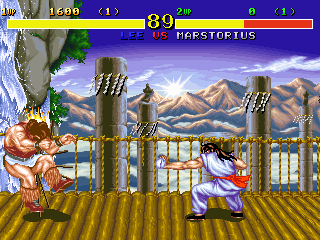
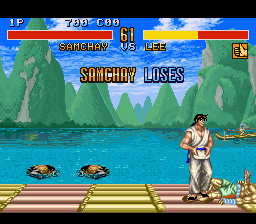
One game consists of three rounds, and the first player to win two rounds is entitled to take their character to the next round of play.
If both players' Power Gauges run out at the same time, it's a Double KO. If they are at the same level when the time runs out, the round is a draw.
When the game runs out of time and both players still have power, the player with the highest power level wins the round.
If the game is prolonged and the fourth round ends in a draw, a final round shall be held.
Weak Spot System
Each character has a unique weak spot. When an attack on a fighter's weak spot inflicts a certain amount of damage, the character will be temporarily stunned and unable to move. After snapping out of it, the character's weak spot will have even less defensive power.
If your character is "on the ropes," focus your remaining attacks on your opponent's weak spot for a better chance at turning the tables to win the game.
When the weak spot is attacked, it flashes. If it is attacked repeatedly, the flashing continues. If the weak spot suffers enough damage, the player is knocked out.
To achieve a quicker recovery when stunned, rapidly press Left or Right on the Control Pad or the Punch or Kick Buttons.
New Entry and Continues
•
New Entry: During CPU Battle Mode, the second player can break into a one player game in progress by pressing the Start Button on the unused Controller.
•
Continue Function: If you lose in CPU Battle Mode, the game is over at that point. If you wish to continue playing, press the Start or A Button within ten counts upon completion of the game. A new game starts, and your opponent from the last game is awarded the first move. There is no limit to the number of games you can play continuously.
Special Attacks
-
 (Rev 1).png)

 (Rev 1).png)

 (Rev 1).png)






.png)

 (En,Fr,De).png)