Play Modes
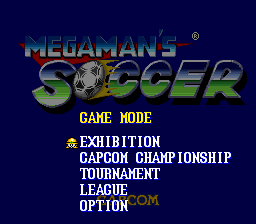
Move the "Met" icon up or down to choose the mode of play you want. Then press Start to begin play.
•
Exhibition: Lets you play a single match where you choose which robots play on your team. Play modes include 1P vs. COM, 1P vs. 2P, 1P & 2P vs. COM, or COM vs. COM.
•
Capcom Cup: A one or two player tournament feature. You play as the Mega Man team and battle each of the eight computer-controlled robot master teams. •
Tournament: Same as the Capcom Cup, except you may choose to control any of the eight robot master teams in addition to the Mega Man team. •
League: A one or two player feature that gives you the chance to play a season against all the other robot teams. You play against the computer as a one player team or as a two player team.
Option Mode
OPTIONS Mode allows you to adjust the control function of each button, set the game time length up to 10 minutes per half, and choose the number of special attacks per game.
You may also listen to the music themes and sound effects used in Mega Man Soccer, adjust the sound from STEREO to MONAURAL, and set the KEEPER control to AUTO (computer-controlled) or MANUAL (full player control). Exhibition Mode: Formations
Choose your formation of 7 players plus a goaltender based on your strategy by putting the "A" or "B" arrow on the formation listed. The first number is defensive players, the second is midfield players, and the last is attacking players.
For a more defensive strategy, choose 3-2-2, 3-1-3, or SWEEPER (a 2-2-2 formation with an additional player playing the SWEEPER position near your goaltender).
Exhibition Mode: Member Change
Here you can adjust which robots you want on your team. FW means Forwards, HF means Halfbacks, DF means Defenders, GK means Goalkeeper, and SW means Sweeper. After each role is a number of Mega Man heads based on your chosen formation. •
Move the square cursor up or down to select a position.
•
Press the A or B button to move the square down to the robot list at the bottom of the screen.
•
Choose the robot type you want and press the X, Y, A, or B button to change all players in that position to the selected robot.
•
Press Start when you have finished selecting your robots.
Exhibition Mode: Position Change
You can adjust where on the field each robot will play. Move the square cursor to the player you want to move, then press the B button. That robot will flash on the field above.
Move the square through the list again until another player flashes. Press the B button again to switch the positions of these two players.
Exhibition Mode: Checking Status
To look at the STATUS of each of your robots, press Down on the control pad. "Met" will appear next to STATUS. Press the A or B button and a robot on the field will flash as more information about that robot appears.
•
Press Left or Right on the control pad to look at a different robot.
•
Press the X, Y, A, or B button when you are done checking your robots.
•
To look at the computer-controlled robots, press Left on the control pad when you see "Met" and scan through them using the same method.
Exhibition Mode: Starting the Game
Press Start to exit and select a playing field. Move the flashing square to the field you want and press Start to play. Once time runs out, you may return to Member Change, Stage Change, or Retry the same game.
Capcom Cup Mode
After selecting this mode, you may start a new tournament or enter a password to return to a previous tournament. When starting a new game, a short animation sequence will play before the game select screen appears.
The CAPCOM CUP is a one or two-player tournament. Mega Man is in the middle, surrounded by Skull Man, Cut Man, Wood Man, Pharaoh Man, Dust Man, Needle Man, Fire Man, and Elec Man. To win, you must play as the Mega Man team and defeat each of these robot master teams. At the beginning of the CAPCOM CUP, you have a team of only Mega Man robots. As you defeat opponents, you automatically gain one robot from each defeated team. This player will appear in your RESERVE. Capcom Cup: Position Select
Move the flashing square to a team and press Start to play a match against them. Choose your formation, then press Start. Adjust player positions the same way as in EXHIBITION.
You can also move players from your reserve team onto your starting team:
•
Move "Met" down to RESERVE and press the A or B button to display the reserve players below the starting eight.
•
Select the starting player you want to switch.
•
Choose the reserve player you want to move into the starting position
.png)

.png)




.png)
.png)



_1.png)

_1.png)
_1.png)
_1.png)
