Getting Started
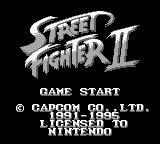
Insert the Street Fighter II Game Pak (label side out) into the Game Boy unit and turn the power switch to the "ON" position. When the title screen appears, press the START Button to access the Main Menu. On the Main Menu, press UP/DOWN on the Control Pad to move the cursor, and press the START Button to enter your selection.
Defending
•
To defend against normal attacks, press AWAY from your opponent on the Control Pad.
•
To defend against low attacks, press DOWN and AWAY on the Control Pad.
•
Your opponent's special move can still hurt you, damaging up to one-fourth of your health meter.
Throwing
•
To throw, press Towards and A or B.
Dizzy
•
When you are "dizzy" (seeing stars), quickly press the A and B Buttons and tap the Control Pad in all directions to shake it off.
The Main Menu
On the Main Menu, four selections are displayed: Normal, Versus, Survival, and Options. Press UP/DOWN on the Control Pad to move the cursor, and then press the START Button to enter your choice.
Modes of Play
There are three different modes of play: Normal (1P), Versus (2P), and the Survival Mode (1P). There is also an Option Mode so you can customize your game set-up.
Normal Mode
The standard 1-Player mode. If using Super Game Boy accessory, Player 2 cannot join in during the match.
Versus Mode
Go head-to-head against a human opponent.
Survival Mode
It's a simplified version of the Normal Mode. You fight one round against each World Warrior. Every time you win one round, you will recover some of your health, and then continue playing until you win or your health runs out.
There is NO CONTINUE. When you lose, the game is over!
Option Mode
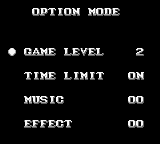
Allows you to customize the game to your liking. Press UP/DOWN on the Control Pad to move the cursor. Change each setting by pressing LEFT/RIGHT on the Control Pad.
Choose from 1 (easy) to 5 (hard).
Turn the time limit ON or OFF.
Choose from 29 (00 to 28) music selections. Press the A Button to hear the tune, and press the B Button to end it.
Listen to the 38 (00 to 37) different sound effects found in the game. Press the A Button to sample the selected effect. Pressing the B Button will stop the effect if necessary.
Versus Mode Setup
By attaching the Game Boy Link Cable to two Game Boy units, you can play head-to-head against another player. To do this, you need the following:
•
1 Game Boy Link Cable (SOLD SEPARATELY)
Versus Mode Instructions
1. Correctly plug in the Game Boy Link Cable to the Game Boys and simultaneously turn the power switch to the “ON” position on both Game Boy units. At the Title Screen, select the VERSUS Mode and press the START Button on either Game Boy.
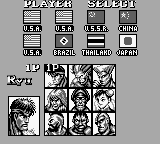
2. At the Player Selection Screen, select the character you want to play.
3. After selecting the player, select the country you want to play in.
4. You are now ready to start the Versus mode.
Caution!
Make sure the Game Boy Link Cable is plugged in correctly and do not unplug the cable during game play. Otherwise, the game will not work properly.
Game Rules
One round lasts 99 seconds. The first player to win 2 out of 3 rounds wins the fight. (The time limit can be turned ON/OFF from the Option Screen.)
The 3rd round is the final round. The winner of this round will proceed to the next fight. If no winner comes out of this round (Draw), there is one more FINAL ROUND. If the FINAL ROUND ends in a Draw, the game is over.
If the winner is not determined within the allotted time, the Warrior who has more vitality is declared the winner. (Only when the time limit is ON.)
Continue - Game Over
If you lose two of the three rounds, the game is over and the Continue Screen appears. If you press the START Button before the timer reaches 0, you may continue your game.
Character VS. Character
One of the coolest options in the Game Boy version of Street Fighter II is the ability to match any fighter up with a mirror-image of himself or herself! Try it out in the VS. Mode!