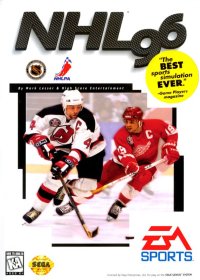
Welcome to NHL® 96!
There's been plenty written lately regarding Global Warming, El Niño, and the like, but North Americans are experiencing a different weather phenomenon altogether—the arrival of the second ice age!
And, in contrast to the idle pace of glaciers extending from the polar ice caps, this time it's spreading like wildfire. Sheets of ice measuring up to 200' x 85' have formed as far south as Tampa Bay, Anaheim, and Dallas, and there's no sign of a warming trend in sight.
EA SPORTS brings you as close as you can get to the NHL without donning a parka! New Features for 96
•
Multiple Skill Levels — Work your way through the ranks from Novice, to Intermediate, to Expert.
•
New Player Moves — Drop Passes, Fake Shots, Spin-o-Rama, Quick Stop, and more.
•
New Graphics and Player Animations — Lie down on "D" to block shots, flip your opponents with extreme body checks, and much more.
•
Enhanced Sound Effects and Music — Stadium specific crowd chants and organ tunes; vocal referees.
•
Improved Gameplay and Computer AI — Advanced goalie and defense intelligence; faster overall gameflow.
•
Multiple Injuries to Players and Goalies
Starting the Game
•
1. Turn OFF the power switch on your Super Nintendo Entertainment System®. (WARNING: Never try to insert or remove a game pak when the power is ON.) •
2. Make sure a Controller is plugged into the controller socket 1 on the Super NES®. If you're playing against a friend, plug the other Controller into controller socket 2.
•
3. Insert the game pak into the slot on the Super NES. Press firmly to lock the cartridge in place.
•
4. Turn ON the power switch. The EA SPORTS logo appears. If you don't see it, begin again at step 1. Game Setup Options
•
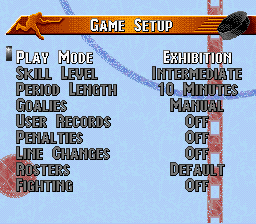
PLAY MODE: Exhibition, Season, or Practice.
•
SKILL LEVEL: Novice, Intermediate, or Expert.
•
PERIOD LENGTH: 5, 10, or 20 Minutes.
•
GOALIES: Manual or Automatic.
•
USER RECORDS: On or Off.
•
PENALTIES: Off, On, or No Offsides.
•
LINE CHANGES: Off, On, or Automatic.
•
ROSTERS: Default or With Trades.
Game Setup Controls
•
Control Pad ↕ to highlight an option.
•
Control Pad ↔ to cycle through choices.
•
Press START to continue. Option settings are saved in memory as defaults until you change them again.
Play Mode Settings
•
EXHIBITION: A one-game exhibition. Play with your friends or test your hockey skills against the expertise of a CPU (computer)-controlled opponent.
•
SEASON: Set up and play through an entire NHL season, complete with best-of-7 playoff series and season-end awards ceremony.
•
PRACTICE: Design plays and run your favorite team through drills in real game situations. Practice mode is also a great place to work on your penalty shot technique.
Skill Level Settings
•
NOVICE: For beginners and players having trouble scoring. You'll notice slower performance by CPU-controlled teams, from skating and shooting to the goalie's reaction time.
•
INTERMEDIATE: CPU-controlled opponents play to their ability but never really rise to a championship level of play.
•
EXPERT: Unless you've come up through the ranks of NHL 96, prepare for the humiliation of a lifetime! The skating is quick, the body checks are lethal, and the passes are right on the tape.
Period Length Settings
•
5/10/20 MINUTES: Select a period length. A complete game consists of three periods; the NHL plays 20-minute periods.
•
Overtime periods following Exhibition and Season games are always five minutes long.
Goalies Settings
•
MANUAL: You can take over control of your team's goalie and challenge the puck handler.
•
AUTOMATIC: Let the CPU control your team's goalie. He'll save as well as his real life counterpart, but when he's in possession of the puck, control is transferred back to you.
User Records Settings
•
ON: Keep an ongoing record of your personal NHL 96 performance. User Record data for up to eight players is displayed on the Record Holders screen.
•
OFF: Play without User Records.
Penalties Settings
•
OFF: No penalties are called. Ideal for a faster paced game with fewer faceoffs, and for those players still learning the game.
•
ON: The refs call the game just as they would in an actual NHL game.
•
NO OFFSIDES: Play with standard penalties active, but without offside violations.
Line Changes Settings
•
OFF: Players never fatigue. Your best line remains on the ice for the duration of the game.
•
ON: You must take notice when your players show signs of tiring. Call for substitutions on the fly or wait until the next faceoff, but keep your players rested!
•
AUTOMATIC: Lines are cycled automatically before each faceoff. Players' energy levels never dip below 100%.
Rosters Settings
•
DEFAULT: Play NHL 96 with the accurate team rosters from the 1994-95 NHL season.
•
WITH TRADES: Play with the trades you've authorized and any players you've created.
Fighting Settings
.png)

.png)





.png)

.png)




.png)
.png)


.png)


.png)
.png)

