Getting Started
Always make sure the power is off on your Super Nintendo Entertainment System before you start. Insert the Nolan Ryan's Baseball cartridge into the Super NES. When you turn the power on, the name ROMSTAR should appear. The title screen will then appear followed by the theme music. If this sequence does not occur, check all connections and verify that everything works. If problems persist, contact the Romstar Consumer Hotline listed in the back of this manual. Press the START button on the Player 1 Controller to begin the game. The Main Menu will appear as follows:
This game contains 2 different game modes, a SINGLE GAME and a PENNANT GAME SERIES.
Single Game Setup
Select the SINGLE GAME option from the Main Menu. Choose 1P VS. Computer for a single player game. For a two-player game, press 1P VS. 2P.
Use the JOYPAD to select your team and press the START button to lock in your choice. Select PLAY GAME to begin.
Pennant Game Setup
Select the PENNANT CONTINUE option from the Main Menu. Choose a team and select the PLAY GAME option to begin.
Game Modes
•
PENNANT CONTINUE: This option will begin or continue the PENNANT GAME series.
•
PENNANT SETUP: This option will set up the PENNANT GAME series.
•
SINGLE GAME: This option will go into the single game mode.
•
CLEAR MEMORY: This option will clear the battery memory. All players, stats, and games in progress will be cleared. Simply select this choice and press the Reset button on the Super Nintendo Entertainment System. Pennant Continue Menu
The PENNANT CONTINUE will display a list of games scheduled for the present day of the Pennant Series and a WATCH PENNANT PROGRESS mode. There are 6 scheduled games to choose from. Use the JOYPAD to select which game of the Series to play and press the A button to lock in your choice.
Selecting a game will go into the PLAY GAME/CHANGE LINEUP Menu. Select the PLAY GAME option to begin. Select the CHANGE LINEUP option to modify the lineup.
If you choose to modify the lineup, use the JOYPAD to select the player to swap, then press the A button to lock in your choice. Use the JOYPAD again to select the second player. Press the A button to exchange the players. You may use the B button to stop an unwanted selection. Press the START button when completed.
The WATCH PENNANT PROGRESS will show the results of each of the six games for the day. A menu with the day's stats will appear. The menu options are:
Pennant Progress Stats
•
NEXT DAY: This option will advance pennant progress 1 day, and return to the Pennant Game menu.
•
BAT AVG: BAT AVG = Safe Hits / At Bat (based on a minimum of 3.1 plate appearances). The batting averages of the top 10 players of both leagues will be displayed.
•
RBI: The RBIs (Runs Batted In) of the top 10 players of both leagues will be displayed.
•
ERA: ERA = Earned Runs X 9 / total innings pitched (based on a minimum of 1/3 innings). The ERAs (Earned Runs Average) of the top pitchers of both leagues will be displayed.
•
SO: The SOs (Strike Outs) of the top 10 pitchers of both leagues will be displayed.
Pennant Setup Menu
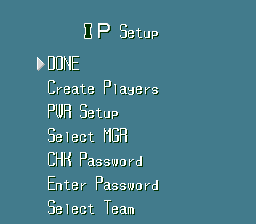
This option will allow the customizing of the Pennant Series. The following menu will appear:
Pennant Setup Options
•
DONE: This option will end the PENNANT SETUP menu, and go into the PENNANT CONTINUE menu.
•
PENNANT LENGTH: Use this option to choose the number of days to reach the All Star Final (10, 30, 80, or 130). Use the JOYPAD to select the amount desired, then press the A button to lock in your choice. Use the START button to return to the PENNANT SETUP.
•
TRADE: This option allows the teams to trade starting lineup players. Use the JOYPAD to select 2 Teams. Press the A button to lock in the choices. Press the B button to stop an unwanted selection. Use the JOYPAD to select the player to swap and press the A button to lock in your choice. Use the JOYPAD to select the second player. Press the A button to exchange the players, or press the B button to stop an unwanted selection. A trade inside the same team is not allowed.
•
FREE AGENT PICK: Use the JOYPAD and the A button to select the team to trade the FREE AGENT into. With the JOYPAD, select the outgoing player and press the A button to lock in your choice. Use the B button to stop an unwanted selection. With the JOYPAD, select the FREE AGENT to trade. Press the A button to trade the players.
•
PASSWORD: This option will allow the use of a team password from previously saved games. Please note that 96 characters must be used to complete the password. Use the JOYPAD to select the character desired for the password. Press the A button to enter the character. If you make a mistake, you can use the B
.png)

.png)


.png)
.png)


.png)


.png)
.png)
.png)

.png)
.png)



_1.png)


.png)

.png)
.png)