Play Modes
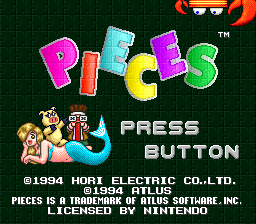
Pieces offers hours of head-scratching fun for even the most clever of puzzle problem-solvers. One can try his luck against computer opponents of varying skill, or get a whole group into the action by using the four-player adapter. •
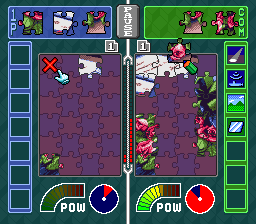
1P VS. COM: An all-out battle of wits against the computer. The prowess of the computer varies greatly according to the Difficulty Level you choose. Beginners should start on Easy Mode before venturing into Normal and Hard Mode.
•
1P VS. 2P: Test your skills against a friend. You can even set a handicap to offset any difference in ability between you and your challenger.
•
Jigsaw: Perfect for when more than two players want to put the pieces in place, though a single player can play too. Up to five people can team up to solve puzzles from eight different themes.
•
Sound: Use this option on the menu to toggle between stereo and monaural sound.
•
BGM: Use this option to turn the background music off and on.
1P VS. COM
The object of each Stage in One-Player Mode is to complete three pictures before the computer does. To view the ending, finish all eight Stages without losing to the computer. If the computer beats you, you'll still have more chances to get even.
Difficulty Screen
The computer opponents you'll face each have unique abilities, and they become more difficult to defeat as the Stages progress. Selecting the difficulty level allows you to skip opponents you've already beaten.
•
Easy: You'll start at Stage One. You'll have the advantage, as your opponent, Rice Bowl Crab, can only move sideways.
•
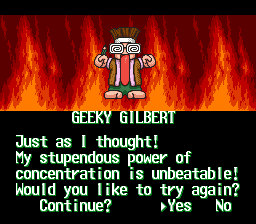
Normal: Choose this mode to begin in Stage Three. The challenger here, Geeky Gilbert, always begins with the border pieces.
•
Hard: For those who fancy themselves as particularly outstanding in the puzzle-solving department. You'll begin at Stage Six. 1P VS. 2P
The object of 1P VS. 2P Mode is similar to that of the 1P VS. COM Mode—the first person to complete three puzzles is the winner. Go for a quick single game, or try a "best of three" or "best of five" series to see who falls to pieces in the long run.
Handicap Select Screen
Pieces allows each player to set a handicap in the Handicap Selection Screen before beginning a game in 1P VS. 2P Mode. Collecting Items is the name of the game, and time is of the essence.
•
Player 1: Player One's Handicap is displayed on the blue bar. Beginners should choose a slower timer.
•
Player 2: Player Two chooses a Handicap on the green bar. Press Start to lock in the choice. Advanced players should choose a faster timer.
•
Power: The amount of time you have left over determines how much the Power Meter fills up, which affects the number of Items you receive.
•
Timer Speed: Choose a higher number (Slow) for a slower timer and easier game. Choose a lower number (Fast) for a faster timer to make the battle more difficult.
•
Item Power: Fit a piece and any time left over on the timer will be stored as ITEM POWER on the POWER METER. Collect enough power to receive ITEMS to help you finish before your opponent. Jigsaw Mode
The object of Jigsaw Mode is for each player, up to five, to complete a puzzle and earn points. The player earning the most points wins. When using the four-player adaptor, the Mouse cannot be used, nor can you refer to the miniature version of the solution normally displayed in the lower right corner of the screen. Genre Select
There are eight genres of images to choose from in Jigsaw Mode, with eight puzzles in each. Small puzzles contain 36 pieces, medium puzzles contain 48 pieces, and large puzzles contain 60.
•
The World: See scenes from around the world like the Leaning Tower of Pisa.
•
Land and Sea: Try your luck from the highest mountain to the deepest sea.
•
Animals: Pick your brain and piece together a litter of puppies.
•
Dinosaurs: Learn a bit about our prehistoric predecessors here.
•
Planes: Face an F-15 Eagle head-on in this uplifting genre.
•
Sports: Tennis anyone? You could win 3-Love in this genre.
•
Animation: Try your luck in the nutty cartoon genre of Animation.
•
???: The images in this genre are a mystery!
Game Type
After selecting a genre, you'll have a chance to set the level of difficulty. Each of the four game types contains a different configuration of variables which determine whether the puzzles will be quick picks or serious head-scratchers.
•
Type A (No Problem): Time Limit: 8 min. Fake Piece: None. This is the easiest type. It features a diagram of the solution to refer to and has no trick pieces.
•
Type B (Leave It To Me): Time Limit: 5 min. Fake Piece: None. Like Type A, this has a diagram of the solution and no fake pieces, but challenges players with a shorter time limit.
•
Type C (This Is So Hard): Time Limit: 3 min. Fake Piece: Yes. This mode features the miniature solution, but fake pieces are thrown in at random. The time limit is a mere three minutes.
•
Type D (Let's Take Our Time):
.png)

.png)
.png)
.png)



.png)

.png)

_1.png)

_1.png)
_1.png)



.png)

_1.jpg)

.png)