Selecting Multiple Items in a List
Highlight an item and press Button A or the Left Mouse Button. The selected item will turn red.
To cancel a selected item, press Button B or the Right Mouse Button. When you are finished selecting items, press Button B or the Right Mouse Button. If no items are selected, the command is canceled.
Entering Numbers
For commands that require specific amounts of Gold and Food, or a number of soldiers, use the Number Table or the Calculator.
When using the Controller, use the Control Pad to select a number and press Button A. When using the Mouse, move the Mouse to direct the cursor to a number and click on the Left Mouse Button.
Number Table Options
•
MIN: Smallest amount for the command.
•
1/4: One fourth of the army or city's supply.
•
HALF: Half of the army or city's supply.
•
3/4: Three fourths of the army or city's supply.
•
ALL: All of the army or city's supply.
•
INPUT: Use the calculator to enter numbers.
Key to Play
•
1. Make sure the power is turned OFF.
•
2. Insert the RISE OF THE PHOENIX game pak. When using the Mouse, connect the Mouse to the game system.
•
3. Turn the game system ON.
•
4. The introduction will begin. Push START to skip to the game set-up.
Starting a New Game
•
1. Select START A NEW GAME in game set-up.
•
3. Decide what game level to play, whether to watch battles between other rulers, and the number of players. Select Demo to watch a computer demonstration.
•
4. Select the ruler you wish to play. Verify your selection. Select NO, if you want to change your ruler.
•
5. Review your game set-up. If everything is OK, select YES and the game will begin. To change the setting, select NO, and return to the item you want to change.
The Options Menu
Select OPTION from the Main Display to access the Options Menu.
•
SAVE: Save your game for future play. Only one game may be saved. Saving erases any previously saved game.
•
LOAD: Resume a saved game.
Game Flow
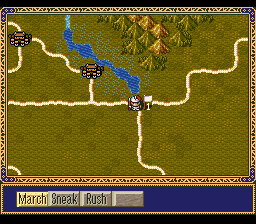
In RISE OF THE PHOENIX, you command your army by repeating turns in two phases, a MOVE phase and a PLAN phase. Your turns to execute commands fall on the first and third week of the months.
•
1. MOVE PHASE: Commands to move your divisions. Direct the movement for each division in your army. When an enemy division is in a neighboring square, you may wage an attack against that division.
•
2. PLAN PHASE: Commands to plan your war strategy. Direct the operations of your divisions. Commands vary between divisions residing at a city and divisions not at a city. One Month of Turns
•
1st Week: MOVE Phase (your army/other armies) -> PLAN Phase (your army/other armies)
•
3rd Week: MOVE Phase (your army/other armies) -> PLAN Phase (your army/other armies)
Winning the Game
Win the game by fulfilling both of the following conditions:
•
2. Defeat or ally all other rulers.
The game ends when your ruler is defeated. As the ruler of an army, you have many responsibilities. Expand your influence and secure supply routes for your army by attacking enemies, making alliances, and winning the loyalty of the people.
Strategic Flow
•
DOMESTIC AFFAIRS: Restore Resources / Build Resources
•
DIPLOMACY: Negotiate with Rulers
•
Goal: Expand Your Influence -> Conquer China
The Army
An army is composed of rulers and their commanding divisions. Each ruler commands divisions composed of the ruler and/or the ruler's generals and soldiers. The ability levels of the ruler or generals affect the Mobility and Battle Skills of their respective divisions. One division may have up to five generals, including the ruler.
In each turn, Gold is automatically paid to your enlisted generals. For Xiang Yu's generals, the amount is based on the general's Battle Skills, and for Liu Bang's generals, it is based on the Charm level. If you run out of Gold to pay your generals, your Respect will decrease. A ruler is also responsible for sustaining his soldiers. Each turn, a given amount of Provisions, reflective of the number of soldiers, is taken from each division's supply. If you run out of Provisions, the number of your soldiers will decrease.
Types of Divisions
•
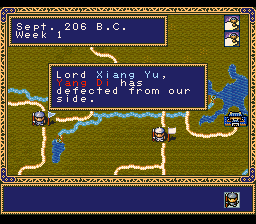
Ruler's Division (indicated by a red flag)
*Note: The division number is displayed to the right of a division in the Main Display. When there is more than one division in the same place, a number is not displayed. An X over a number indicates that the division has completed its command.*
Types of Cities
There are a total of 39 cities which fall into four different categories: Commercial, Military, Barrier, and Capital. For Military and Commercial cities, the scale, type, and display of the city will differ, according to the Population. The Defense level also differs according to
.png)

.png)

.png)