Getting Started
Set up your Super Nintendo Entertainment System and plug in a controller. For a two-player game, plug in a second controller. For a multi-player game, you must use a multi-player adaptor. See "TEAM BATTLE ROYAL" for more on multi-player games. Insert your SATURDAY NIGHT SLAM MASTERS game pak into your Super Nintendo Entertainment System and turn the power on. The title screen will appear after the CAPCOM logo. A demonstration game will begin if you do not select any options. This will give you an idea of how the game is played. To return to the title screen, press the START button. NOTE: In order to recreate the feel and animation of the arcade version, the black strips at the top and bottom of the screen are normal.
When the title screen appears, you will have two options: GAME START and OPTION MODE. Move the cursor to the option you wish to select and press the START button. To start the game, move the cursor to GAME START and press the START button.
The GAME MODE SELECT screen will appear with two options: SINGLE MATCH and TEAM BATTLE ROYAL. To play a game, choose which type of game you want to play and press the START button.
To end the game at any time, simply turn off the power on your Super Nintendo Entertainment System and remove the game pak. Make sure to replace the plastic cover on your SATURDAY NIGHT SLAM MASTERS game pak. Option Mode
The Option Mode allows you to change some basic features in the game. From the title screen, move the cursor to OPTION MODE and press START. Press the control pad Up or Down to highlight the option you want to adjust.
Difficulty
The default difficulty level is set at 4 stars, but you may adjust the number by pressing Left or Right on the control pad. The more stars that appear means a more difficult game. The hardest game has 8 stars, while the easiest has 1 star.
Time Limit
You can choose to have a time limit of 3 minutes for your matches or no time limit at all. Press Left or Right on the control pad to choose YES for a time limit or NO for no time limit.
Configuration
There are default settings for the three button functions for this game but you may change the functions of
Official CWA Rules
A match is won by:
A Count Out occurs when a Slam Master remains out of the ring for 20 seconds. A Double Count Out occurs when both Slam Masters are out of the ring for 20 seconds.
In case time runs out, the player or team with more energy wins. There is a 1-minute time extension in case of a draw in Team Battle Royal.
All players can lose (resulting in a No Contest/Game Over) for the following:
•
Single Match: Double Count Out or Time Up with equal energy.
•
Team Battle Royal: In case of a second draw after the 1-minute time extension, both Slam Masters lose.
Single Match Mode
Single Match refers to a match with two Slam Masters in the ring. You can play either a one-player match against the computer or a two-player match. From the Mode Select Screen, highlight Single Match. Then the character select screen will appear. Press START on controller two to play a two-player match.
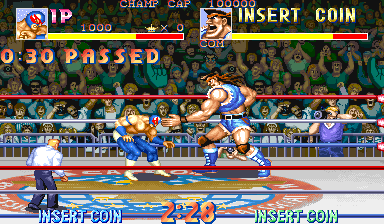
Move the cursor back and forth then press START to choose your Slam Master. Each Slam Master will have a long yellow energy bar. When you hit your opponent, his energy meter will decrease.
Once the energy bar is completely red, the "Pin" message may appear when your opponent hits the mat. Use the Pin button, and if your opponent cannot shake you after the ref counts to three, you win the match. The same goes for your opponent if he pins you.
When playing a one-player game, you will compete in a tournament and will be taken on a tour of the other seven venues. When you win a match, you move on to the next venue. Once you defeat all the other Slam Masters you will face the ultimate challenge; the championship matches against the mysterious CAPCOM Wrestling Association bad boys: Jumbo and Scorpion!
Team Battle Royal
Team Battle Royal has two teams with two Slam Masters each. After you select the Team Battle Royal from the Mode Select screen you will be asked which players will be entering the match. If you want to play a multi-player game, you must plug in a multi-player adaptor.
You can play a one-player game in Team Battle Royal, but you will have to choose your computer teammate. You can be 1P, 2P, 3P or 4P in a one-player game depending on which control pad you use.
For a two-player game, you can play a competitive or cooperative game. A cooperative game means the two players must be either 1P and 2P or 3P and 4P. A competitive two-player game will have a computer teammate on both teams.
Three player games are set up depending on which three control pads are used:
•
If 1P, 3P and 4P are used, then 1P will have a computer teammate.
•
If 2P, 3P and 4P are used, then 2P will have a computer teammate.
•
If 1P, 2P and 3P are used, then 3P will have a computer teammate.
A four-player game will have 1P and 2P as one team and 3P and 4P being
.png)


.png)