Jumping Into Action
•
Press Start to advance to Title screen
•
Press Start to advance to Mode Select screen
•
Use Control Pad to highlight the mode you wish to play and press Start
•
Use Control Pad and A to enter name then press Start
•
Use Control Pad to highlight the race duration you want then press Start
•
Use Control Pad to highlight the course you want then press Start
•
Use Control Pad and A to choose your bike then press Start
Game Modes
•
Practice: Practice on the various courses. Learn all the turns.
•
Time trial: Improve your time by racing against the clock on the course (and bike) of your choice. Unlike the Practice Mode you'll have the track all to yourself. •
Race Tour: This intense high-speed competition puts your skill and endurance to the ultimate test. Race 7 other bikers through all the courses. Top finishers can win the sponsors needed to move on to a higher class of machine. In a tour, the results from each race are tracked to determine the overall standing.
•
2P Race: Blast a buddy off the track with this fierce head-to-head racing mode. •
Options: This mode lets you set control options. You can reverse the gear shift control, the steering control, switch to "real time," or turn "Hit" on.
Selecting a Mode
•
Press Control Pad up/down to highlight the mode you wish to play
In the screens before the race, pressing B will return you to the previous screen, or the previous choice (on screens where more than one choice is made.)
Name Entry
•
Press the Control Pad to select the letter you wish to enter
•
Press A or Y to enter the letter
•
When finished press Start or position the arrow over END and hit A.
If you make a mistake, position the arrow over "DEL" then press A or Y to delete the last letter you entered.
Time Select
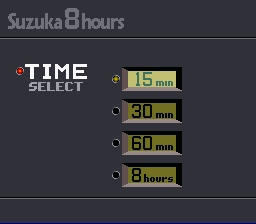
This is where you choose the duration of the race(s). The races take place in "game time" which is faster than actual time. If you wish to switch to actual time, you can do so in the Options mode. Eight hour races are endurance racing at its most brutal—all day and into the night. The time choices are:
To select time:
•
Control Pad up/down to highlight the race duration you want
•
Press A, Y, or Start to enter your choice and move on to Course Selection.
Course Selection
The Course Selection screen shows the five courses you'll be racing on: EASY A course, B course, C course, D course, and HARD Suzuka. Study the courses and you'll know when to nail the brakes and when to hammer the throttle. On a Race Tour you must be a top finisher on each track before you can advance to the next one. If you are beginning a Race Tour you will start with A course. When this is the case, A course will be highlighted and no other options are available to you.
Selecting a Course:
•
Press Control Pad up/down to highlight the course you wish to race
Choosing Your Machine
This screen lets you choose the motorcycle you will ride for the race ahead. Pick a wicked bike that fits the track you'll be racing on. The flashing arrows indicate which choice is being made. Four choices are made in this screen: class of bike, characteristics of the bike, automatic or manual transmission, and the color of the bike. You can begin the race at any time by pressing Start.
The first choice is the class of bike you'll be riding (Note: You do not choose class in Race Tour.)
Selecting the Class of bike:
•
Press Control Pad left/right to light up the class you want
If you want to go back to a choice you've already passed press B.
Transmission and Bike Ratings
Choose your transmission. If you choose an automatic the gears will shift automatically as your speed changes. If you go for the manual, you'll have to use the Control Pad to rocket up and down through the gears.
At the bottom of the screen an information box tells you how the highlighted bike rates. Bikes with various strengths are available in both manual and automatic models. Take your pick of acceleration, speed, and cornering ability.
The rating system is:
To select your bike:
•
Press Control Pad up/down to highlight the bike of your choice
Now pick the color of your ride:
•
Press Control Pad left/right to change to the next color
•
When the color you want is pictured, hit A, Y, or Start and the race will begin!
Starting a Race Tour
A Race Tour is a brutal endurance challenge. See if you've got what it takes to rank with the world's best. You have the option of starting a new Race Tour or continuing one already in progress. If you have passwords you earned in previous races, you can continue that tour with your standing intact.
Starting a Race Tour:
•
Highlight Race Tour on the Mode Select screen
•
Press Control Pad up/down to highlight Start
•
Follow "Gearing up for a Race" procedure.
Pit Stops
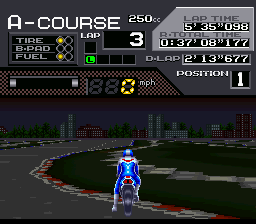
When your tire and fuel indicators light
.png)

.png)
.png)
