Maps
This screen is a partial overhead view of a particular scenario. The map is where you will strategically position your icons to defeat your enemies.
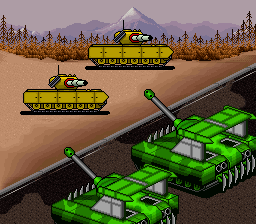
There are 20 levels, each with increasing difficulty, icons, and strategy. Once you attack your enemy, the screen will enter battle mode, where you will view an automatic animated cinema. Information
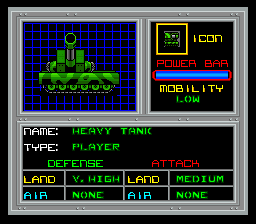
By maneuvering the cursor over any icon on the map screen and pressing SELECT, you will receive current INFORMATION on that particular piece.
The information includes a detailed picture, name, energy bar, basic mobility and defense/attack strengths and weaknesses.
Battle Bar
By pressing the A-BUTTON on the controller, the BATTLE BAR is overlaid on top of the map screen. The BATTLE BAR gives you total control of your army.
You are given 3 choices, and a display of the terrain effect. To select your choice, use the CONTROL PAD and press the A-BUTTON.
•
BATTLE: to engage the enemy
•
MOVE: positions your icons on the map
•
END: when you have finished your turn
•
TERRAIN EFFECT: percentage of defense assistance (e.g., TERRAIN 25%)
Terrains
Terrain enhances or hinders players' and enemies' movement and defense. There are 12 terrains on which you will battle. Listed below are all the terrains (and their defense ratings), as they would appear on the MAP screens.
Defense Rating Chart:
Terrains and Ratings:
Piece Production System
This is the Production Factory. To start building pieces, you must have an armory, a city, and an energy plant in your possession.
Once you own all three, place the cursor over the armory and press the LEFT-BUTTON on the controller. You may select a piece, using the CONTROL PAD, by moving the cursor over your selection and pressing the A-BUTTON.
Option "B"
Option "B" allows both you and the computer to build pieces on any level without having possession of an armory, a city, and an energy plant.
To use Option "B," go to the RADAR SCREEN and press SELECT to get to the OPTION SCREEN. While on the option screen, select OPTION "B" using the CONTROL PAD, and press the A-BUTTON to activate this option.
AJV-68X Defense Satellite
Hidden in 4 places is vital information that is necessary to activate the AJV-68x defense satellite. The four places you must occupy are:
Once you occupy these places, the super weapon will automatically activate. This weapon takes four turns to charge fully (25% each turn).
At full-charge, it completely destroys any of the opponent's piece that you target, even if that piece is at full strength. You do not have to wait until the weapon is fully charged to use, but it will not do maximum damage. To use this weapon press the X-BUTTON on the control pad.
Icon Replenishing
When an icon occupies the center of a city, energy plant, armory or base, the icon will be recharged to full strength and the center will change to that army's corresponding color.
For example, when your medium tank enters the center of a city, the center will change color from gray to green, signifying it now belongs to you and restoring the medium tank to maximum strength.
Missions Overview
There are 20 missions in the game, with each level requiring increased skill. At the beginning of each mission you will receive a MISSION BRIEF. In each mission a VICTORY CONDITION must be accomplished before advancing to the next level.
Mission List
•
SCOUTING REPORT: PROVE YOUR COMMAND ABILITY
•
VICTORY CONDITION: TOTAL DESTRUCTION
•
SCOUTING REPORT: COMBINED ARMS
•
VICTORY CONDITION: TOTAL DESTRUCTION
•
SCOUTING REPORT: COMBINED ARMS
•
VICTORY CONDITION: TOTAL DESTRUCTION OR OCCUPY BASE
•
SCOUTING REPORT: WEAPONS PLANT DISCOVERED
•
VICTORY CONDITION: TOTAL DESTRUCTION
•
SCOUTING REPORT: TWO-SIDED ATTACK (LARGE TANKS WITH MIXED TROOPS)
•
VICTORY CONDITION: DESTROY ALL TROOPS
•
SCOUTING REPORT: THERE ARE TWO BASES
•
VICTORY CONDITION: DESTROY TROOPS AND CAPTURE BASE
•
SCOUTING REPORT: COMBINED ARMS
•
VICTORY CONDITION: OCCUPY BASE
.png)


.png)
.png)
.png)








.png)
.png)