Overview
Lizzie McGuire: On the Go! game is more than just a game - it's an address book, a brain teaser, and a whole lot more. Alone or with friends, you'll be entertained for hours with fun games such as When Cheerleaders Attack!, Box Bash, Code Blue, cool party activities like Lizzie's Charades, Ask Lizzie and Operator. It also includes rockin' PDA features like Class Scheduler, Horoscopes and Best Friends Address Book.
Getting Started
Title Screen
When you turn on the Lizzie McGuire: On the Go! game, the main menu will appear with the following options:
•
When Cheerleaders Attack
Use +Control Pad Up & Down to highlight your selection, and then press the A Button to select.
Let's have some fun!
To unlock activities within the Games and Fun With Friends sections, you will need to play the When Cheerleaders Attack game. As you make your way through levels of increasing difficulty, activities will become unlocked.
When Cheerleaders Attack!
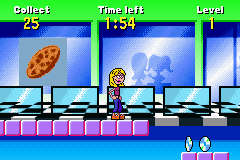
In this fun arcade style game, you must guide Lizzie through the mall. But be careful, there are angry Cheerleaders on the prowl.
To win a level, you must collect all of the fashion accessories and food items. But to reach them, you must avoid hostile Cheerleaders and their rampaging Pom-Poms. Jump across gaps in platforms and don't let the rapidly moving escalators keep you from your goal.
Use the +Control Pad to move Left, Right, Up and Down. Press the A Button to jump over or onto the Pom-Poms, and the B Button to throw Glitter at the Cheerleaders, which will temporarily stun them.
The further you get in timed mode the more Games and Fun with Friends activities you will unlock!
Games
Play for points, for time, or just for the joy of winning.
Box Bash
Can you clear the screen of all boxes AND be the #1 scorer? It's not as easy as it looks.
Select groups of boxes of two or more and they will be cleared from the screen. Groups consist of boxes that are of the same color and are touching, side by side.
When you clear a group of boxes, the boxes above the group will drop down to fill the void. Also, when a column has been cleared, all of the columns to the right of it will shift to the left.
Use the +Control Pad to move the cursor around the board. Press the A Button to select a group. Press the B Button to undo the last move.
You earn points for how many boxes that you are able to clear at one time.
Boxes Points
Boxes Points
Matching
How's your memory? Can you find the pairs?
When this game starts, all the tiles will be face up. After a few seconds, they will flip over, face down. Now the fun begins!
Use the Control Pad to move the cursor around the board. Press the A Button to select a tile and it will flip over, revealing its image. Now move the cursor over to a tile that you think matches the first one and press the A Button again. If they match, you earn points and the tiles stay face up. If they don't match, you lose points and the tiles flip back over.
Dots 'n' Boxes
This classic game never gets old. Can you complete more boxes than your opponent?
Use the +Control Pad to move the cursor around the board. Press the A Button to select a space in between two dots. Once selected, a line will appear in your color. Your opponent will then do the same. You alternate back and forth placing lines on the board with the goal of completely blocking in a box. If you complete a box, it will fill in with your color and you will then get to go again, and again, until you are unable to fill in anymore boxes.
You can't stop your opponent from completing their own boxes, but you can use strategy to minimize how many they do complete.
Code Blue
All you have to do is place four tokens in a row before your opponent does. That doesn't sound too hard... does it?
Use the +Control Pad to move the cursor across the top of the game board. Press the A Button to drop your token. The token will drop down until it hits another token or the bottom of the board. The first player to get four in a row, either vertically, horizontally or diagonally, wins.
Word Guess
Can you guess what word Lizzie is thinking of?
Use the +Control Pad to move the cursor around the keyboard. Press the A Button to select the letter that you believe is in the hidden word(s). If you are correct, all instances of that letter will appear in the word(s). If you are