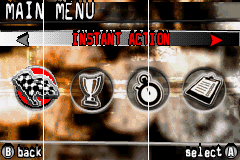
Main Menu
After you have loaded your Player Profile, you can now get behind the wheel of a Monster Truck. Select a racing mode from the Main Menu to jump into action. Your progress is automatically saved as you complete each race.
Game Modes
•
Instant Action: Want to get into a race right away? Instant Action is the place to be. A random track and a random Monster Truck are automatically selected for you. •
Race: Select your truck and track and work your way through 30 tracks across 3 difficulty levels each. That's a lot of racing! •
Time Attack: Race against your best times. Can you set a new track record?
See page 15 for an explanation of the Options Menu.
Finish in 1st place to place in Race mode to open up new trucks and new tracks.
Destruction Meter
What's the point of having a big Monster Truck if you can't run through and over different objects on the track? As you destroy objects, your Destruction Meter will begin to fill up. When the meter is full, it will turn into the word "RAMPAGE". While it's flashing, your Monster Truck will experience all of the following benefits: •
All terrain will be treated as optimum driving surfaces. •
Collisions with destructible objects and other vehicles will not slow down or damage your vehicle, but will cause the other vehicle to slow considerably.
•
Your truck will have an extra boost of speed.
•
The Glue power-up will come into effect. You can refill the Destruction Meter several times during the race. Just keep running over stuff to keep the bonuses coming.
Options
•
Records: View your best times from the Time Attack mode. Use the Control Pad to view each of the track's best times on the Rookie, Intermediate, and Professional difficulty level. Press the B Button to go back to the Options Menu.
•
Settings: From the Settings Menu, you can customize the audio portions of the game - turn the Sound FX, Music, and Commentary On or Off. Press the Control Pad RIGHT to turn the option ON, press the Control Pad LEFT to turn the option OFF. Press the A Button to accept your changes and go back to the Options Menu. Press the B Button to ignore your changes and go back to the Options Menu.
•
Credits: Review the names of the people that worked on the game.

.png)
