Rumble Pak Function
This Game Pak has a built-in rumble feature for real-time feedback when used with the Game Boy COLOR system.
The game play features will operate when loaded into any Game Boy COLOR system. However, rumble vibrations will only be felt when the battery has been installed.
Rumble Pak Battery Installation
•
Remove the battery cover and insert one AAA battery as shown.
•
Make sure to use only fresh alkaline batteries. Do not use nickel-cadmium batteries (rechargeable type).
•
Replace the battery cover.
•
Load the Game Rumble Pak into any Game Boy COLOR system, then turn the Game Boy system on.
Caution
Make sure to remove the Game Boy Rumble PAK from the Game Boy COLOR system when inserting or removing the battery.
Rumble Feature Toggle
When the game is Paused, you may toggle the rumble feature On or Off by pressing SELECT. The new setting will take effect after gameplay is resumed.
Getting Started
•
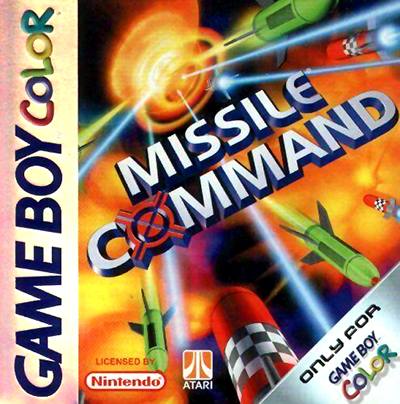
Making sure your Nintendo Game Boy COLOR System is turned off, plug the MISSILE COMMAND Game Pak into the Nintendo Game Boy COLOR System.
•
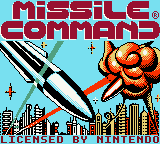
Turn on your Game Boy COLOR. In a few moments the Legal Screen should appear.
Legal Screen
•
(C)1999 HASBRO INTERACTIVE, INC.
•
(C) 1999 ATARI INTERACTIVE, INC.
•
(C) 1999 MAJESCO SALES, INC.
The Main Menu
Once the MISSILE COMMAND Title Screen has appeared, you may press START to display the Main Menu Screen.
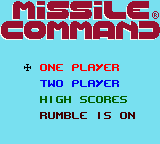
Once the Main Menu Screen appears, you may press the Control Pad Up or Down to move the cross-hair icon next to one of the following options:
Main Menu Options
•
One Player - Selects a one player game.
•
Two-Player - Choose this mode to start a two-player game using one Game Boy COLOR system. The two players take turns, and compete for the highest score.
•
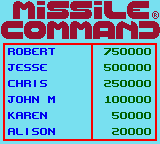
High Scores - This option displays the current High Scores. High Scores achieved during game play will not be saved once the Game Boy COLOR System has been turned off.
•
Rumble on/off - Press the A Button to toggle between on and off. Remember you can always change the Rumble setting during Game Play by pressing SELECT.
When the cross-hair icon is positioned next to the desired option, press START to select it.
Playing a Two Player Game
When playing a two-player game, each player's turn will continue until they have successfully completed the current wave of alien aggression.
Play will alternate until both players have lost all six of their buildings located in the current city.
Current Player
The score will be updated for the player who is currently playing.
Playing Missile Command
You start the game with 2 missile batteries each containing 15 missiles. Pressing the A Button will deploy one missile at a time from the right missile battery, while pressing the B Button deploys one missile at a time from the left missile battery.
Game Screen Elements
When aiming your missiles, the exact sky position of the cross-hair icon at the exact moment either missile battery is fired will determine the exact position your missile will explode in the sky.
Use the Control Pad to move the cross-hair icon to the position in the sky where you want your missile to explode and press either the A Button or B Button to launch a missile. Once the outbound missile is launched, you may now move the cross-hair icon to the next desired position.
To destroy an incoming Alien Warhead, you must detonate your missile such that its explosion collides with the tip of the Alien Warhead's vapor trail. A missile explosion colliding with only an Alien Warhead's vapor trail will have no effect on the incoming Warhead.
Scoring
With each city that you defend, the points awarded for destroying various aspects of the Alien Armada will increase.
First City Scoring
•
Destroying Alien Warhead: 25 points
•
Missile remaining bonus: 5 points for each unused missile
•
City remaining bonus: 100 points for each intact city
•
Destroying Alien Satellite: 200 points
•
Destroying Alien Scout Vessel: 200 points
•
Destroying Alien Bombs: 200 points
During play for the second city, the number two is multiplied to these score values. During play for the third city, the number three is multiplied to these score values, and so on as the number of cities increase, up to a maximum of six.
At every 10,000 points you will receive a Bonus City.
High Scores
When the game is over, the High Score Screen will appear. If the current player's score is higher than any score currently on the high score list, the player will be able to enter their name on the high score list.
Name Entry Mode
•
Press the Control Pad Up to move forward through the alphabet.
•
Press the Control Pad Down to move backward through the alphabet.
•
Press the Control Pad Right to move the cursor to the next available space or Left to move the cursor to the previous space. .png)

.png)


.png)


.png)

.png)

.png)
 (SGB Enhanced).png)

.png)