GETTING STARTED
Set up your PlayStation®2 computer entertainment system according to its instructions. Ensure the system is turned on (green indicator).
Insert the Scooby-Doo! and the Spooky Swamp disc label-side up. Attach game controllers and other peripherals. Follow on-screen instructions and refer to this manual. Memory Card
To save game settings and progress, insert a memory card (8MB) into MEMORY CARD slot 1. You can load saved game data from the same or any compatible memory card.
INTRODUCTION
Join Scooby-Doo and the Mystery Inc. gang in an all-new adventure! Shaggy and Scooby stumble onto their biggest mysteries yet in the swamp behind the Mystery Inc. Clubhouse. Help Mystery Inc. collect clues, solve the case, and catch the criminal masterminds. Use tools like cameras, magnifying glasses, and tape recorders. Travel between three unique regions, meet new friends, battle foes, and build the ultimate sandwich!
CLUBHOUSE
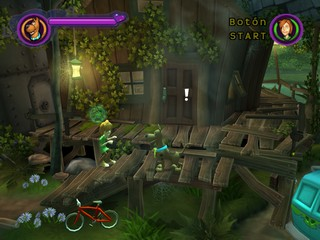
The Clubhouse is located in the Swamp, where the adventure begins. You can walk through the door to enter.
Returning to the Swamp from another region will bring you back to the Clubhouse. Use the Mystery Machine to travel to other areas. When resuming a saved profile, you will always return to the Clubhouse.
REWARDS
Trophies
•
There are 15 trophies to earn.
•
Check the trophy shelves in the Clubhouse to see how to win them.
Costume Parts
•
View information on all your costumes.
•
See how many costume parts you still need to find.
Case Files
•
Read about the Mystery Inc. gang, friends, and enemies.
•
Photos you've taken will be displayed here.
Sandwich
•
All collected sandwich pieces contribute to one mammoth mouthful.
•
Check the size of your masterpiece!
Medallions
Ghost Sightings
•
A collection of all your Ghost photographs!
MULTIPLAYER
Work with a friend to solve the mystery! Player 2 can press the START button on a second controller to drop in at any time.
Either player can drop out by bringing up the Pause menu with the START button and selecting 'Drop Out'. The game will resume uninterrupted with one player and an AI companion.
•
To swap characters during a Multiplayer game, press the button.
•
If the second player also presses the button when prompted, both characters will swap.
•
Both players can bring up their own Character Select wheel.
•
If one player brings up the Costume Select screen, both players can change costumes.
SAVING
Scooby-Doo! and the Spooky Swamp uses an auto-save feature. There is no need to manually save the game. Your trophies, collectibles, and achievements will be saved automatically. When resuming the game with a saved profile, play will always resume in the Swamp, in front of the Clubhouse.
OBJECTIVES
If you're unsure what to do next, consult your notebook. Mystery Inc. will always receive their next objective on-screen.
Press the SELECT button to check your notebook if you forget, or for more information.
•
A mysterious scent has wafted past Mystery Inc.'s clubhouse and at the perfect time.
•
Talk to other characters... they might let something slip...
•
You all look freezing - head to Moose's shop just here to the right COMBAT
Mystery Inc. will encounter strange creatures that will try to stop them. Every character has their own combat moves and special abilities.
•
Press the button to attack.
•
Hold down the button to charge up for a more powerful hit.
•
Press the button while jumping for a devastating ground pound attack.
Listen to Mystery Inc. when battling an enemy. They will often give you a hint, such as timing your attack or throwing something first.
SPECIAL ABILITIES
Some characters can interact with certain objects. Look for an icon of that character, or a colored glow.
•
Switch to that character by pressing and holding the button to bring up the character select wheel.
•
If the character you need is being played by the AI, tap the button to switch.
•
Only Velma can operate terminals. Press and hold the button to bring up the character select wheel and select Velma with the button. •
I heard the crash and just saw the van here. Are you okay?
COSTUMES
Dressing up is awesome! View your costumes by selecting the costume icon on the Character Select wheel.
•
Press and hold the button, then select the costume icon.
•
Try themed costumes, or get creative!
Some costumes need to be purchased with Scooby Snacks, so collect as many as you can. You can see the whole range of costumes available in the Clubhouse, including how many are still left to find. Some costumes can only be earned. MINI-GAMES
Throughout the game, you'll have the opportunity to try mini-games. These are scattered throughout the three regions.
Play them all, beat your best scores, and win Scooby Snacks! Most mini-games are available after you have solved the mystery for that region, or if you have played it already during the game. DOJO DANCIN'!
Lila enjoys subjecting Mystery Inc. to her various 'tests'. Return to the Dojo at any time to take on a growing number of Spiders. See how long you can last without losing all of your courage! How long can
.png)

.png)
.png)
.png)


.png)
_1.png)
.png)


.png)
.png)
.png)
.png)


.png)


.png)


.png)


_1.png)
