Hittin' The Streets
It's time to back up that smack with some sweet moves on the court. Take it to the house in a Pick Up Game, or take on the league's best studs in NBA Challenge. You can also work your way to the top in Be A Legend mode and more. The ballin' starts from the Main menu.
Main Menu
From the Main menu you can choose the NBA STREET Vol. 2 game mode you want, create a baller or a custom team, unlock players and courts with Reward Points, adjust game settings or check out the greatest ballers of all time.
Press the +Control Pad or Control Stick to change a Main menu selection.
•
Choose the game you want to play
•
Unlock new players and courts with reward points
•
Check out the greatest street ballers of all time.
Note
Default options are listed in bold in this manual.
Pick Up Game
Playing a Pick Up Game helps you get quickly acquainted with life on the streets. These games don't mean jack, so brush up on your skills without worrying too much about the outcome. Don't take it personally if you get schooled early on. Just pick yourself up off the floor and come back for more.
TO BEGIN A PICK UP GAME:
•
From the Play It menu, highlight PICK UP GAME and press the A Button. The User Setup screen appears.
User Setup
Before you start shootin' the rock or making sweet no-look passes in a Pick Up Game, create a user name for your bad self in order to track your progress and game records.
TO HOOK YOURSELF UP WITH A USER NAME:
1. From the User Setup screen, choose HOME or AWAY and press the A Button. Next, select YES to enter a name or select a pre-existing user name. If you don't wish to save user stats select NO.
2. After a name has been created or selected, the User Setup pop-up screen appears. Here you can review your career stats.
3. When you're finished reviewing the career stat categories, press the A Button. Now wait for any other users to finish the setup process.
If you're only ballin' with one human-controlled player, press the A Button again to continue to the Choose Team screen.
If you're hoopin' it up with 2-4 players, Player 2, Player 3, and Player 4 can join the game at this point by pressing START/PAUSE on the respective controller. Players 2-4 must select to play with or without a user name, as well as Home or Away, before advancing to the Choose Team screen.
Note
Only two human controlled players can be on one team.
Choose Team
Ah yeah, the NBA world is now your playground. Select from one of the 29 NBA teams, or hoop it up with a squad of Old School Ballers or an all-star squad of NBA Stars.
TO SELECT A TEAM:
1. From the Choose Team screen, press the Control Pad or Control Stick to scroll through the available teams.
2. To select a team, highlight its logo—it also appears in the big window—and press the A Button.
3. Repeat step No. 2 and select a squad for the opposing team. The Choose Players screen appears.
Choose Players
Own the court with the NBA's best. Once you select a team, choose three ballers from your current lineup and get ready to run the floor.
TO CHOOSE YOUR THREE STARTERS:
•
From the Choose Players screen, highlight the player you want to play with and press the A Button. After you select the third player, the Choose Court screen appears.
Choose Court
Take it to the house on one of the 11 authentic urban worlds featured in NBA STREET Vol. 2.
TO CHOOSE A COURT:
•
From the Choose Court screen, highlight the locale you wish to play at and press the A Button. Highlight PLAY GAME and press the A Button to begin the game or highlight MY RULES and press the A Button to change your game settings.
My Rules
Tweak the game rules to fit your playin' style.
Game Mode
Select the play mode for your next game.
•
Select PICK UP, TRICK POINT CHALLENGE, DUNKS ONLY, NO GAMEBREAKERS, NBA SCORING, OLD SCHOOL SCORING, GAMEBREAKER WINS or BACK TO BASICS.
•
For a detailed description of these game modes, check out the on-screen display located at the bottom of the My Rules menu.
Play To
Set the amount of points that you will play to.
•
You can set the amount between 1–50 points, 100,000 to 1,000,000 trick points, or Level 1 Gamebreaker to Level 2 Gamebreaker (depending on the game mode).
Spot Points
Give yourself or your opponent an edge by spotting either team some extra points before the game starts.
Shot Clock
Set the shot clock violation at 12, 24, 48 seconds. You can also turn the Shot Clock setting OFF.
On the Blacktop
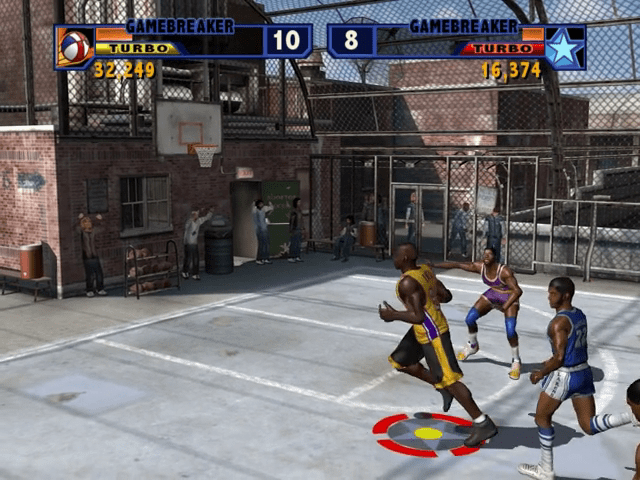
School is now in session. Lace up the tops, turn up the beats, and take your show to the streets. It's game time, playa.
Game Screen


.png)

_1.png)







.png)

_1.png)
.png)
_1.png)



_1.jpg)