Game Features
•
Best-looking environments
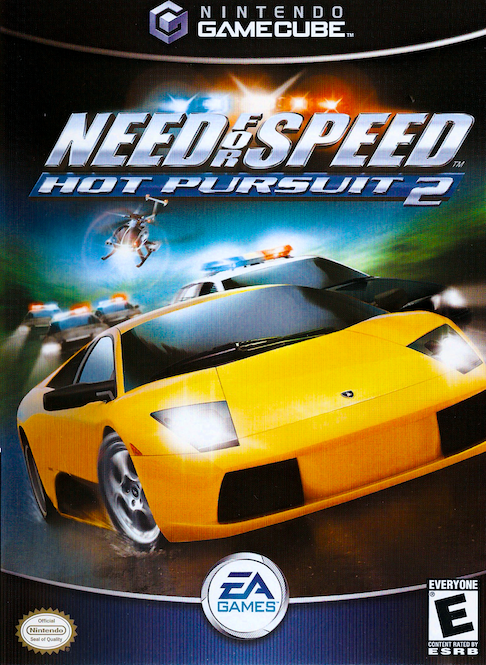
For more information about Need for Speed Hot Pursuit 2 and other EA GAMES™ titles, visit www.eagames.com
Setting Up the Game
A quick look at the choices below can help you spend more time on the track and less time asking for directions.
Main Menu
•
SINGLE CHALLENGE: Design your own one- or two-player race
•
OPTIONS: Adjust audio, display and gameplay settings
•
QUICK RACE: Drive instantly in a randomly generated race
•
HOT PURSUIT: Escape from the police and their powerful machines to become the ultimate road racer •
CHAMPIONSHIP: Race wheel-to-wheel for the title of World Champion without interference from cops
If you think you're ready to outrun the cops in 33 wild scenarios, go for Hot Pursuit. To begin a career of classic racing without cops, try Championship mode. To create your own custom race, choose Single Challenge mode. And if you want to get on the road fast without being picky, opt for a Quick Race.
Starting a Game in Hot Pursuit Mode
To start a game in Hot Pursuit mode:
1. Select HOT PURSUIT from the Main menu. The Hot Pursuit race tree appears.
2. Select an unlocked challenge from the Hot Pursuit race tree. The description box appears. Read it and press the A Button.
3. The Car Select screen appears. Choose your car, colour and press the A Button.
4. The transmission type pop-up screen appears. Choose your transmission type and press the A Button. The game begins.
Starting a Game in Championship Mode
To begin a new game in Championship mode:
1. Select CHAMPIONSHIP from the Main menu. The Championship race tree appears.
2. Select an unlocked challenge from the Championship race tree. The description box appears. Read it and press the A Button.
3. The Car Select screen appears. Choose your car, colour and press the A Button.
4. The transmission type pop-up screen appears. Choose your transmission type and press the A Button. The game begins.
Hot Pursuit and Championship Trees
Hot Pursuit and Championship modes feature trees, or detailed maps, of the series of races that lead to your ultimate goal. The trees allow you to pick your own path through an interconnected series of challenges and rewards.
Winning a race can unlock more events than a second or third placing. So the faster you go, the more choices you have for your next race.
To navigate the Tree:
1. Press the +Control Pad UP/DOWN and LEFT/RIGHT to highlight events in the tree.
2. Press the A Button to see more information about a highlighted event.
3. Press the A Button again to begin any unlocked event.
Starting a Single Challenge Game
To begin a Single Challenge game, select SINGLE CHALLENGE from the Main menu. The Single Challenge menu appears.
Creating a Challenge
Race Type appears above the race characteristics. This is the biggest choice you have to make.
To highlight the race type of your choice, press the +Control Pad LEFT/RIGHT.
•
Number of Players: Play alone (1) or with a friend (2).
•
Cops: Turn police presence ON or OFF.
•
Number of Opponents: Race against one car or a full grid of seven other cars.
•
Opponents: Choose the type of cars you'll be racing against, either the SAME car as yours or a RANDOM assortment of cars. When racing only one opponent, you choose the specific car you want to race against. •
Difficulty Level: Race against BEGINNER, INTERMEDIATE or ADVANCED drivers.
•
Traffic: Enable or disable non-racing traffic: OFF or ON. To advance to the Track Select screen, press the A Button. To return to the Main menu, press the B Button.
Selecting a Track
Need for Speed Hot Pursuit 2 features 48 challenging and scenic tracks from around the globe. Keep your eyes peeled for escape routes and shortcuts, as everything from volcanoes to mineshafts await you.
Track selection is necessary only in Single Challenge mode.
To highlight tracks, press the +Control Pad LEFT/RIGHT. Track information is listed at the top of the screen or press the Y Button for an audio description of the track. Locked tracks display a padlock and the point cost for unlocking the track.
To highlight the direction of a track, press the + Control Pad UP/DOWN. Tracks may be driven forwards or backwards, or even mirrored forwards and mirrored backwards.
After selecting a track, you will be prompted to select the number of laps to race. To highlight your choice, press the + Control Pad LEFT/RIGHT and then press the A Button to advance to the Car Select screen.
Need for Speed Hot Pursuit 2 tracks are filled with shortcuts (and long-cuts too). Using these wisely can help you win against otherwise daunting opponents.
Select a Car
The Need for Speed Hot Pursuit 2 Car Selection screen is every driver's dream. The hottest automobiles ever produced spin on a turntable in front of you, gleaming in the spotlights. If you drive fast enough, any of these dream cars can be yours.
Pick your car carefully. Looks are important, but in the end only horsepower and handling will keep you out of jail. You can unlock new cars as you earn points, but you may want to save your points
.png)

.png)
_1.png)
_2.png)

.png)

.png)

 (En,Fr,De,Es,It,Sv).png)

.png)