SAVE GAME
You can save your progress to a Nintendo GameCube Memory Card in Slot A or B. Select this option with the A Button. The game will check available space. Select one of the 5 available slots to save your game.
You must return to the Main Menu to save your game. From a Trial By Truckin' game, select Main Menu from the City Interface. You will not lose your game by doing this. After saving, select Trial By Truckin' to return to where you left off.
QUIT GAME
This option will quit the game.
STARTING TRIAL BY TRUCKIN'
You begin your Trial at Big Mutha Truckers. Ma provides a small load to sell and cash for fuel, repairs, and upgrades. Your goal is to turn this into a fortune.
The quickest way to make money is by trading. Your truck can carry different commodities. Changing your trailer allows access to different types. Buy cheap and sell high to quickly earn a fortune.
Other ways to make cash include racing in Rival Challenges or successfully completing Special Missions. THE CITY INTERFACE
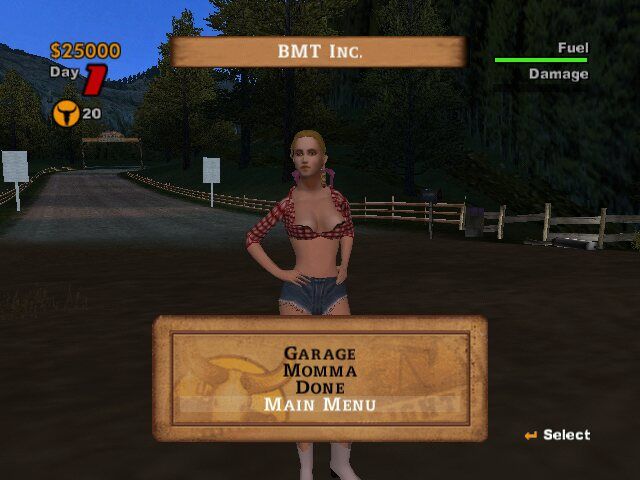
Whenever you arrive in a City, you will access the City Interface. Use the Up and Down +Control Pad or Control Stick to highlight your desired option and select it by pressing the A Button.
The City Interface options are:
At Big Mutha Truckers, Inc., there is no Store or Bar option. Instead, you get the "Momma" option, where you can see Momma and learn about your siblings' progress.
THE STORE
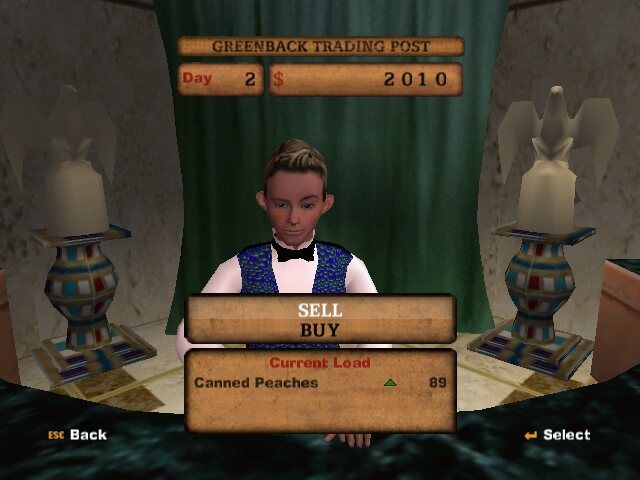
Each of the five cities has a Store where you may buy or sell commodities.
To sell your cargo, select the SELL option. If you are carrying more than one cargo, a pop-up will appear detailing your current load. Highlight the cargo you wish to sell, then press the A Button.
A pop-up will ask how much of your commodity you wish to sell. Adjust this amount using the Left and Right +Control Pad or Control Stick. Press the A Button to sell that amount.
Before selling a load, you can press the Y Button for more information on your sale.
To buy a commodity, select the BUY option. A list of available commodities will appear, along with the current asking price per unit.
Use the Up and Down +Control Pad or Control Stick to scroll through the commodities list. Select a commodity by pressing the A Button. A pop-up will ask how much you would like to buy. This will default to the maximum you can afford or fit in your trailer. Adjust the amount using the Left and Right +Control Pad or Control Stick, then press the A Button to confirm your purchase.
Commodity Types
There are three different types of commodity available: Flatback, Refrigerated, and Tanker, corresponding to each of the three trailer types. You begin with a Flatback trailer. If you trade in your trailer at the Garage, other commodities may be purchased and transported.
Use the Left and Right +Control Pad or Control Stick to check prices on other commodity types in the Buy menu.
You can "mix and match" up to three different cargoes of the same commodity type, provided you have enough room. If you are using the Tanker Trailer, you may only carry one commodity.
New commodities are released onto the market during the game, so it's always worth keeping an eye on new developments.
Buy Low and Sell High
Prices for commodities vary from city to city. Where a commodity is abundant, you will get a lower price whether buying or selling. Scarce or rare commodities will demand a higher price.
Look for the small triangle symbols beside each commodity:
•
A green triangle pointing upwards: the price listed is above average.
•
A green "double-stacked" triangle pointing upwards: the price is well above average.
•
A red triangle pointing down: the price is lower than average.
•
A red "double-stacked" triangle pointing down: it's very cheap here.
•
Two yellow arrows: the price is average.
THE GARAGE
This is where you can refuel your truck, pay for repairs, buy upgrades, customize your truck, and trade your trailer.
Use the Up and Down +Control Pad or Control Stick to highlight your desired option, then press the A Button.
Refuel
Ensure you always have enough fuel to reach your destination to avoid being towed by the Hick State County Roadside Recovery Company.
To refuel, select the option from the menu. A pop-up will ask how much fuel you would like to purchase. This defaults to the maximum you can afford, but you may lower this amount using the +Control Pad or Control Stick. Press the A Button to purchase your gas.
Repair
Driving on rough roads takes a toll on your truck. All garages offer a repair service. Do not venture onto the roads if your truck is severely damaged. If you suffer a complete breakdown, the Hick State County Roadside Recovery Company will tow you to your last port of call.
To fix your truck, select the repair option. A pop-up will ask how much you wish to spend on repairs, defaulting to the maximum amount you can afford. Adjust this using the +Control Pad or Control Stick to move the slider. Press the A Button to carry out repairs.
Upgrades
Every Garage carries a selection of Upgrades for your truck. These affect how the truck behaves. While some are expensive, they will pay for themselves many times over.
Circles beside each upgrade indicate how many stages of upgrade are available. When you purchase one level, an "empty" circle will be
.png)















.png)