Welcome
Thank you for purchasing Nihon Telenet's HuCARD, *Puzzle Boy*. Before use, please read this User's Manual carefully to understand how to handle the card and use it correctly. Keep this manual in a safe place for future reference. Precautions for Use
•
Since the card is a precision device, avoid use or storage under extreme temperature and humidity conditions, as well as strong shocks. Do not force the card to bend.
•
Do not touch the terminals or get the card dirty by wetting it with water, etc., as this may cause malfunction.
•
Do not wipe the card with volatile oils such as thinner or benzine.
•
Play at a distance from the TV screen (about 2 meters).
•
If you play for a long time, take a 5-10 minute break every hour for health reasons.
Reset Method
If you press the SELECT button while pressing the RUN button during the game, you can start the game over from the beginning.
Game Modes
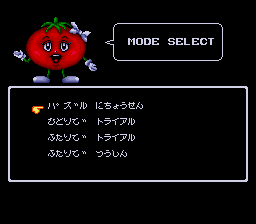
*Puzzle Boy* offers four modes: "Puzzle Challenge," "Single Trial," "Two-Player Trial," and "Communication."
•
Puzzle Challenge: Select this mode if you want to challenge a 20-floor maze.
•
Trial: Select this mode to compete on the number of floors cleared in a short time.
•
Communication: Requires two PC Engine GT units and a cable. Selecting a Mode and Course
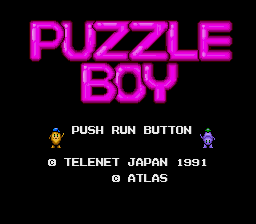
1. Press the RUN button to begin.
2. Select your desired mode from the options: Puzzle, Single, Two-player Trial, or Communication.
3. Select a course. Available courses include "Leo Hits Course," "Hyoh Hyoh Course," and "Fu-Rots Hits Course."
4. Choose a difficulty level: Beginner, Intermediate, Advanced, or Pro.
Difficulty Levels
All modes feature four difficulty levels with up to 20 stages per course.
•
Beginner Level: The easiest mode. Challenge this first to firmly learn the basics.
•
Intermediate Level: Contains many floors that require some effort. Recommended after finishing the beginner level.
•
Advanced Level: Features wide floors and is more puzzling.
•
Pro Level: A collection of truly difficult problems. Clearing this course makes you a "Puzzle Boy."
Stage Selection
•
You can freely select up to the 16th stage of a Pro course.
•
To access Pro stage 17 and beyond, you must first clear stages 1-16.
•
Both 1-player and 2-player modes start at the difficulty select screen.
Communication Setup
To play 2-player communication, you need two PC Engine GT units and one communication cable. Players can conduct 2-player trials on their respective game screens. Gameplay Mechanics
•
Poterin: The protagonist. Aim for the stairs to progress. Reaching the designated stage clears the floor.
•
Blocks: Red, yellow, and green blocks appear on the screen and are key to the game.
•
Trial Mode: Clear a specified number of floors within a time limit. Unlike Puzzle Mode, floors are connected from right to left; proceed to the left side of the screen.
•
Game Over: If you fail to clear all floors, a choice screen appears allowing you to try again or return to course selection.
Block Characteristics: Green Block
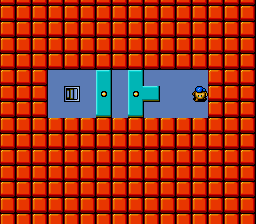
The green block functions as a revolving door.
•
It is pinned in place but rotates in the direction it is pushed.
•
As it stands, you cannot proceed, but rotating the block allows you to pass underneath, changing the block's state.
•
In certain states, the block will not move even if pushed, such as when a red block is in the way.
Password System
In Puzzle Challenge mode, a password is displayed each time you clear a floor.
•
Write down the password shown at the bottom of the "FLOOR CLEAR" screen to interrupt the game and continue later.
•
To resume, press SELECT on the title screen to access the password input screen.
•
Enter the recorded password to continue your progress.
Guarantee and Rights
HuCARD is a dedicated game card for the FH (Family Computer HuCard). We have made every effort to ensure quality; if any inconvenience due to our responsibility occurs, the product will be exchanged for a new one. Duplication of this software and use in pawn shops are prohibited without permission.

.png)
.png)
