What is Picross?
Picross (Pick-Ross) is a puzzle game. Use the numbers as clues to scrape the correct squares and reveal the hidden picture. This puzzle has a 5x5 field. The clues above the columns are read from top-to-bottom. The clues to the left of the rows are read from left-to-right. Each individual number tells you how many consecutive squares need to be scraped.
If there is more than one number, there will be at least one blank square between each of the scraped areas. If you have figured out that a square should not be scraped, mark it with an "x". Doing this can be crucial to solving the puzzles.
For example, a "5" means you need to scrape 5 consecutive squares. Also, the "1", "3" means you need to scrape 1 square, leave at least 1 square blank, and then scrape 3 consecutive squares.
For the very top-right clue, it is read "1", "2". Because it only gives you 4 squares of information (3 scraped and 1 blank), it can fit into the 5 squares in multiple ways.
Game Mechanics
When you have scraped all the squares that are supposed to be scraped, the hidden, mystery picture will be revealed. If your time runs out, then your game is over.
If you scrape an incorrect square, your remaining time will be reduced. The first mistake will cost 2 minutes, the second 4 minutes, and all other mistakes will cost you 8 minutes each. Incorrectly placed "x"s do not cost you any time.
No matter how difficult the puzzles are, you CAN solve them logically with the given clue numbers. You do not need to rely on your intuition to figure out which squares to scrape and which to mark with an "x".
Game Modes
EASY PICROSS
EASY PICROSS offers you 5x5 square puzzles and 10x10 square puzzles. There are a total of 64 problems.
PICROSS
PICROSS contains 2 courses: KINOKO and STAR. Each of these courses contains 64 puzzles, each of which is a 15x15 square monster. The STAR course is only accessible after you have completed the KINOKO course.
Selecting a Puzzle
In the SELECT A PROBLEM Screen, you may choose any puzzle, including ones you have previously solved, by moving the cursor to them and pressing the "A" Button. The puzzles get slightly harder with each level, with level 1 being the easiest and 8 being the most difficult. Hint Option
Before starting each puzzle, you will be given the option to play "WITH HINT" or not. This option will give you the solution to one vertical column and one horizontal row before you begin the puzzle. Press the "A" Button once to stop the top cursor, and once again to stop the left cursor. Puzzle Information Display
•
Displays the time remaining when you solved this puzzle for the first time. •
An "H" next to the time indicates that the hint option was used in the solving of the puzzle. •
This number shows how many times you have attempted this puzzle. You may try each puzzle as many times as you wish. •
When you solve a puzzle, a check mark will be displayed in its box. •
Displays your best time for this puzzle. TIME TRIAL
Once you have solved every puzzle in the STAR course, you will be able to access the Menu Item entitled "TIME TRIAL", which has a few new twists! •
There is no "WITH HINT" option.
•
There is no time limit. Take as long as you want with each puzzle. •
Your mistakes will not be noted by the computer. You will not be penalized and you will not know that you have made a mistake.
•
Different puzzles will be presented each time.
Please enjoy all the new puzzles! Try to join the rankings by solving the problems as quickly as you can!!
HOW TO SAVE YOUR DATA
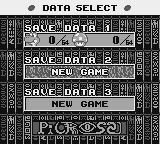
There are 3 data files for saving your progress. The data will be saved automatically.
To save your data in the middle of the game, simply press the "START" Button. This will pause the game, and you may select the SAVE option, and then select "YES." The game data will be saved and you may continue your game.
To erase all the saved files, press "SELECT" and left on the Control Pad as you turn the game on. Choose "OK" and press the "A" Button.
To simply erase only one of the saved files, select the file you wish to erase on the Data Select screen, and press the "A", "B" and "SELECT" Buttons simultaneously. The message "ERASE OK?" will appear. Press the "A" Button to confirm.
Hints for playing PICROSS
HINT 1
If you know that a square should be left blank, mark it with an "x" before you forget. By doing so, you add more information and can gradually determine which squares must be scraped.
HINT 2
The more squares you manage to scrape successfully, and the more "x"s you mark off, the more information you will have to help compare against the other clues.
HINT 3
Try and solve the rows and columns that have the largest number of squares to be scraped. For example, a "15" means all
.png)

_2.png)
 (SGB Enhanced).png)
