COCKPIT HUD
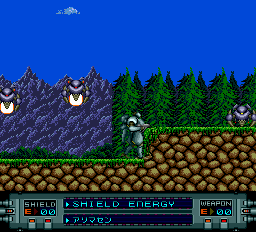
The cockpit displays the following status meters: ALARM, SHIELD, LEVEL, and WEAPON. These provide real-time feedback on Algieros's current state and resources.
LEVEL
LEVEL represents Algieros's ability. When LEVEL increases, all weapons power up and BOOSTER flight time becomes longer. Additionally, the recovery speed of the WEAPON meter increases.
HAND WEAPON Types
Algieros can be equipped with 18 types of weapons. Weapons are categorized by whether their meter recovers automatically or requires manual activation via WEAPON ENERGY.
•
Automatic Recovery: HAND GUN, NEEDLE LASER, SONIC WAVE, V BLASTER, RING CANNON, PLASMA BEAM, TERRA BUSTER, NAPALM MISSILE
•
Manual Activation: MISSILE LAUNCHER, WIDE ANGLE, VERTICAL SEARCH, SLENDER RAY, MAGNET CRUSH, BURST FLAME, OVAL LASER, PROTECTOR BEAM
BOOSTER TYPE
Algieros can switch between two types of BOOSTERS using the left and right directional keys.
•
Back Booster-A: Can hover in mid-air for a limited time.
•
Back Booster-B: Can fly for a longer duration but cannot hover in mid-air.
SHIELD ENERGY
SHIELD ENERGY restores the SHIELD meter. Set the control panel to SHIELD ENERGY and press the Run button to recover fully. Pressing the Select button twice uses two SHIELD ENERGY units at once, causing Algieros to glow and become invincible for a set time.
WEAPON ENERGY
WEAPON ENERGY restores the WEAPON meter. Its usage is identical to SHIELD ENERGY. It is essential for powering weapons that do not recover automatically.
FORWARD ROOM (Transfer Room)
In Eternal City, each area contains a Transfer Room where important messages and items are received from central command. There are four distinct types of Transfer Rooms:
•
MESSAGE ROOM: Displays important messages.
•
ITEM ROOM: Transfers weapons, energy, and boosters.
•
ENERGY ROOM: Recovers SHIELD and WEAPON meters.
•
PASS WORD ROOM: Allows the use of passwords and backup memory.
CONTROLS AND RESET
When entering a Transfer Room, the control panel opens. Operate according to the on-screen messages, and press the Select button to exit. The game is designed so that pressing [RUN] + [SELECT] opens the control panel rather than resetting the game, preventing accidental resets due to the frequent use of the Select button.