Game Modes
•
Normal game: For one player. The aim is to clear stages.
•
Battle game: Up to five people can compete.
•
Versus game: Compete using TurboExpress.
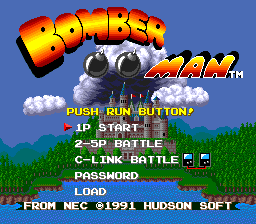
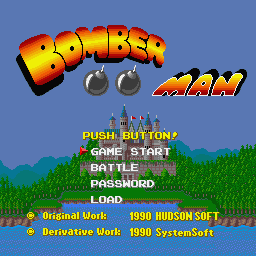
To select a mode, use the SELECT Button or Direction Key on the title screen, then press RUN to enter your choice.
NOTE: For more than one person to play in the Battle game, a TurboTap accessory and one additional TurboPad controller for each player are required.
Password and Date Entry
PASSWORD
Each time you play in the Normal game mode, you will be given a password. If you write the password down and enter it when you restart the Normal mode, you will be able to resume from the round you had left off.
To enter your password:
•
Use the Direction Key to select PASSWORD and press RUN.
•
Use the Direction Key and Button 1 to select and enter each character.
LOAD
If you have a TurboBooster-Plus, TurboGrafX-CD Player, or TurboDuo, it is possible to "SAVE" your game in memory and resume playing later.
To resume a saved game:
•
Use the Direction Key to choose LOAD on the title screen and press RUN.
•
Select which of the up to three saved files you wish to continue from, and press RUN.
Control Basics
Take a moment to familiarize yourself with the basic TurboPad components and operations.
•
DIRECTION Key: Move Bomberman left, right, up, and down. Also move the cursor up and down to make selections.
•
SELECT Button: Move the cursor. Press while holding the RUN Button down to reset the game.
•
RUN Button: Start, pause, and “un-pause” the game; enter certain selections. Hold while pressing the SELECT Button to reset the game.
•
Button I: Place bombs and enter certain selections.
•
Button II: Explode a bomb when you have a detonator (in Normal game mode).
•
TurboSwitches: Recommended setting: Both should be in the down position.
Normal Game: Story and Objectives
Galactic Crisis
The Magellan solar system contains six planets. Evil Bomberman and his cronies steal seven vital chips from the Pan-Galactic mother super computer and shut it down. As the Number One Super Detective in the Pan-Galactic Federal Bureau, Bomber Cop is on his way to stop them.
When the opening is over, the planet display appears. Press the RUN Button and the game begins.
Game Interface
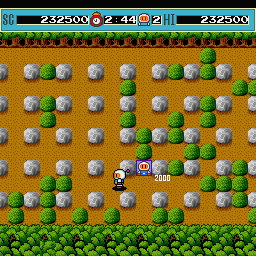
The screen displays the following elements:
•
Boulders you can blow up
•
Number of Bombemans in reserve
•
Boulders you can't blow up
Stage Objectives
To get to the next stage, you must destroy all the enemy characters. One of the smashable boulders is hiding the door to the next stage; while blowing up boulders to find this door, you must also destroy all attacking enemies within the time limit.
A bomb placed between you and an enemy blocks the enemy's movement. However, if you do not move clear after placing a bomb, you will blow yourself up. If time runs out, fast-moving enemy characters will move in for the kill, so keep an eye on the clock.
Game Over Options
When you run out of Bombemans, the game is over. The commands on the Game Over screen are:
•
CONTINUE: Continue for the number of times displayed, starting at the stage where the last game ended.
•
END: Returns you to the title display. If you run out of CONTINUES but want to play on, write down the password, choose END, and input the password at the title display.
•
PASSWORD: Save your game using the password displayed on the screen. Write down the password to reenter it at the title screen.
•
SAVE: Use this option if you have a TurboBooster-Plus, TurboGrafx-CD player, or Turbo Duo.
Power Items
Find the power item hidden in one of the smashable boulders to boost Bomberman's performance. If Bomberman is destroyed by an enemy or blows himself up, this extra power is lost. If you destroy all enemies before finding the power item, the boulder where the item is hidden will glow. Items marked with an asterisk (*) will work even if Bomberman is destroyed.
•
MULTIBOMB: Gives you one extra bomb to drop each time you pick one up. Can stockpile up to ten bombs!
•
BOULDER PASS: Bomberman can float over smashable boulders.
•
TIME: Stops the clock and freezes enemies in place for 20 seconds.
•
FIRE POWER: Increases the size of your bombs' flames. Can be powered-up in five steps.
•
BOMB PASS: Bomberman can float over bombs.
•
FLAMEPROOF SUIT: No flame can harm Bomberman for up to 20 seconds.
•
SPEED BOOTS: These increase speed in three steps.
•
SLOW SHOES: These slow movement down.
•
REMOTE CONTROL: Detonates the bombs when you want to.
•
ONE UP: Adds one Bomberman.
•
FRUIT: Bonus points (four types).
•
BOMB KICK: Allows you to



.png)
.png)
.png)













.png)






_1.png)