Game Modes
The game features four distinct mode menus accessible from the title screen:
•
<START>: 1-player mode against the computer starting from Stage 1
•
<MANUAL>: Rules and settings explanation mode
•
<1P CONTINUE>: Continue for 1-player play
•
<2P CONTINUE>: Continue for 2-player play (VS play)
Manual Mode
Manual mode provides a clear explanation of the game's rules. Use the directional keys to align the cursor with the desired item, then press button ① to start the on-screen explanation. Press button ② to cancel the explanation.
Continue Game
A password is required to continue playing. This password is identical to the stage identifier and is displayed on the map at the start of the stage. The password is the same for both 1-player and 2-player modes.
Game Overview
Players operate units (troops) provided in advance to play the game. The objective is to either capture the enemy's containment facility or wipe out the opposing side completely.
Operation Screens
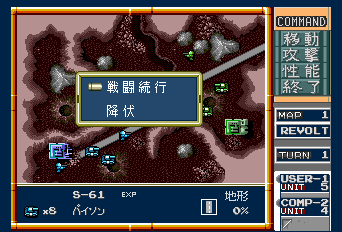
The main screen displays the following elements:
•
Number of USER2 (COMP)'s units
Friendly and enemy units on the map are distinguished by color. For detailed information, refer to MANUAL mode.
Controls
Primary operations use button ① and the directional keys for cursor movement. Button ① confirms actions, while button ③ cancels them. The RUN and SELECT buttons are used for "unconditional surrender."
Hex System
Hexes are a basic concept representing distance, similar to a grid of squares. 'Movement Power' and 'Distance' attack power are measured in hex units.
Terrain Types
Terrain significantly impacts unit abilities, including attack, movement, and defense. The following terrains can be landed on:
•
Flatland: Bike/Track movement power drops slightly.
•
Hill: Movement power for all vehicle units drops.
•
Road: All units can move normally.
•
Bridge: Built across a valley; features are the same as a road.
•
Wasteland: Movement power for all ground units drops.
•
Industrial Area: Units can be repaired by moving through this area.
•
Valley: Only infantry, mechanized infantry, and aircraft can enter.
•
Factory: The side that occupies this wins; other features are the same as a valley.
•
City: High bullet resistance and possesses simple important cities.
Normal Movement
To move a unit normally, follow these steps:
1. Select 'Move' with button ① during your turn.
2. Select the unit to move and press button ① to display its movement range.
3. Move the cursor to the destination and press button ① to confirm.
Special Movement: Transportation
Load units into transport units to move them. Disembark by pressing button ① again.
1. Select the unit to be transported and press button ①.
2. Move onto the transport unit and press button ①.
3. Move the transport unit as normal.
Special Movement: Factory Deployment
Deploy weapons from a factory during your turn. One unit cannot both load and deploy within the same turn.
1. Place the cursor on the factory hex and press button ①.
2. Place the cursor on the unit you want to deploy and press button ①.
3. Place the cursor on the desired location and press button ①.
Attack Commands
Select the attack command during your turn and press button ① to enter combat. Attacks are divided into two types:
•
Direct Attack: Attacks an enemy unit in an adjacent hex. Possible after moving.
•
Indirect Attack: Attacks an enemy from a distant hex. Not possible after moving.
To initiate combat:
1. Place the cursor on the attacking unit and move to the side of the enemy unit.
2. Place the cursor on the target enemy unit and confirm with button ①.
Combat Resolution
The battle scene includes special effects and animations to show the outcome. Combat details calculate the final result using:
The battlefield may display up to 12 special effect types per battle field.
Performance Command
Press button ① to adjust the unit's command to performance, which displays the performance screen. This screen includes:
•
WEAPON DATA Screen: Shows unit shape and weapon data.
•
Capability Display: Lists firepower, number of units, and terrain information.
Game Pause and End
Press button ① to end the command, which ends all of your units' actions. To pause, press the RUN button. Use the SELECT button to choose an option and the RUN button to decide.