GETTING STARTED
Set up your PlayStation®2 computer entertainment system according to its Instruction Manual. Make sure the MAIN POWER switch (located on the back of the console) is turned ON.
Press the RESET button. When the power indicator lights up, press the OPEN button and the disc tray will open. Place the ONIMUSHA™ 3: DEMON SIEGE disc on the disc tray with the label side facing up. Press the OPEN button again and the disc tray will close.
Attach game controllers and other peripherals, as appropriate. Follow on-screen instructions and refer to this manual for information on using the software.
MEMORY CARD (8MB) (for PlayStation®2)
To save game settings and progress, insert a memory card (8MB)(for PlayStation®2) into MEMORY CARD slot 1 of your PlayStation®2 system. You can load saved game data from the same memory card or any memory card (8MB) (for PlayStation®2) containing previously saved games.
GETTING INTO THE GAME
MAIN MENU
Press the START button on the Title Screen to display the Main Menu's list of options. Move the left analog stick/directional buttons ⬇/⬆ to highlight the option you want, and press the ✖ button to confirm.
•
NEW GAME - Start a new game from the beginning.
•
CONTINUE - Load a saved game and start from the point where you saved.
•
OPTION - View and change various gameplay settings. (You can also change options during play by pressing the SELECT button to pause the game and using the Pause Menu.)
•
SPECIAL FEATURES - View various rewards added to the gallery when you fulfill certain game requirements.
GAME OVER
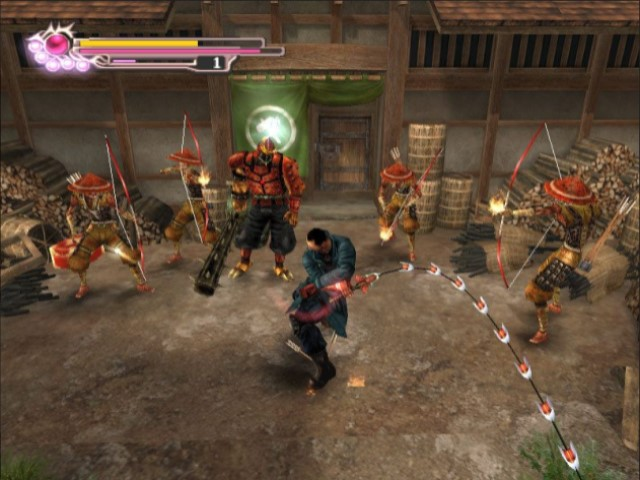
Your game is over when your vitality reaches zero from sustaining attacks from the enemy, or you become caught in a critical trap, unable to beat it. Failing to escape certain traps will result in game over regardless of how much vitality you have left.
When your game is over, you have the option to continue from your last save position. On the selection screen choose YES to automatically load that save and pick up where you left off. Choosing NO takes you back to the Title Screen.
BLOCKING
Hold down the L1 button to block incoming attacks. Some attacks from certain enemies cannot be blocked.
If an enemy catches you in its clutches, press the left analog stick or directional buttons and repeatedly while mashing the action buttons in order to get yourself free sooner. You can use all buttons except the START button and the SELECT button to get yourself free.
CHARACTER CHANGE
As you progress through the game, you switch control between Samanosuke, Jacques, and other characters as well. Basic controls are the same for all characters, except that only Samanosuke and Jacques can transform into an Onimusha. No matter what character you are currently controlling, the game will end if your health reaches zero.
AKO AND TENGU TREASURE BOXES
Hidden throughout the game are special Tengu Treasure Boxes that only Ako can open. When Ako finds one, you can give her a signal and have her open it for you.
Ako will tell you when she finds a Tengu Treasure Box. When she signals you, press the button to have her open the box. She will bring the contents of it back to you. Press the button to take the item.
Ako does not appear until the game is underway. You cannot open Tengu Treasure Boxes without Ako's help.
If you find items after destroying objects or defeating enemies, Ako will automatically pick them up for you.
COLLECTIBLE ITEMS
•
HERB - Grows in the wild and has a soothing scent. When its leaves are boiled and eaten, they restore some Vitality.
•
SALVE - This box, containing a first-aid bandage and medicine, restores a small amount of Vitality.
•
MEDICINE - Contains a selection of herbs that restore Vitality.
•
FIRST AID KIT - Holds a selection of medicines to deal with various afflictions and restore Vitality.
•
POWER JEWEL - Ancient yellow ornament filled with Vitality.
•
ONI JEWEL - Ancient blue ornament filled with the power of Ogre Magic.
TIME WARP
By using the Time Warp, you can send Ako back and forth between the future and the past, and so allow yourself to switch between controlling Samanosuke and Jacques. Things that happen while playing Samanosuke in the past will have an affect on the future, where Jacques is, but future events will not change anything in the past. The key to proceeding through the game successfully is switching between characters when the time is right. STORE
By giving items to Ako when using the Time Warp, you can have her hand them off to the other character. Before executing the Time Warp, select STORE from the Inventory and press the button to go to your Item Screen. Highlight an item to send, press the button, and then press the button again to give the item to Ako. You can give her up to four items to carry through the Time Warp and hand over to the other character. Some items may not be transferable.
WARP
By using the Time Warps found in different areas, you can switch control between Samanosuke and Jacques. Inspect the Time Warp to display the Time Warp Screen. Then select WARP to send Ako through time to the other character. SOULS
Defeating enemies releases Souls of four different colors. Each color represents a different kind of



_1.jpg)





_1.png)


.png)