Setup and Configuration
Adjust the Music, Sound Effects, and Speech Volumes by pressing left and right. You can also configure the Controller settings, choosing between Easy and Normal/Hard difficulties. This allows you to assign keyboard keys to actions as you prefer. To change a configuration, place the cursor on an action and press the desired button.
High Scores
View the high scores for the game. This screen displays the best scores achieved.
Choosing a Car
There are 5 cars to choose from. Press left and right to cycle through them. The two graphs display each car's acceleration and handling performance; the higher the line stays in the graphs, the better the acceleration and grip. Payload shows the relative amount of weapons you can carry, with higher lines indicating more ammunition capacity. Armour indicates how well the car resists damage from attacks.
Press the START button to confirm your selection. You can then enter your name using the up, down, left, and right buttons. Press B to exit back to the Title Screen.
Driving Controls
NOTE: The Driving and Combat buttons listed are DEFAULT settings, which can be re-configured in the OPTIONS screen.
•
Accelerate: B button (or UP key)
*NOTE: UP and DOWN can be used for accelerate and brake functions, keeping your right hand free for using weapons.
Pause Menu
While the game is paused, two selections will appear on screen. Press START to confirm a selection:
•
Continue: Continue with your current game.
•
Retire: Quit your game, taking you back to the High Score Screen.
Pickups
These items are available throughout the game to aid or hinder play.
•
Energy: Adds energy to your energy bar.
•
Time: Adds time to the counter.
•
Double Lasers: Powers up your laser cannon (appears only in Bonus Tracks).
•
Quad Lasers: Powers up your laser cannon (appears only in Bonus Tracks).
•
Mines: Adds mines to your inventory.
•
Missiles: Adds missiles to your inventory.
•
Firewalls: Adds firewalls to your inventory.
•
Heatseekers: Adds heatseekers (homing missiles) to your inventory.
•
Smart Bombs: Adds smart bombs (laser-guided bombs) to your inventory.
•
Front Armour: Repairs some front armour.
•
Rear Armour: Repairs some rear armour.
•
Flipview: Flips the screen upside down and reverses steering control. Can only be reversed by picking up another Flipview icon. Appears only in Bonus Tracks; avoid this if possible.
Tracks and Modes
There are 3 different main tracks and 4 different modes, totaling 12 variations.
•
City: The first track, allowing you to get used to driving and shooting.
•
Mountain: The second track, offering more turns and jumps for greater challenge.
•
Space: The third track, requiring complete control of your car.
After finishing these main tracks, you will race in Mirror, Night, and Night-Mirror modes.
Bonus Tracks
Bonus Tracks are designed for obtaining new weapons. Kill a certain number of enemies (tracked by the bonus counter) to make icons for new weapons or power-ups appear. You must pick these up, as Bonus Tracks are the only places to obtain these specific weapons. Once obtained, the icons will appear in normal tracks for reloading.
HUD and Display Elements
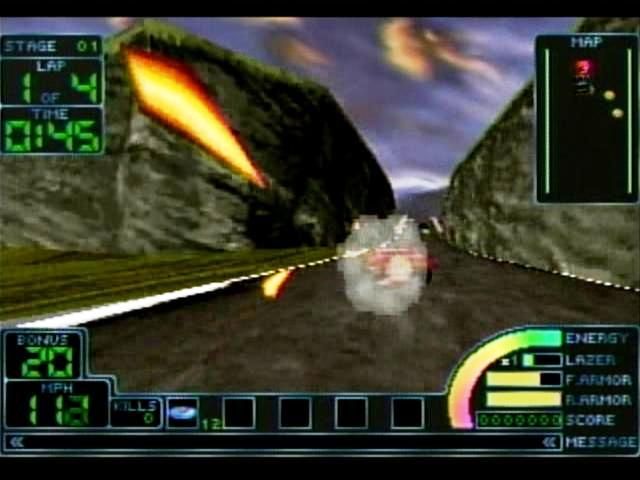
The following elements are displayed during play:
•
Timer: The time left to finish the current lap.
•
Lap Counter: The lap you are currently on.
•
Radar: Shows your relative position to other cars and objects. Use it to spot mines and firewalls ahead, and enemies and missiles behind.
•
Bonus Counter: Displays how many enemies you must kill to qualify for a bonus track or earn a power-up.
•
Speed: The current speed of your car.
•
Energy: Your current energy level, changing from green to red as it decreases.
•
Laser Temp: A bar showing laser heat; they shut down automatically to cool off once overheated.
•
Front/Rear Armour: Displays the status of your respective armours.
•
Score: Your current score.
•
Kills: Your total number of kills in the game.
•
Inventory Counters: Displays the number of Mines, Missiles, Firewalls, Heatseekers, and Smart Bombs in your inventory.
.png)



.png)
.png)