Precautions for Use
With this game, you can easily back up your progress data using a separately sold "memory card". Please insert the memory card securely into the memory card slot of the Neo Geo console and save/load the game as described below.
Load (Data Recall) Method
If the memory card is correctly set, the "Load Selection Screen" will be displayed before the game starts.
•
Select "YES" with the lever and press the A button to continue playing from the previous save.
Save (Data Recording) Method
If the memory card is correctly set, the "Save Selection Screen" will be displayed after the game over.
•
Select "YES" with the lever and press the A button to record your progress data up to that point.
•
Some software may automatically save during the game.
Normally, multiple saves for the same game are not possible. If data for the same game is saved on the memory card, the previous data will be automatically deleted, so please be careful.
About Card Formatting (Initialization)
New memory cards are not formatted (initialized). Please be sure to format them according to the following procedure before use.
•
① Correctly set your Neo Geo cassette and memory card in the Neo Geo console.
•
② While pressing the A~D buttons on the 1P controller simultaneously, press the reset button on the Neo Geo console.
•
③ When the "Data Screen" is displayed on the TV, select "Format Card" with the lever.
•
④ Press the A button to complete the format.
Precautions for using memory cards
•
In addition to the Neo Geo main unit set, a Neo Geo cassette is required for saving and loading memory cards.
•
Never insert or remove memory cards or cassettes, or turn the main unit power ON/OFF during saving or loading.
•
When inserting a memory card, make sure the arrow is pointing upwards.
•
Memory cards are sold separately. Please be sure to purchase and use only those specifically designed for Neo Geo.
Precautions for using cassettes
•
This product is a Neo Geo exclusive game cassette.
•
Always turn off the main unit power when inserting or removing a cassette.
•
Cassettes are precision instruments, so avoid using or storing them under conditions of strong shock or extreme temperatures. Also, never disassemble them.
•
Do not touch the terminals with your hands or get them wet.
•
Do not wipe the cassette case with thinner or other chemicals.
•
When not playing, always unplug the AC adapter from the outlet.
•
If you connect the Neo Geo to a projection TV (screen projection type TV), double burning may occur, so do not connect it.
Follow these rules and have fun playing!!
Game Mode
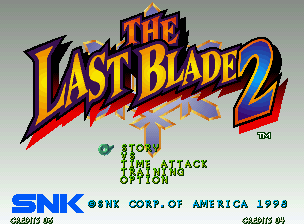
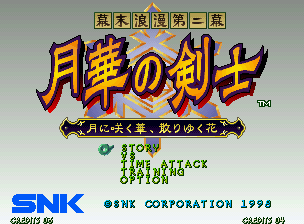
Press the Start button during the title demo to display the mode selection screen, and you can choose from the following 6 modes.
•
STORY MODE: Normal CPU battles begin.
•
SHORT MODE: This is a simple 4-stage CPU battle.
•
VS MODE: This is a 2P battle.
•
TIME ATTACK MODE: This mode competes to see how many enemies you can defeat within the time limit.
•
TRAINING MODE: This mode allows you to practice special moves and other techniques.
•
OPTION: You can change various settings.
Mid-game participation
During a CPU battle (excluding Training Mode), press the Start button on the controller that is not being used to switch to a 2P battle.
Continue
If you lose a match, the continue screen will appear. If you want to continue the game, press the Start button before the count reaches 0.
About Training Mode
On the mode selection screen, select [TRAINING MODE] to practice special moves and more against a CPU character.
Please set the CPU character's actions and the player character's sword gauge.
(Pressing the start button during training mode will display the menu screen.)
•
COM-ACTION: You can set the CPU character's status.
•
SWORD-GAUGE: You can set the player character's sword gauge status.
•
CHARACTER-CHANGE: Return to the character selection screen.
•
RESET: Return to the mode selection screen.
About Options
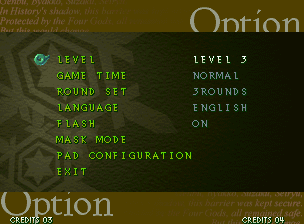
On the mode selection screen, select [OPTION], the menu screen will be displayed, and you can change the settings for the following 6 items.
•
LEVEL: You can change the difficulty of CPU characters in 8 stages.
•
GAME TIME: You can change how the remaining time in the game progresses in 4 stages.
•
ROUND SET: You can change the number of rounds per stage.
•
LANGUAGE: You can change the message display language during the game.
•
MASK MODE: If you set this item to ON, the remaining time, health gauge, sword quality gauge, etc. will not be displayed during the game, allowing for a more intense gameplay experience. (Excluding Time Attack Mode and Training Mode.)
•
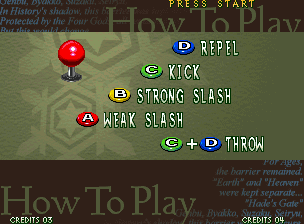
PAD CONFIGURATION: You can change the settings for each button.
About the Game System
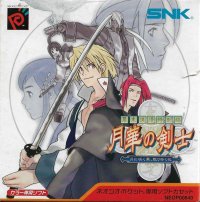
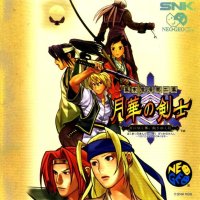
Here, we will explain the game system of [Bakumatsu Roman: Gekka no Kenshi]. Sword Quality
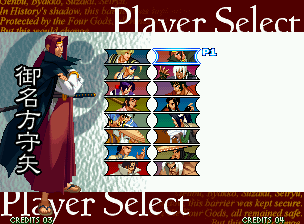
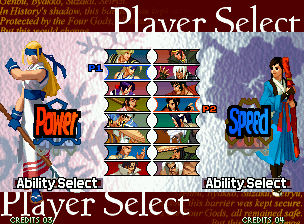
After character selection, players will choose one of two sword qualities: "Power" or "Technique."
•
Power: This is a sword quality type with high attack power. Damage can be dealt even through defense.
•
When health is red and gauge is MAX: "Super Secret Art" available, "Shouka" available.
•
Technique: This is a speedy


.png)
_2.png)
_3.png)





.png)
.png)







_1.png)