NOTES ON USAGE
MEMORY CARD-BACKUP
A NEO GEO Memory Card (sold separately) allows you to save and load game progress. Insert the memory card into the console's memory card slot.
TO LOAD (Retrieving Data)
If the NEO GEO Memory Card is inserted correctly, the "LOAD DATA" screen will appear. Use the joystick to select "YES" and push Button A to resume play.
TO SAVE (Recording Data)
If the NEO GEO Memory Card is inserted correctly, after a game has ended, the "SAVE DATA" screen will appear. Use the joystick to select "YES" and push Button A to save data. Some software saves data automatically during play.
You cannot save data for a game more than once. Saving new data for a game on a memory card will automatically erase previous data for the same game.
FORMATTING CARDS
Newly purchased NEO GEO Memory Cards are not formatted. Before using a new card, follow these procedures to format it.
•
Correctly insert a NEO GEO game cassette and memory card into the console.
•
While holding down all buttons (A to D) on the Player 1 controller, push the RESET button on the Home System console.
•
When the "MEMORY CARD UTILITY MENU" appears, select "FORMAT" and follow the on-screen instructions.
•
Press Button A when formatting is completed.
PLAYING THE GAME
STARTING PLAY
Push the START button during the opening sequence to call up the "MODE SELECT" screen. Move the joystick up or down to select "GAME START" and push Button A.
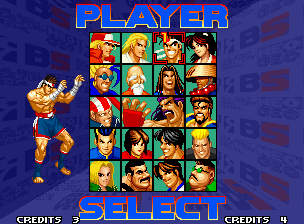
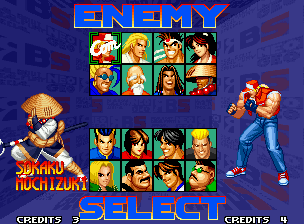
After the playing instructions demonstration, select a character and your first opponent (computer player) with the joystick and push Button A to begin the game. Push any button (A to D) to skip the playing instructions demonstration.
TWO-PLAYER & BURST-IN PLAY
Press the START button on the Player 1 and Player 2 controllers to start Two-Player Play. During 1-player computer battles, press the START button on the unused controller to begin "Burst-In" 2-player battles.
CONTINUE
When you lose a match, the continue countdown will begin. Push the START button before the count reaches "0" to continue play.
OPTION MODE
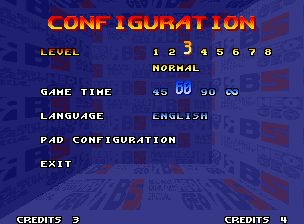
In the "MODE SELECT" screen, move the joystick up or down to select "OPTION" and push Button A to call up the "CONFIGURATION" screen. Move the joystick up and down to select the item to change and move the joystick left or right to alter settings.
LEVEL
Change computer battle difficulty among 8 levels, with "1" being the easiest and "8" the hardest.
GAME TIME
Change round times to 1 of 4 levels: 45, 60, 90 and ∞ (no time limit).
LANGUAGE
Change the language for screen message displays among 4 languages: Japanese, English, Spanish, and Portuguese.
PAD CONFIGURATION
Select this item and push Button A to call up the "PAD CONFIGURATION" screen to change controller button settings. Select the button setting to be changed by moving the joystick up or down and press the button you want to use. Push the SELECT button to return to the "PAD CONFIGURATION" screen.
EXIT
Select this item and push Button A to return to the "MODE SELECT™" screen.


.png)





.png)