Getting Started
•
Turn OFF the power switch on your Nintendo® Game Boy® Advance. Never insert or remove a Game Pak when the power is on.
•
Insert the Game Pak of Britney's Dance Beat™ into the slot on the Game Boy Advance. To lock the Game Pak in place, press firmly.
•
Turn ON the POWER switch. The credit screens will appear (if you don't see them, begin again at step 1).
•
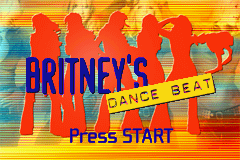
When the title screen appears, press START to proceed to the Main Menu.
Main Menu
•
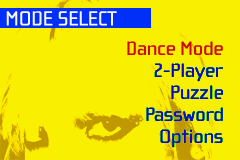
Dance Mode - Begin a new dance game of Britney's Dance Beat™.
•
2-Player - Compete in a dance-off with a friend. See page 11 for more information.
•
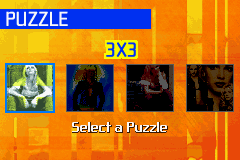
Puzzle - Here you can do four different shuffle puzzles of Britney photos.
•
Password - Enter a password to continue a previously played game. See SAVING AND LOADING on page 16 for more information.
•
Options - Customize the game with the following options:
•
MUSIC VOLUME - Select the sound volume level.
•
SFX VOLUME - Select the sound effects volume level.
•
DIFFICULTY - Select a difficulty level (Easy, Normal, or Hard).
•
GAME CREDITS - A list of credits for the game.
Dance Mode Menu
•
Mode Select - Select a mode from the Mode Select screen.
•
Practice Mode - Help Britney practice her moves for her tour! See page 9 for more information.
•
Concert Mode - The big event: Help Britney get through her concert! See page 10 for more information.
•
Tour Book - Your collection of Britney tour photos. See page 13 for more information.
•
Video - After earning enough points, watch an exclusive Britney video. See Page 13 for more information.
Playing a Game
Select a mode from the Mode Select screen. Use the Control Pad Up/Down to highlight a mode, then press the A Button to confirm. Press the B Button to cancel a selection.
Dance Mode
Start the game by selecting Practice Mode from the Dance Mode selection screen. Once you have successfully completed all of the Practice songs, then you can select Concert Mode.
Select Music
•
"Oops! ... I Did It Again"
Practice Mode
Use the Control Pad Up/Down to select the dance routine you want Britney to practice. Press the A Button to confirm your selection or the B Button to cancel.
NOTE: When you first start the game, you will only have one song to start with. The others will be unlocked as you successfully complete a song.
When the song starts, watch the rotating red bar on the Dance Gauge. When it crosses over a button icon, press the corresponding button. Depending how close you were to timing it right, you'll score a "Great," "Good," or "Miss." The more moves you successfully complete, the higher your final score. Unlock more songs as you complete each routine.
After you've completed a routine, you will see an Instant Replay of your performance. To exit, press START.
Concert Mode
Use the Control Pad Up/Down to select the song you want Britney to perform in concert. Press the A Button to confirm your selection. When the song starts, watch the rotating red bar on the Dance Gauge. When it crosses over a button icon, press the corresponding button. Depending how close you were to timing it right, you'll score a "Great," "Good," or "Miss." The more moves you successfully complete, the higher your final score. Unlock more songs as you successfully perform each routine.
After you've completed a routine, you will see an Instant Replay of your performance. To exit, press START.
Note: For more information on each song, see page 17.
2-Player Set-Up
Check your Game Boy Advance Instruction Manual for full connection details. Depending upon the way the Game Boy Advances are linked, the game will choose the player who will be in control (Player 1).
Player 1 will be the only player able to select a song to dance to. After Player 1 selects 2-Player Mode, and selects a song, both players will advance to the Game Screen to begin the dance-off. Both Players can select their own difficulty level on the Select Difficulty screen.
After the Dance-Off
When the song is over, the dance-off ends. Both players will advance to the Score Screen, showing the score tally for both players. It will also show Win, Lose or Draw for both players for their performance in the dance-off.
Player 1 can press the A Button to return to the Select Music Screen. Only Player 1 can choose another song to dance to, or press the B Button to return to the Mode Select Screen to select another mode.
Tour Book
For each successfully completed routine, you'll be rewarded with an exclusive Britney tour photo. The tour book is where all the Britney photos you've earned are stored. Use the Control Pad Left/Right and Up/Down to select a photo. Press the B Button to return to the Mode Select screen.
Video
After successfully completing all of the practice and

 (En,Fr).png)
.png)

.png)
 (Rev 1).png)
 (Rev 2).png)
_1.png)
 (Rev 1).png)







.png)


.png)

