Getting Started
Insert the Game Pak into the Game Boy Advance and turn the power ON. When the title screen appears, press START or A and proceed to the area where you'll edit your character. Using the instructions on page 7, set up your main character for this game.
Controls
Two Main Characters
Choose whichever character suits you:
•
Neil: An upbeat lad who learned to play golf from the legendary golfer, Kid. He has a low-trajectory draw shot.
•
Ella: Just like Neil, Ella trained under Kid. She is a sharp, vigorous young golfer with a high-trajectory straight shot.
Whichever character you don't select at the beginning of the game will appear as your doubles partner in Story mode.
Edit the Main Character
The first time you play the game, you must set up the main character. Select whether you'll play as a male or a female, choose to play left- or right-handed, and confirm your character's status.
Enter Your Name
Once you've confirmed your character's status, enter your character's name. Use + to select letters and press A to enter your selections.
Get Started
Once you enter a name, the Story mode will begin. After the opening conversation in the Marion Club manager's office ends, you'll be able to control your character.
After you edit your character once, you can press START or A on the title screen and proceed directly to the main menu.
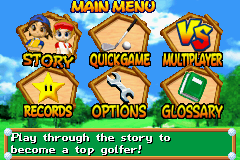
Main Menu
•
Story: Try out your skills against competitive rivals and work to become recognized as the ultimate golfer! P. 24
•
Quick Game: Quickly jump into a realistic golf challenge or play a mode with some quirky rules! All games here are for one player. P. 37
•
Multiplayer: Play with two to four players, either cooperatively or competitively. There are various game modes to select from. P. 39
•
Records: Check all sort of results from the different game modes.
•
Options: Change game settings.
•
Exchange Clubs: Swap clubs with other players. You can only exchange clubs once you get a new set of clubs in Story mode. P. 27
•
Glossary: Check on golf terminology you don't understand.
Options
Taunt & Support Editor
Edit the taunts and support messages of your character. During a match, while other golfers are trying to shoot, press any of the buttons to display the taunt or support message for that button.
Music
Turn the background music ON or OFF. You can also change the music settings from the Settings selection in the Pause Menu. P. 47
Data
Delete all play records here. Once data has been deleted, it cannot be restored, so be careful when deleting play files.
Editing Taunt and Support Messages
1.
Select the message you wish to edit.
A default message is set to each button at the beginning of the game, so first, select the message you want to edit and press A.
2.
Edit letters or change text bubbles.
Select the top item with the cursor and press A. The items you can edit will change in the following order: Text Balloon, Sound, and Letter. Press B to return to the previous screen.
•
Letter: Edit the letters in the message text.
•
Text Balloon: Change the color of the text balloon.
•
Sound: Change the sound your message makes.
•
Reset: Restore the default message for a button.
•
Erase One Letter: Delete letters one at a time.
•
Enter: Register an edited message.
How to Exchange Clubs
1.
Select Your Equipment
In order to exchange clubs, you must use a Game Boy Advance Game Link cable. (Connecting the Link Cable P.40)
2.
Begin Linking
Once you've established a connection between your Game Boy Advance game systems, press A and go to the Exchange Clubs screen.
3.
Select the Club Sets
Select the club set you wish to exchange by pressing Left or Right on ◄►, then press A to enter your selection. You cannot select the club set that your opponent is currently using. When both players have selected club sets, either player can select [Yes], and then press A to begin the club exchange. When the club exchange is done, press A and you will return to the Exchange Clubs screen.
If you select a club set and then press A, the description of the club set you selected will appear. If you press B at this time, you will return to the previous screen without exchanging clubs.
Hitting Shots
There are two different ways to hit shots, both of which require you to watch the power gauge at the bottom of the screen. Stick to the auto-swing method until you get the hang of things!
The Power Meter
•
Range Marker: Adjust with L or R.
•
Impact Zone: Random Auto-swing.
Auto-swing (for Beginners)
Start backswing > Set power
1. Depending on your club selection and the ball's lie, the range marker will change. Press A to start the backswing.
2. Press A again to


.png)
.png)
.png)


 (En,Fr,De).png)




_1.png)

.png)