GETTING STARTED
•
Making sure your Nintendo® Game Boy® System is turned off, plug the CENTIPEDE® Game Pak into the Nintendo® Game Boy® or Game Boy® COLOR System.
•
Turn on your Game Boy®. In a few moments the Majesco Sales, Inc. Company Logo Screen should appear. •
If the screen remains black, adjust the contrast dial on your Game Boy®.
THE MAIN MENU
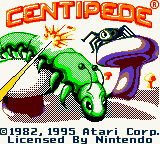
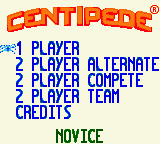
Once the CENTIPEDE® Title Screen has appeared, you may press the Start Button to display the Main Menu Screen.
•
Two-Player Alternating - Choose this mode to start a two-player game using one Game Boy® or Game Boy® COLOR system. The two players take turns, and compete for the highest score.
•
Two-Player Competition (Game Link) - In this game, you and your opponent try to shoot the same creatures simultaneously. The one with the highest individual score wins.
•
Two-Player Team (Game Link) - The same idea as the competitive mode, except that you and your partner start with a combined total of 4 wands (lives), and you work together to achieve the highest possible combined score.
Press the Control Pad Right or Left to select the following skill levels:
•
Novice - This is the slowest level. To make it even easier, you won't see any Fleas until the third wave, and there are no Scorpions until the fifth wave. •
Standard - Slightly faster than the Novice Level, but you begin at Wave 10.
•
Advanced - This level is faster yet, and begins at Wave 19. Both the Fleas and Scorpions are waiting for you the moment you start. •
Expert - It doesn't get any faster - or harder - than this. The game begins with Wave 28. And the Fleas are everywhere. You have been warned! When the desired game mode is selected and the game level you desire is displayed, press the Start Button to begin.
HIGH SCORES
When the game ends, if the current player's score is higher than any score currently on the high score list, the player will be able to enter their name on the high score list by doing the following:
•
Press the Control Pad Up or Down to move forward or backward through the alphabet.
•
Press the Control Pad Right to move to the next available letter position. (You may press the Control Pad Left to move back one letter position to correct any letters.)
•
Press the Start Button to enter the current name and exit the High Score List screen.
Note: Once the Game Boy® or Game Boy® COLOR unit is turned off, all of the player's high scores will be erased.
.png)


 (En,Fr,De,Es,It,Nl) (GB Compatible).png)
 (GB Compatible).png)
