Starting the Game
NOTE: This CD-ROM can only be used with the PlayStation™. Do not attempt to play this CD/ROM on any other CD player — doing so may damage the headphones or speakers. •
Set up your PlayStation™ as described in the PlayStation™ instruction manual and insert a controller into controller port 1. •
If you wish to play together with a friend you need to connect your two consoles with a Link Cable.
•
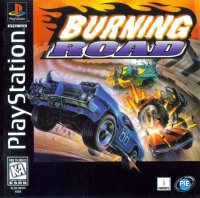
Insert the Burning Road™ CD, label side up, and close the disc cover. Be careful not to touch the surface.
•
Press the POWER button to load the game. The game will start after the Sony Computer Entertainment and the PlayStation™ Logos have been shown. If nothing happens turn the system OFF and make sure that it is set up correctly. •
Once the game has loaded you will be at the Main Screen menu ready to play Burning Road.™
Getting Started
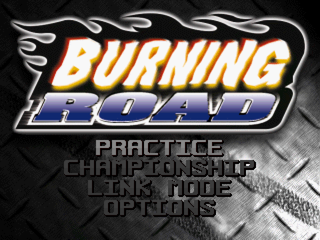
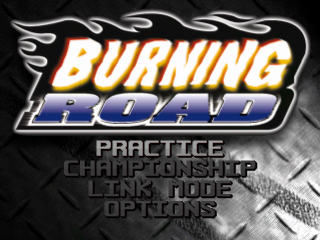
After the various logos have been displayed the Main Menu screen will appear.
•
Use the Directional Buttons up and down to change the highlighted menu item and press the X Button to select.
•
If you don't perform any action within 30 seconds the game will switch to demo mode.
•
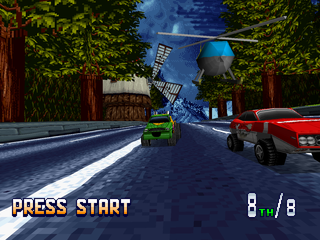
Skip the demo sequence by pressing the START button.
Practice Mode
Practice your skills in one of the four vehicles on one of the three tracks while competing against 7 computer controlled opponents. Learn how to master your car and work out the tricky curves before going to Championship.
If you want to perfect your skills on a specific track this is the game mode you should select.
•
First you have to select which track to practice on. Choose between Beginner, Advanced and Expert.
•
Use the Direction Buttons left and right to change the highlighted track and press the X Button to select.
•
You have a time limit of 8 seconds to make your choice. After that the track which is highlighted will automatically be selected.
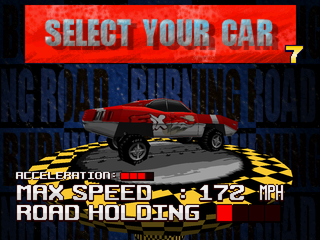
Once you've selected the desired track it's time to choose from one of the four cool vehicles. Each vehicle has different abilities. Some are slower but have better road holding capabilities. Others are faster but controlling them on the road is more difficult.
•
Use the Direction Buttons left and right to change the vehicle and use the X Button to Select.
•
Again you have 17 seconds to make your choice or the currently shown car will be automatically selected.
Start-Up Items
Choose between Automatic Transmission (AT) or Manual Transmission (MT). If you select Automatic Transmission your car will automatically shift gears up and down when needed.
When using Manual Transmission however, you can with some practice achieve better acceleration than with Automatic Transmission.
•
Use the Direction Buttons left and right to highlight the desired choice and use the X Button to select.
•
Note that you again have a limited time to make a choice.
Now that all your choices have been made, it's off to the race track. Prepare yourself for a mind blowing race at incredible speed. Prepare yourself for Burning Road.™
Championship
This is the real thing. Choose one of the four cars to race against the 7 computer controlled opponents on all tracks, one after the other. Beat the qualifying time to advance to the next track and make sure that the others eat your dirt.
You have practiced every curve on all the three tracks. You know them all, even in your sleep. You have driven your car to the extreme and you beat them all in practice. Now it's time for you to go for the championship.
When you enter the Championship mode you will again have to choose in which car and with what kind of transmission you wish to race. Once you have made your choices you will be taken to the beginner track to prove your skills. If you win on the beginner track, you will advance onto the advanced track and then onto the expert track.
Link Mode
Link up with your friends to show them what horsepower is all about. Put an end to the discussion of who's the better driver by making them disappear in the dust.
If you want to show your best friend just how wrong he is when he claims that he is the better driver, then challenge him in this Head to Head battle and show him up once and for all.
When selecting the Link Mode Burning Road will seek out challengers for approximately 8 seconds. If no challenger has arrived within this time the game will return to the Main Menu screen.
If you experience problems while trying to establish a Link connection, make sure that the Link Cable has been inserted correctly into the Serial I/O port on the back of your PlayStation™. Once you have linked up you may choose your track, car and transmission and launch into a race of honor.
The Race
Once the track has been loaded the countdown to the race will begin. Three...Two... One...GO! Hit the pedal and go for the pole position. Watch those sharp curves and get those power slides under control.
You have five camera positions available in the game: three behind the car, one in the car and one in front of the car.
•
Use the L1 and L2 buttons to move the camera position in and out to the position that suits you the best.
•
Use the START button to pause and unpause the game.
•
If you want to quit the race and return to the Main Menu screen press the SELECT button while in pause mode.
Heads-Up Display
While in the race you have a Heads-Up Display. Learn to read it to make the most of the race.