Loading the Game
Set up your PlayStation™ game console as instructed in its manual. Ensure the power is OFF before inserting or removing a compact disc. Insert the Psychic Force™ disc and close the disc cover. Insert game controllers and turn on the PlayStation™ game console. Follow the on-screen instructions to start a game. Control Configuration
In-game control configuration can be modified in the OPTION mode.
R2/L1/L2 are not used in the initial control configuration.
Game Modes
ARCADE (One- or Two-Player Game)
Coin-Op conversion. A second player can join-in during gameplay.
STORY (One-Player Game)
Features in-game intro and ending sequences for each character. No time-attack or high score name entry features available in this mode.
TRAINING
Allows you to practice your moves against a stationary character. Hit/damage values and other meaningful hints are displayed on-screen.
VS (Two-Player Battle Mode)
TWO-PLAYER HEAD-TO-HEAD COMPETITION.
The Selection Screen allows you to set handicaps as well as choose the battlefield, guard (defense) type, and other parameters.
Note: Two controllers must be plugged in to select this mode.
OPTION
Allows you to set up controller button configurations, difficulty levels, and other basic game parameters.
How to Play
Basic Game Flow
Start Game: Select Character and Guard (Defense) Type.
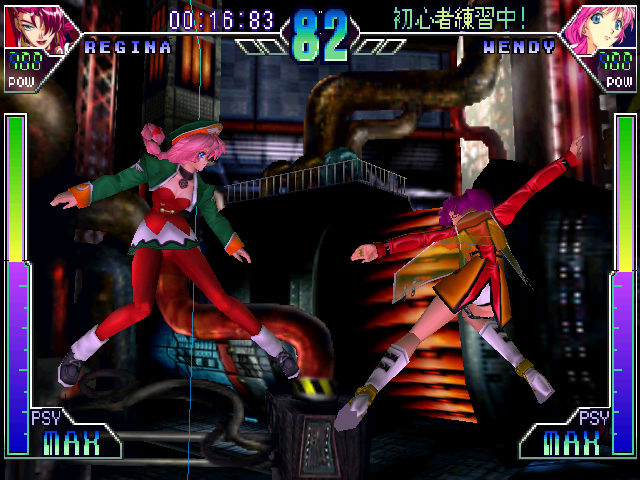
Victory Conditions: Reduce your opponent's Health Meter to empty and you'll be declared the winner of the round.
•
PLAYER 1 CHARACTER SELECTION
•
PLAYER 2 CHARACTER SELECTION
Guard (Defense) Types
AUTO GUARD
•
Automatically guards character for a limited number of times.
•
Automatically charges up your character's Psychic Meter when there's no control input.
MANUAL GUARD
•
Player must manually execute Guards and Psychic Meter recharges.
Game Progression
Each time you defeat an opponent in Story Mode, you'll face a new enemy in a new episode.
You can continue a game all you want in these modes. However, you cannot change characters in the Story Mode.
When the timer clock runs out during a round, the character with more health is declared the winner. In the Story Mode, there is no time limit.
In Story Mode, the game is over if you draw in the final round of an episode.
If you continue a game, your Time Score points will carry over.
VS (Head-to-Head) / Joining a Game-in-Play
Two players select a character of their choice for battle. A second player joining a game-in-play will be offered a selection of characters to choose from.
When the timer clock runs out, the battle will carry over into a sudden-death round within a smaller Psy-Arena.
Note: In a sudden-death round, the Health and Psychic Meters of both players will be reduced to '0'. The battle will commence from that point and whoever inflicts the first blow will be declared the winner.
In a final round where the winner of a battle is to be decided, a double-knockout will be declared a draw. In a case where the second player joined a game-in-play, a double-knockout in the final round will result in "Game Over."
In a two-player game where the second player joined a game-in-play, the winner continues battling CPU-controlled characters while the loser is eliminated from gameplay ("Game Over").
Normal Blast
Press either ▲ or O buttons when your opponent is at a distance. Used for long-range attacks, the effects of a Normal Blast depends on the button pressed.
•
▲ Fires a blast towards your opponent.
•
O Fires a homing blast towards your opponent. However, it leaves you wide open for retaliation.
Grab
Close in alongside your opponent and press both the ☐ and ▲ buttons at the same time.
•
☐ + ▲ Allows you to grab your opponent and inflict a damaging close-range blast. You can also penetrate an opponent's "Guard" and grab him/her.
Pause Menu
When you press the SELECT BUTTON in any mode while the game is paused (press START to pause), you will see two options, CONTINUE (the default) and QUIT.
To quit the game and return to the title screen, highlight QUIT and press X. You will be asked to confirm. Highlight YES or NO and press X to quit or continue play.
Psychic Meter and Psychic Attacks
Psychic Attacks: Input combinations with the directional and trigger buttons to execute special Psychic Attacks.
A Psychic Attack will drain a character's psychic power percentage displayed on the Psychic Meter. Furthermore, you cannot execute a Psychic Attack if the psychic power percentage required for the move exceeds the remainder shown on the Psychic Meter.
Barrier
Holding down the button, press all points on the directional in a circular motion. A barrier will shield your character from all attacks.
However, the barrier will drain your Psychic Meter as long as you maintain it. To drop your barrier, simply release the button.
Emergency Barrier
Holding down the button, press on the directional. Immediately after being blown back from an opponent's attack, input the aforementioned combination and you can call up a barrier to shield your character from any subsequent attacks.
However, you should
.png)

.png)
_2.png)
.png)
 (Disc 1) (Game Disc).png)
.png)
 (Disc 1) (Game Disc).png)



 (Es,It,Pt).png)
.png)










.png)



.png)
.png)