Starting the Game
1. Set up your PlayStation™ game console according to its Instruction Manual. Make sure the power is OFF before inserting or removing a compact disc. 2. Insert the Dark Omen™ disc and close the Disc Cover.
3. Insert game controllers and turn on the PlayStation™ game console. The Electronic Arts™ and Games Workshop® logo screens appear, followed by the Dark Omen video introduction. At the end of the video introduction, the Main menu appears. To bypass the video introduction and advance to the Main menu, press *.
The Main Menu
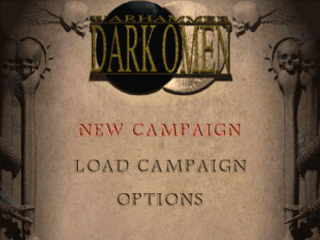
The Main menu follows the introduction. Three choices appear on the Main menu.
•
To make a selection, move the pointer over an item, then press *.
New Campaign
Begin a new campaign.
Load Campaign
Continue a previously saved campaign. For details on saving your campaign, see Debriefing.
Options
Sound Balance
Adjust the balance between sound effects and music volume. Moving the slider all the way toward sound effects turns off the music.
Resume
Highlight this option and press START to return to the Main menu.
New Campaign
Before proceeding to the battlefield, you must choose which regiments you wish to deploy.
Deployment
The banners of all regiments in your army appear in the top frame. Banners are used to help identify each regiment. Three regiments currently appear in the Deployment frame: the Grudgebringer Infantry, Crossbows, and Cannon.
•
To cycle through regiments, press the D-Button.
•
To move a regiment into the Battle frame, highlight its banner and press *.
•
To remove it from the Battle frame, highlight its banner and press * again.
•
To view the Troop Roster, highlight the book at the bottom of the screen, then press *.
Once you've selected all the regiments you want to deploy, highlight "To Battle," press *, and prepare to begin!
You can deploy a maximum of eight regiments in a battle, even if you have more available in your army. Select the best regiments for each battle.
Note
The Grudgebringer Cavalry is selected for every mission. In some battles, other regiments are automatically selected too. Similarly, you may be restricted from taking certain regiments on a particular mission.
Money Matters
Your army earns gold at the end of a successful mission so you can afford to hire reinforcements and buy armor.
Regiments
There are six different regiment types available during the campaign. They each have different abilities:
March on foot. Best suited for hand-to-hand combat.
Ride on horseback. Move much faster than other regiments.
Skilled in the art of hand-held ranged weapons, e.g., crossbows, longbows.
EA Tip
Consulting the Map is the only way to assess the strength of an enemy regiment, so use it to help decide which of your own regiments to pitch against them in battle.
Deployment Phase
Immediately before a battle begins, you can position your troops and set initial orders. Some white flags appear in the ground around your regiments. These flags mark the deployment area, and you can position your troops anywhere within their boundaries.
You can move regiments between multiple deployment areas on some battlefields.
To end the Deployment Phase and start the battle, press START. However, you should only do this after you have considered issuing some initial orders to your regiments, as detailed in the next section.
Positioning Your Regiments
To position your regiments:
1. Move the pointer over the regiment you want to position. The pointer turns into a grasping gauntlet.
2. Press to pick up the regiment, then D-Button to any position (within the deployment area).
3. Press again to place the regiment in their designated position.
Basic Orders
As you move the pointer away from the regiment, it changes appearance again. This happens often on the battlefield, depending on the situation at hand. Check the following list to see what each pointer signifies:
•
Pressing on the landscape orders your regiment to move to that location. A BLUE flag appears in the ground to confirm the order.
Note
Most Artillery regiments (e.g., Cannons) can't move. Regiments act on a move command only after the battle starts.
•
This allows you to face your regiment in a particular direction. Press * when you have the pointer in the direction you require. The regiment immediately turns and faces the new direction.
Note
This pointer appears only if it is positioned close to the current regiment.
•
When over an enemy banner, the pointer changes into a sword. Press * to order your regiment to engage the enemy.
•
If your regiment has both hand-to-hand and projectile capabilities, you can press to toggle between a sword (hand-to-hand combat) and an arrow (projectile attack).
Note
Regiments can act on an engage command only after the battle begins.
Line of Sight
In order to spot the enemy, they must be within your regiment's field of vision, and your regiment's view to them must be unobstructed.
The enemy is harder to spot the further they are from your own troops.
Some regiments who use projectile weapons don't rely on line of sight, as their weapons are designed to be fired over obstacles, e.g., Mortars. However, their accuracy is compromised if they cannot see the target.
Other Orders
You can use the Control Panel in the bottom-right corner of the screen
.png)

.png)
.png)
.png)
