Moving the View
To scroll around the landscape, hold down the SCREEN MODE button and press the directional button in the desired direction.
DUALSHOCK® analog controller users can scroll around the landscape using the right analog stick. To use Analog mode, press the analog mode switch (so the LED is red) on your DUALSHOCK® analog controller.
Changing Worms
If Worm Select is enabled, press the WORM SELECT button to select a different member of your Worms Team. You can only change Worms if you haven't already moved one or selected a weapon.
Moving Worms
Move your Worm around by using the directional button or the left analog stick on the DUALSHOCK® analog controller.
Jumping
Make your Worms jump forward by pressing the JUMP 1 button.
You can also make Worms jump backwards by pressing JUMP 1 twice in quick succession and perform an upward jump with JUMP 2. Pressing JUMP 2 twice in quick succession performs a back-flip.
•
Tip: Certain weapons can be used while your Worm is jumping.
Quit
Press the START button to open the Quit Menu. You can select Draw Game, Force Sudden Death mode and Quit Game. You can also view the number of rounds won by each team from here.
When the Quit Menu is accessed, the game is in pause mode. Press the START button again to resume play.
Name Switch
Sometimes the visibility of the Worm names can hinder the player. Press the NAME DETAIL LEVEL button to toggle the Worm name visibility setting between full, partial, and none.
On-Screen Information
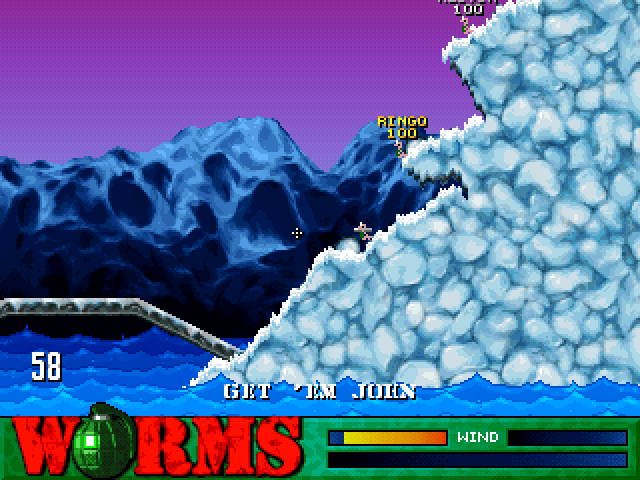
The game screen is full of useful information. The following explains what it all means!
Turn/Round Time Indicator
Your Turn Time counts down at the bottom left of the screen. When it reaches zero, play passes to the next team.
Wind Bar
Some weapons, e.g. Bazooka, are affected by the wind. There is a wind strength indicator at the bottom-right of the screen to help you gauge your shots.
Team Status
Each team in the game has an overall energy bar shown at the bottom of the screen. When this is fully depleted, that team is removed from the game.
Worm Status
Worm names and energy values appear above each Worm.
Utilities
Enabled utilities (Double Damage, Crate Spy etc.) will appear above the wind indicator in a small box when they are in use.
Collectable Utilities
Fast Walk
This lasts for one turn and allows Worms to walk over the land much quicker than before. Excellent for long assaults and critical attacks.
Laser Target
Enables a Laser Sight on the following weapons: Uzi, Mini Gun, Hand Gun, Kamikaze and Shotgun. This makes it much easier to judge your shots. This only lasts one turn though.
Low Gravity
This incredible effect makes all your shots and movements susceptible to Low Gravity. This means superlong jumps and more besides!
Jet Pack
Use the directional button to control vertical and rear thrusters as your Worm takes to the skies. Particularly useful to reach distant shores if you're short on Teleports and exceedingly useful if you wish to fly by and drop some Dynamite onto a bunch of Worms. Join the space age, get the Jet Pack!
Instant Effect Utilities
Double Time
Instantly doubles the amount of time remaining on the current turn.
Crate Shower
Randomly drops a few more crates onto the landscape.
Crate Spy
This effect, which lasts until the end of the round, allows the team to reveal the contents of any crates around the landscape.
Double Damage
Lasts for just a single turn and delivers double damage to any explosion that occurs. Mighty powerful and should be used with caution.
Menu System
Main Menu
From here you can select to play a single-player game, create a multiplayer game, or go to the options menu. The button on the controller is used for selecting. Pressing the button will take you back to the previous menu, or out of team select windows.
Single-Player Menu
Single-Player Quickstart Game
This allows you to get playing very quickly. You will play with a predefined team and weapon selections against a series of computer-controlled robots (Wormbots). Games will be played on randomly generated landscapes, with the default game option set.
Training
The training arena offers a host of distinct disciplines in which to train. In all training modes, you will work against the clock. Your best times are logged and can be saved to your memory card. To play, select your team, then event, then start.
Missions
Missions in Worms World Party are cunningly designed to test everyone from beginners to seasoned veterans. They range in order from easy to hard and must be completed in order. If you struggle to complete a mission, the game realizes this and supplies help in the form of extra weapons / utilities to help you progress.
•
Note: If you successfully complete a mission, the custom-drawn landscape in that mission is available for you to play on in normal games! (See TERRAIN GENERATION SCREEN section later in the manual for details) Select team, then mission, then start.
Time Attack
Time Attack is similar to missions, though there are multiple ways to complete the level. The objective is to find the fastest method. The times for completion are saved and Team17 record times are listed as a gauge. Deathmatch Challenge
Similar in play to