System Setup
Set up your PlayStation®2 computer entertainment system according to the instructions supplied with your system. Check that the system is turned on (the on/standby indicator is green).
Insert the Crazy Frog Arcade Racer disc in the system with the label side facing up. Attach game controllers and other peripherals as appropriate. Follow the on-screen instructions and refer to this manual for information on using the software.
Memory Card (8MB) (for PlayStation®2)
To save game settings and progress, insert a memory card (8MB) (for PlayStation®2) into MEMORY CARD slot 1 of your PlayStation®2 system. You can load saved game data from the same memory card or any memory card (8MB) (for PlayStation®2) containing previously saved games.
This title will autoload a previously saved game when it first starts, allowing you to continue your progress automatically.
Auto-Save Note
When a profile is loaded, auto-save is automatically enabled for that profile, even if you had turned it off before saving the profile, allowing you to save your progress automatically.
Main Menu Navigation
Navigate the menu using the directional buttons. Select an option by pressing the X button. Go back to the previous screen by pressing the button.
One Player
Select this mode to confront competitors in a championship, single race, pursuit race or time trials. You also have access to two crazy mini-games: Crazy Dance and Crazy Pinball.
Two Player
Select this mode to go head to head with up to two players in championship, single race, or battle mode. You'll need to have two controllers connected before selecting this option.
Records
View the high scores of your best performances in single-player.
Options
Adjust the various game settings such as Sound, Display, Controller configuration and Vibration.
Video Box
Select this option to see the bonus videos included on the game disc.
Load Data
Load data previously saved on a MEMORY CARD (8MB) (for PlayStation©2) inserted in memory card slot 1.
Saving
Crazy Frog Arcade Racer uses an Autosave feature, so please ensure you have the memory card you wish to use for loading and saving inserted before beginning the game.
Saving occurs automatically, but only in single player mode during Championship, Single Race, Pursuit and Time Trial modes. In addition, any changes you make to the game options are saved when you exit the options screen.
Championship
Confront your competitors or friends in 4 championships comprised of 3 different circuits, either in Single Player or Multi-Player.
At the end of each race, participants receive a number of points based on the order in which they finish. The driver who has scored the most points by the end of the last race wins the championship.
In single player championship mode only: Your best scores are automatically saved for you to the MEMORY CARD (8MB) (for PlayStation©2) inserted in memory card slot 1.
Single Race
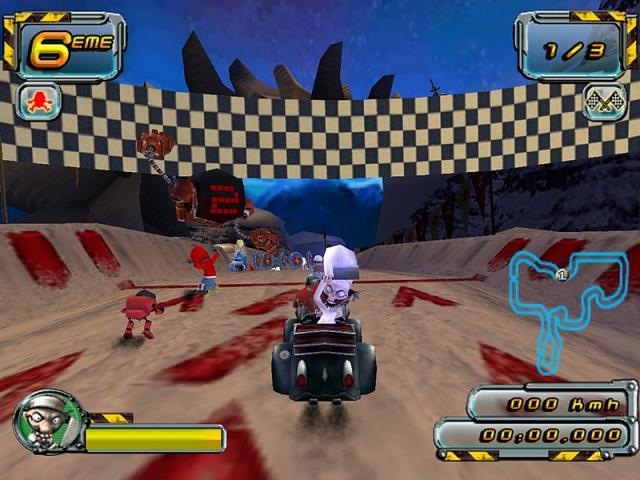
You can choose from 12 different courses to challenge your competitors or friends in frantic races. This mode is available in both single player and multiplayer.
Chase Race
Right from the start, the player is being pursued by Drones. The player must survive as long as possible on the circuit before his energy gauge runs out. The race ends when the energy bar is completely depleted. Time Trials (available in Single Player only)
This mode allows you to test your talents in driving alone against the track without opponents or bonuses. Time is your only competition. Your best times will be automatically saved on a MEMORY CARD (8MB) (for PlayStation®2) inserted in memory card slot 1.
Battle
In this mode, which is designed for Multiplayer only, confront one of your friends in the battle arenas. The rules are simple, the last one alive on the track wins!
Each player starts with 3 lives. Bonuses are dispersed throughout each arena, enabling you to set traps for your opponent, or to attack them.
Mini Games
Try these two mini-games and beat the highscores!
Crazy Dance
Choose the music and the difficulty level with the left and right buttons. Once the music starts, you must push the correct button at the right time to keep dancing.
As you continue to press the button correctly, the dancing will get faster and you'll trigger incredible combos!
Crazy Pinball
Choose the table you wish to start on and press X when you are ready. It's now simple to control, just press X at the right moment, to launch the ball in the direction of the arrow. Try and eliminate all the drones for maximum bonus. .png)

.png)

_1.png)
.png)


.png)

.png)