USER PROFILE
Before playing, create a profile for your FIFA Soccer 13 statistics and results. Enter your name, choose your favorite team, enable or disable Casual Controls, select a controller configuration, and decide if you want to use autosave.
If you choose casual controls, the controller automatically adjusts and autosave is automatically activated.
If your TV is compatible with progressive scan, you can press the button and the button at the same time on the Select Language screen to activate progressive scan mode. Once the configuration is confirmed, loading will continue as usual.
FIFA Soccer 13 has a file to save user profiles, where you can save up to eight different profiles. If this file is overwritten, all previously saved user profiles will be automatically deleted.
If you have a memory card (8 MB) for PlayStation®2 system that contains previously saved profiles, make sure that you have inserted it before starting FIFA Soccer 13 to prevent any risk of overwriting saved data. The game will notify you before you attempt to overwrite saved files on the memory card. To manage all your existing profiles, use the MI FIFA 13 profiles option.
LEGENDARY DIFFICULTY
If you believe you are among the best FIFA Soccer 13 players, you can test your skills and prove it. In Game Settings from the MY FIFA 13 menu, change the difficulty setting to Legendary. Good luck!
SCOUT REPORT
Before each match against the CPU, FIFA Soccer 13 displays the Scout Report. In this report, a key player is identified, the team's formation is explained, and information about their playing style is provided.
Use the Scout Report to discover the tactics the rival team will use during the match and adjust your playing style accordingly.
TO PLAY
QUICK MATCH
Press the START button in the main menu to go directly to the field with the default settings. If you want to play in a different mode, choose TEAM, PLAY PRO, or PLAY GOALKEEPER.
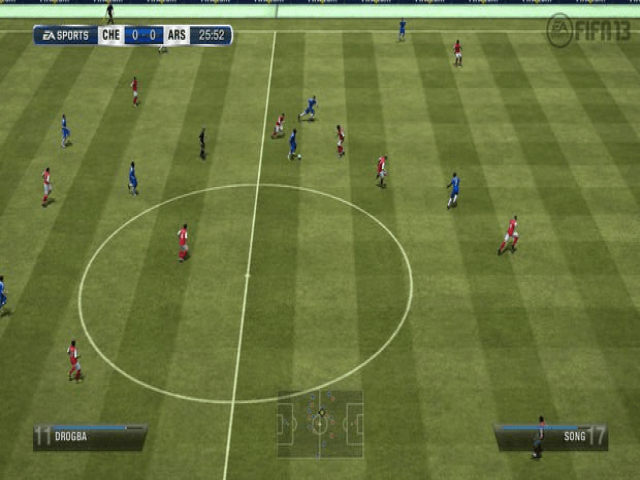
GAME SCREEN
•
Physical condition level
SAVE AND LOAD
Before exiting a game mode or a menu where changes have been made, make sure your progress has been saved to a memory card. Otherwise, all unsaved information will be lost. Files can be loaded manually by going to the Load screen (via the main menu).
CAREER MODE
Career Mode is a complete experience that offers you the opportunity to play a lifetime of football career. The mode is divided into three stages: Player, Player-Coach and Manager.
Start as a Player and go through all three stages or start later as a Player-Coach or Manager. The success you have in each game mode is monitored by the Prestige system; the better you perform, the more famous you will become!
PLAYER CAREER
Take control of a single professional footballer playing in multiple league, cup and continental competitions to increase your form rating and represent your national team.
PLAYER-COACH CAREER
The Coach career is the ideal intermediate step to go from Player to Manager. Make the most difficult decisions and play with all eleven players or only with your professional when you go out on the field.
Your main objective in the team is to control all aspects, from formation, playing style and training, to who is left on the bench. As Player-Coach, you don't have to worry about the financial aspect, such as transfers and ticket costs. The Manager takes care of your team's finances.
MANAGER CAREER
Take control of the financial aspect of your favorite club and satisfy the Board of Directors. Ascend to the top with the new Prestige system, making the team the best and winning prestigious cups and the League!
PRESTIGE
In Career mode, Prestige is the way to measure how recognized you are in the world of football. Prestige points are necessary to progress through the 8 levels of Prestige.
Overcome challenges and perform well to earn points. Knowing how to deal with problems will also give you benefits. View the Prestige screen in Career Mode and review your current level and its benefits.
PARTY MODE
Compete for the ultimate bragging rights with up to eight players in offline multiplayer matches. Compete with your friends in a series of matches; FIFA Soccer 13 keeps a record of your victories and defeats. Play a round with all your friends to determine who is the king of FIFA Soccer 13.
DIRTY TRICKS
Dirty tricks are rewards and tricks you can use to help defeat your opponent. They are not representative of real football or the rules of the game. Choose Yes to activate them or NO to deactivate them.
PLAY AS GOALKEEPER
The goalkeeper position is one of the most important on the field. In Play as Goalkeeper mode, you control the goalkeeper and must protect your team's goal.
Maintain a good position in front of the net, save shots, stop crosses and distribute the ball among your teammates after saves. Stay alert! You have no margin for error.
There are two camera modes in Play as Goalkeeper. One allows you to follow the ball as the action unfolds on the field. The other allows you to focus on the goalkeeper and prepare for opponent attacks. To switch between the two camera modes, press the L1 button.
OTHER GAME MODES
SEASON
In Season mode, you can control a football club and play a full season without worrying about anything other than playing the matches. Financial administration, transfers and your team's training are the responsibility of other people; all you have to do is go out on the pitch. Choose this mode and play non-stop.














.png)


_1.jpg)