STARTING THE GAME
PlayStation 2 Setup
Set up your PlayStation 2 computer entertainment system according to the instructions in its Instruction Manual. Make sure the MAIN POWER switch (located at the back of the console) is turned ON. Press the RESET button. When the power indicator lights up, press the OPEN button and the disc tray will open. Place the NASCAR® 06: Total Team Control disc on the disc tray with the label side facing up. Press the OPEN button again and the disc tray will close.
Attach game controllers and other peripherals, as appropriate. Follow on-screen instructions and refer to this manual for information on using the software.
*Note: Illustration may not match all PlayStation 2 console types. For owners of SCPH-70000 series PlayStation 2 systems, refer to the setup instructions supplied with your system.* VOICE COMMAND CONTROLS
Gain a competitive advantage by calling out to teammates for help, talking to your crew chief for real-time feedback, and voice-activating menu options. Use your USB headset to give your crew chief verbal commands.
•
Toggle voice communicator ON/OFF: R3 button (click)
*NOTE: You can modify the noise responsiveness of your microphone by adjusting the Voice Sensitivity sliders for your headset (access the AUDIO menu via the Settings menu). Adjust the slider to determine how sensitive the microphone is to picking up your voice commands during gameplay.*
ON THE TRACK
NASCAR 06: Total Team Control begins with you in the middle of a heated battle with Dale Earnhardt Jr. and Michael Waltrip during the final moments of the Pepsi 400. Using the all-new Team Racing Controls, see if you can finish the race in first place.
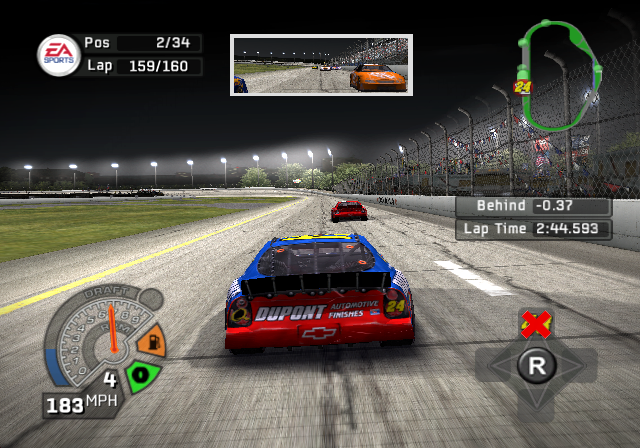
GAME SCREEN
•
Lap time/Time behind leader
DRAFTING, FLAGS, AND SKILL POINTS
Standard Drafting
When you pull up close to the bumper of the car in front of you, both cars can go faster than if they were driving separately. Additionally, you can save gas. The Draft meter shows the current strength of the regular draft.
Share Draft
Press the button to Share Draft with the car in front of you. Share Draft increases the speed of both cars and improves your relationship with the other driver. The draft meter fills faster if your driver is a Hero.
Intimidator™
To be an Intimidator™, approach the bumper of another car. When the draft meter begins to fill, press the button to intimidate. The intimidated driver may lose concentration and slide out of the way, allowing you to pass, but that driver may hold a grudge against you. The meter fills faster if your driver is a Villain.
Grudges & Alliances
When you run into or intimidate another driver, he'll remember your actions on the next lap, or even during the next race. A red icon displayed above a car indicates that driver holds a grudge against you.
Similarly, you can form alliances with other drivers by racing a clean race or sharing a draft. In turn, an ally is more likely to work with you during the heated moments of a race.
Flags
During the course of a race, flags indicate changes in track conditions. A yellow flag indicates a caution and means you must slow down and maintain your current position in the field. There are no yellow flags in Whelen races.
A white flag is displayed when the leader of the field crosses the finish line to begin the last lap of the race. The first driver to cross the finish line again receives the checkered flag of victory.
Pit Stops
During longer races, you have to make pit stops to refuel, get new tires, and repair your car. You can change your pit options before you reach your stall. Pit stops are not allowed in Whelen races.
Skill Points
Earn Skill Points in each race (excluding multiplayer and online modes) by driving well and completing laps without damaging your car. Points are earned then added to your Skill Points account during the race. Use Skill Points to unlock tracks, cars, sponsors, and more.
SAVING AND LOADING
Before exiting a game mode or a menu where changes have been made, be sure to save your progress to a memory card (8MB) (for PlayStation®2) in MEMORY CARD slot 1 when Auto-Save is set to OFF. All unsaved information will be lost otherwise. You can also save or load manually by accessing the SAVE or LOAD screens (via the Settings menu).
•
To save or load a file, select a storage location then highlight the file you wish to load (or create a new file when saving for the first time). Once the file is selected, the game data is either loaded or saved.
FIGHT TO THE TOP
Create a driver and power your way up the NASCAR ranks by building the ultimate team. As you progress through your career, take the helm of your own racing organization and position yourself to outperform or own real-world NASCAR teams.
As a driver, make a name for yourself in the Whelen series, Craftsman Trucks, and NNS by finishing near or at the top of the standings. As you move your way through each level, the NEXTEL Cup series
.png)

.png)
.png)
.png)

_1.png)
.png)


.png)

.png)




.png)
.png)
_1.png)



_1.jpg)

.png)