"Over the Top" Ball Handling
Clown your opponent with "Back 2 Papa" or "Off the Heezay" passes back to yourself. Legends are made with these specialty moves.
Back 2 Papa
•
button + two Turbo buttons (while moving towards the basket)
Off the Heezay
•
button + two Turbo buttons (while standing still)
Advanced Dunks
Don't just dunk, dunk with authority. Try different combinations of turbo buttons (using the button) to discover new advanced dunks.
•
Take That: L1 button + R1 button + button
•
Da Hangman: L2 button + R2 button + button
•
Backbreaker: R1 button + R2 button + button
•
Around The Way: L1 button + L2 button + button
Player Lock Strategy (Give and Go)
With Player Lock Strategy, you can retain control of a player without the ball. If you're good, you can pass the ball to a teammate, create some space, and then Alley-Oop the pass back to yourself for a sweet Give and Go.
•
Enable/Disable Player Lock: right analog stick
•
Jump for Alley-Oop: button + any Turbo button
•
Set a Pick: R3 button + two Turbo buttons
Using Gamebreakers
Light up the scoreboard with a Gamebreaker. The Gamebreaker shot is available only when the Gamebreaker meter is full.
•
Gamebreaker Shot or Dunk: button while holding any two Turbo buttons
Pocketed Gamebreakers
Pocket a Gamebreaker and bust it out later in the game or mess with your opponent by canceling their pocketed Gamebreaker.
•
Pocket Gamebreaker: SELECT button
•
Cancel Gamebreaker: any Turbo button + the SELECT button
Advanced Defense
This section is for all who want to put the lock down. The advanced defensive moves are not easy to perform but with practice, you'll get it.
•
Turbo Block: button + any two Turbo buttons
•
Trick Counter: button + any two Turbo buttons
It takes time and practice to rise to the skill level of the NBA's best. Use development points to raise your Created Baller's defensive ratings.
Hittin' The Streets
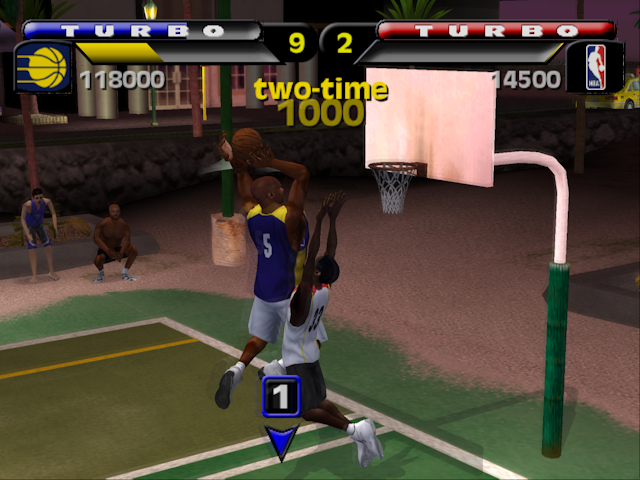
The trash talkin' stops here. It's time to back up that smack with some sweet moves on the court. Take it to the house in a Pick Up Game, or take on the league's best in NBA Challenge. You can also work your way to the top in Be A Legend mode and more. The ballin' starts from the Main menu.
Main Menu
From the Main menu, you can choose the NBA STREET Vol. 2 game mode you want, create a baller or a custom team, unlock players and courts with Reward Points, adjust game settings, or check out the greatest ballers of all time. Press the D-button to change a Main menu selection.
•
Play It: Choose the game you want to play (Pick Up Game or Other Game Modes).
•
My Team: Create a baller or a custom team.
•
Rewards: Unlock new players and courts with reward points.
•
Options: Adjust game settings.
•
High Scores: Check out the greatest street ballers of all time.
•
Inside Vol. 2: Check out what's new in NBA STREET Vol. 2, or get a preview on all the available dunks and moves featured in the game.
Pick Up Game
Playing a Pick Up Game helps you get quickly acquainted with life on the streets. These games don't mean jack, so brush up on your skills without worrying too much about the outcome. Don't take it personally if you get schooled early on. Just pick yourself up off the floor and come back for more.
To Begin a Pick Up Game
•
From the Play It menu, highlight PICK UP GAME and press the button. The User Setup screen appears.
User Setup
Before you start shootin' the rock or making sweet no-look passes in a Pick Up Game, create a user name for your bad self in order to track your progress and game records.
To Hook Yourself Up With a User Name
1. From the User Setup screen, choose HOME or AWAY and press the button. Next, select YES to enter a name or select a pre-existing user name. If you don't wish to save user stats, select NO. After a name has been created or selected, the User Setup pop-up screen appears. Here you can review your career stats.
2. When you're finished reviewing the career stat categories, press the button. Now wait for any other users to finish their setup.
3. If you're only ballin' with one human-controlled team, press the button again to continue to the Choose Team screen.
4. If you're hoopin' it up with 2-4 players, Player 2, Player 3, and Player 4 can join the game at any point during the User Setup process by pressing the START button on the respective controller. Players 2-4 must select to play with or without a user name, as well as Home or Away, before advancing to the Choose Team screen.
5. Two user controlled players per team. The third baller will be controlled by the CPU.
6. When playing with 3-4 players, only controllers inserted into the multitap will be recognized.
Choose Team
Ah yeah, the
.png)

.png)

.png)

_1.png)








.png)


_1.jpg)





.png)